
Recreative
A powerful, data-driven mod that gives you complete control over Creative Mode tabs!
截图

介绍
Recreative


Recreative is a powerful, data-driven mod that gives modpack developers and players complete control over Creative Mode tabs! Using simple JSON configuration files, you can completely reorganize, modify, hide, or create entirely new Creative Tabs without writing a single line of code.
Features
- Completely hide unwanted vanilla or modded tabs from the Creative Menu.
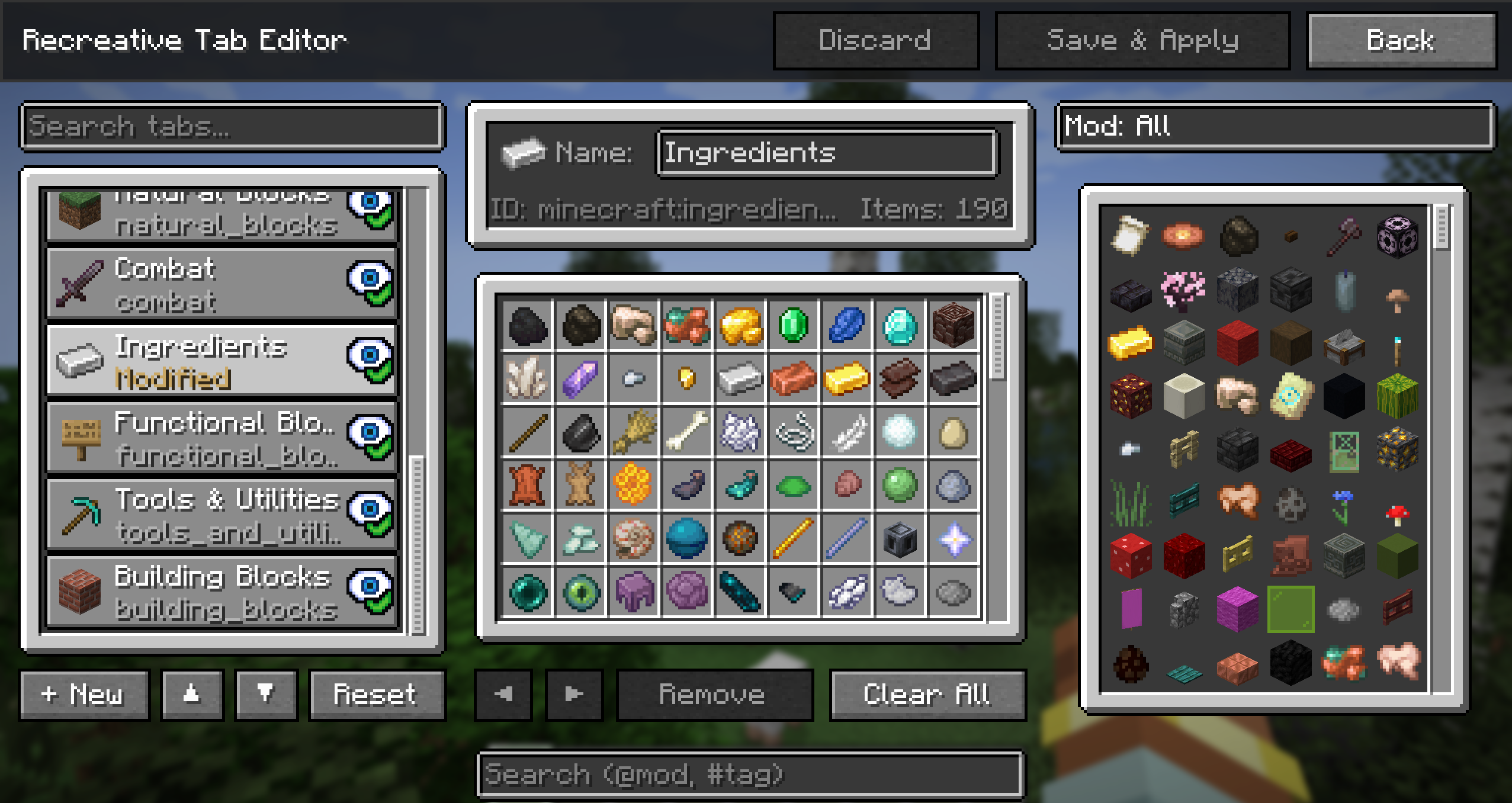
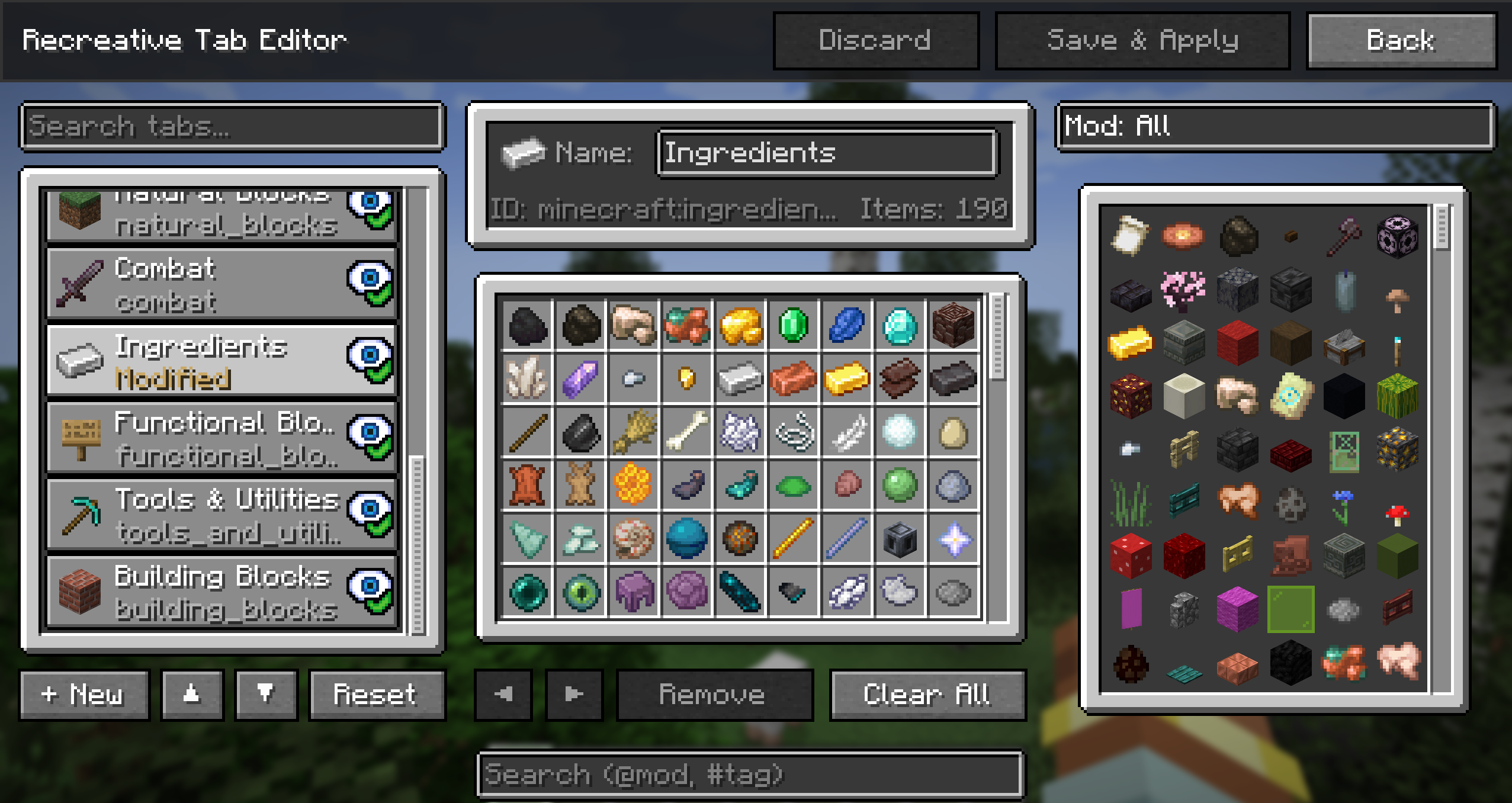
- Rename tabs, change their icons, or add and remove specific items.
- A fully functional in-game tab editor!
- Build brand new tabs from scratch with your own custom icons and item lists.
- Reorder tabs and force them to appear in a specific order from left to right.
- Instead of just appending items to the end of a tab, you can inject them exactly where you want using
afterorbeforeplacement rules. - Add or remove entire groups of items at once using Minecraft tags (e.g.,
#minecraft:logs,#c:ores). - Tweak your UI on the fly with hot reloading, so you can see your changes instantly without restarting the game.
Usage & Configuration
Recreative watches the ./config/recreative/ folder in your Minecraft instance. You can create as many .json files inside this folder as you want to organize your rules.
Example Rule File
[
  {
    "action": "remove_tab",
    "tabs": ["minecraft:building_blocks"]
  },
  {
    "action": "custom_tab",
    "tabs": ["my_pack:magic"],
    "name": "Magical Items",
    "icon": "minecraft:amethyst_shard",
    "add_items": [
      "minecraft:enchanted_book",
      "#minecraft:potions"
    ]
  }
]
Check out the wiki for documentation on all actions, advanced item placement, and syntax.
Commands
Recreative provides a couple useful commands to help you manage your configuration and easily find IDs without leaving the game.
/recreative reload– Hot-reloads yourrecreative_settings.jsonand all rule files in theconfig/recreative/folder and instantly rebuilds the creative menu./recreative dump <tabs|items|blocks|all>– Exports registered IDs into nicely formatted JSON files located inconfig/recreative_exports/. Perfect for finding the exact namespace IDs needed for your scripts.
In-Game Settings
General config options can be accessed in-game (when Cloth Config is installed). This includes toggling the mod on/off globally, and a debug option to show internal tab IDs, which replaces all tab names with their registry ID to help you write your config files faster.
License

Credits
Icon made by Nekomaster!


常见问题
Recreative 支持哪些 Minecraft 版本?
Recreative 支持 Minecraft Java 版 1.20.1–26.3,共 8 个版本,可用的加载器:Fabric / Forge / NeoForge。下载时注意选择和你游戏版本一致的文件。
Recreative 怎么安装?
先用 PCL2 或 HMCL 启动器安装对应版本的 Fabric / Forge / NeoForge,再把下载的 .jar 文件放进游戏目录的 mods 文件夹,重新启动游戏即可。开启了版本隔离的,mods 文件夹在 versions/版本名 下面。运行环境:客户端和服务端都要装。
evanbones 的其他作品
查看全部 →
Shield Expansion
为盾牌加入弹反、附魔、等级和自定义功能,让盾牌玩法更有趣!

Cultural Delights
一个为农夫乐事添加世界各地美食系统的附属模组。

Sun and Moon Celestial Configuration
改变太阳和月亮的大小!

Wolf Armor Compat (Fabric)
为 Wolves With Armor 与其他热门模组添加兼容性
评论
登录后评论和评分