
截图

介绍
Ranky – Minecraft Title Management Mod
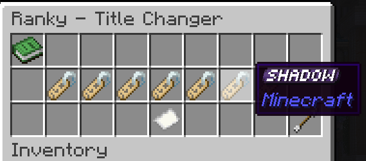
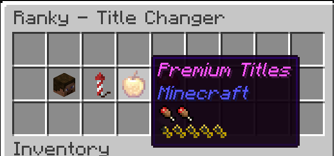
Effortlessly manage server titles with Ranky, a server-side Fabric mod introducing a GUI-based system for unlocking and managing titles via advancements!
Features:
- Chest-Based GUI: Intuitive title selection.
- Advancement Unlocks: Earn titles through achievements.
- Configurable: Customize titles via JSON.
- Pagination Support: Handle large title lists easily.
- Server-Side Security: Safe and reliable.
- Reload Config: Update titles without restarting.
- Aliases: Use
/titlesor/ranksto open the GUI.
Commands:
/titlesor/ranks: Opens the title selection GUI (all players)./ranky reload: Reloads configuration (op level 4).
Config Example:
Located in config/ranky_titles.json:
[
  {
    "name": "Noob",
    "command": "say %player% is now a Noob",
    "item": "minecraft:name_tag",
    "requirements": []
  },
  {
    "name": "Veteran",
    "command": "say %player% is now a Veteran",
    "item": "minecraft:diamond",
    "requirements": ["minecraft:story/mine_diamond"]
  }
]
Fields:
name: Title display name.command: Runs when selected (%player%= player name).item: GUI button (Minecraft item ID).requirements: List of required advancement IDs.
Common Advancements:
minecraft:story/mine_diamond: Acquire diamonds.minecraft:nether/find_fortress: Discover a Nether Fortress.minecraft:end/kill_dragon: Defeat the Ender Dragon.
Adding Titles:
- Stop the server.
- Edit
config/ranky_titles.json. - Add new entries.
- Save and restart or use
/ranky reload.
Permissions:
/titlesor/ranks: Accessible to all players./ranky reload: Operator-only.
Make titles an exciting, customizable feature with Ranky!
Here’s an example test configuration for Ranky with LuckPerms support to create a cosmetic rank:
[
    {
        "name": "Overlord",
        "setCommand": "lp user {player} parent add Overlord",
        "removeCommand": "lp user {player} parent remove Overlord",
        "item": "minecraft:name_tag",
        "requirements": [
            "dystorian-adventures:cosmeticranks/overlord"
        ]
    }
]
常见问题
Ranky 支持哪些 Minecraft 版本?
Ranky 支持 Minecraft Java 版 1.21.1,可用的加载器:Fabric。下载时注意选择和你游戏版本一致的文件。
Ranky 怎么安装?
先用 PCL2 或 HMCL 启动器安装对应版本的 Fabric,再把下载的 .jar 文件放进游戏目录的 mods 文件夹,重新启动游戏即可。开启了版本隔离的,mods 文件夹在 versions/版本名 下面。运行环境:仅服务端。
SK4N 的其他作品
查看全部 →
MissingMons [cobblemon]
MissingMons 为 Cobblemon 添加了目前游戏中尚未加入的材质、模型、动画和生成,但关键在于你们可以投票决定我要添加什么!

Eeveelutions Reimagined
为你带来官方重制版伊布进化型,如今拥有动画效果,表现力更胜以往。
Cobblemon Shiny Boost Mod
Boost shiny rates for a limited time globally

Cobblemon Broadcaster
Notifies the global chat when a Shiny, Legendary, Ultra Beast, or custom-aspect Pokémon spawns near a player.
评论
登录后评论和评分