Random Eventy
When creating a new world you have a new button, there you can configure the randomness of your survival world!
截图


介绍
🎲 RandomEventy
Welcome to RandomEventy, the mod designed to turn your predictable Minecraft world into a chaotic, unpredictable adventure! Whether you want to spice up your survival gameplay or suffer through a “cursed” challenge, this mod gives you full control over the madness.
Upon creating a new world, you’ll find a dedicated button that opens a world of possibilities. Mix and match these features to create your own unique brand of chaos!
🛠️ Key Features
- Random Mob Drops: Why settle for leather when a cow could drop diamonds? Or dirt? 🐄
- Random Block Drops: Mining stone might give you ancient debris… or a poisonous potato. ⛏️
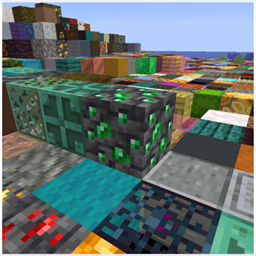
- Random Block Gen: The terrain itself is randomized! Watch as the landscape transforms into a patchwork of mystery. Note: This feature performs a lot of calculations per second. It may run slowly on low-end PCs! 🖥️⚠️
- Cheese Dimension: Explore a world full of massive, Swiss-cheese-style holes. Don’t fall in! 🧀
- Random Dimension Gen: [Experimental] This feature allows for complete dimensional randomness. ⚠️ WIP: This is currently in active development and might not work perfectly yet, but stay tuned for updates!
📜 License & Usage
RandomEventy is licensed under the MIT License. Feel free to poke around the code and modify it! We only ask that if you redistribute or post a modified version, you must provide clear credit to the original creator. ✍️
🌐 Compatibility
Please note that this mod is currently designed for Singleplayer only. It is not officially supported on servers unless you are using a tool like e4mc to bridge the connection.
🔗 Important Links
- Git Repository: Repository 💻
- Issues / Bug Reports: Bugs 🐛
- Support Me: YouTube ❤️
- How it Works (Showcase): [COMMING SOON] 🎬
常见问题
Random Eventy 支持哪些 Minecraft 版本?
Random Eventy 支持 Minecraft Java 版 1.21.11,可用的加载器:Fabric。下载时注意选择和你游戏版本一致的文件。
Random Eventy 怎么安装?
先用 PCL2 或 HMCL 启动器安装对应版本的 Fabric,再把下载的 .jar 文件放进游戏目录的 mods 文件夹,重新启动游戏即可。开启了版本隔离的,mods 文件夹在 versions/版本名 下面。
KitRocky 的其他作品
查看全部 →
Fast Block Placement
这个模组能让你放置方块的速度大幅提升。你可以打开菜单(默认按 O 键),自由设置想要的放置速度。之后按下“V”键(默认按键,可自行更改),就能快速放置方块了。

Visible Invisible
开启后,可以看见受到隐身药水效果影响的生物和玩家。

Memory Album
When you take screenshots, you can view them ingame, with coordinates saved.

Random Eventy
When creating a new world you have a new button, there you can configure the randomness of your survival world!
评论
登录后评论和评分