
Rain&Thunder Countdown
Simple yet fully customizable and togglable rain and thunder countdown
截图
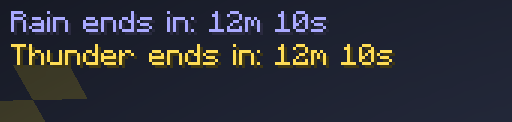

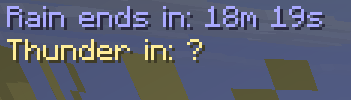
介绍
FOR THE MOD TO WORK YOU NEED TO WAIT FOR RAIN!!! THEN EVERYTHING WILL WORK(mod needs to hook up the rain lines) DO NOT WORRY
Thunder Countdown
Ever wondered how long until it starts raining — or when that thunderstorm will finally end? Thunder Countdown adds a clean, lightweight HUD overlay that shows you exactly that, in real time.
Features
Rain countdown — shows how long until the next rain starts when the weather is clear
Rain timer — shows how long until the rain stops while it’s raining
Thunder timer — shows how long until the thunderstorm ends while it’s active
Reads real Minecraft weather data directly — no fake timers, no guessing
Fully customizable via Mod Menu + Cloth Config:
Toggle rain and thunder timers independently
Choose a custom color for each timer state (clear / raining / thundering)
Full English and Russian localization — the HUD and settings automatically follow your in-game language
How it works
The mod reads the internal weather timers straight from the Minecraft server every second and sends them to the client. Nothing is simulated — what you see is exactly what Minecraft has scheduled.
FOR THE MOD TO WORK YOU NEED TO WAIT FOR RAIN!!! THEN EVERYTHING WILL WORK(mod needs to hook up the rain lines) DO NOT WORRY
Note on thunder: Minecraft does not plan thunderstorms in advance. The thunder timer is only shown while a thunderstorm is already active. During regular rain, the thunder indicator shows ? because the game hasn’t decided yet.
Dependencies
Mod Required: Fabric API✅ Required: Cloth Config✅ Required: Mod Menu✅
Compatibility
Minecraft 26.1.x
Fabric Loader ≥ 0.19.2
Java 25+
Author
Made by raskajanie
Licensed under MIT.
常见问题
Rain&Thunder Countdown 支持哪些 Minecraft 版本?
Rain&Thunder Countdown 支持 Minecraft Java 版 26.1.2,可用的加载器:Fabric。下载时注意选择和你游戏版本一致的文件。
Rain&Thunder Countdown 怎么安装?
先用 PCL2 或 HMCL 启动器安装对应版本的 Fabric,再把下载的 .jar 文件放进游戏目录的 mods 文件夹,重新启动游戏即可。开启了版本隔离的,mods 文件夹在 versions/版本名 下面。运行环境:客户端和服务端都要装。
raskajanie 的其他作品
查看全部 →
Borsch instead of lava
Famous Ukrainian borsch instead of lava,flowing lava and lava bucket!

Ping Items
Lets you mark items in containers!

Newgen Ping Hud
TAB ping and onscreen ping display. fully togglable and customizable.

Visualified
Ultimate Performance & Immersion
评论
登录后评论和评分