
RadioFM
A radio everyone nearby hears: plays on its own or through Simple Voice Chat or Plasmo Voice. YouTube, SoundCloud, Dropbox, Discord and direct links. Carry it in hand or place it on a block
截图
介绍
A radio everyone nearby hears. It plays on its own or through a voice chat mod
Sources. YouTube, SoundCloud, Dropbox, Discord and direct file links. Track lists load from a .txt or .m3u file
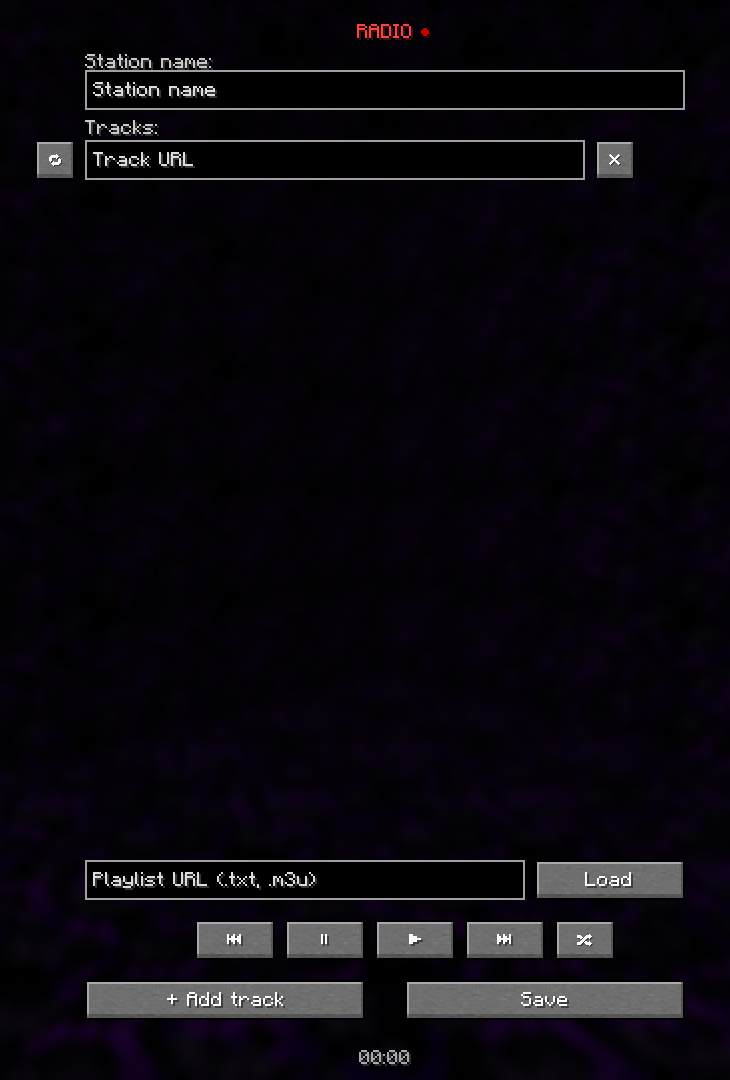
Using it. Craft a radio or get one with /radiofm give. Right click switches it on, shift and right click opens the settings. It works in hand and on a block. Shift with the mouse wheel sets the range, ctrl makes the step finer. The radio screen shows the playing track, and the arrows next to a track move it up or down the queue
Voice mods. None are needed: without them the radio plays through its own channel, with a volume slider in the radio screen and the track name in the subtitles. With Simple Voice Chat or Plasmo Voice installed, pick which one to use with /radiofm choice
For servers. /radiofm ban takes radios away from a player entirely. The game rules radiofm:max and radiofm:maxRadius cap how many radios one player may run and how far they carry; everything else is in config/radiofm-server.toml. Links are checked: a radio will not reach addresses inside the server’s network
Source code and the full documentation are on GitHub
Радио, которое слышат все вокруг. Играет само или через мод голосового чата
Источники. YouTube, SoundCloud, Dropbox, Discord и прямые ссылки на файлы. Список треков можно загрузить файлом .txt или .m3u
Как пользоваться. Скрафтить радио или получить командой /radiofm give. ПКМ – включить, Shift+ПКМ – настройки. Работает и в руке, и на блоке. Shift с колесом мыши меняет слышимость, с Ctrl – точнее. В окне радио видно играющий трек, а стрелками рядом с треком его можно двигать по очереди
Голосовые моды. Не обязательны: без них радио играет через свой канал, с ползунком громкости в окне радио и названием трека в субтитрах. Если стоит Simple Voice Chat или Plasmo Voice, какой использовать, выбирается командой /radiofm choice
Для серверов. /radiofm ban закрывает игроку доступ к радио целиком. Гейм-рулы radiofm:max и radiofm:maxRadius ограничивают число радио на игрока и дальность звука, остальное – в config/radiofm-server.toml. Ссылки проверяются: внутренние адреса сервера радио не откроет
Исходный код и подробное описание – GitHub
常见问题
RadioFM 支持哪些 Minecraft 版本?
RadioFM 支持 Minecraft Java 版 1.21.1,可用的加载器:NeoForge。下载时注意选择和你游戏版本一致的文件。
RadioFM 怎么安装?
先用 PCL2 或 HMCL 启动器安装对应版本的 NeoForge,再把下载的 .jar 文件放进游戏目录的 mods 文件夹,重新启动游戏即可。开启了版本隔离的,mods 文件夹在 versions/版本名 下面。运行环境:客户端和服务端都要装。

评论
登录后评论和评分