
QuickSign
Quick sign text copy & paste for Minecraft. Use Shift+Middle Click to copy sign text and automatically paste it to any other sign type - works in both Survival and Creative mode.
截图
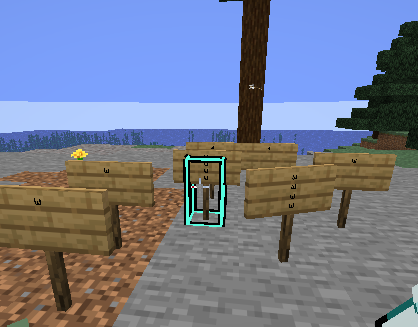
介绍
⚡ QuickSign
Lightning-fast sign text duplication for Minecraft
✨ Features
ActionDescription🖱️ Shift + Middle Click on any signCopies all 4 text lines instantly✍️ Auto-Paste when opening the editorText automatically fills in & confirms🌳 Universal CompatibilityWorks with all sign types🗑️ Middle Click in the airClear clipboard instantly🎨 Creative ModePreserves vanilla pick block (copies sign + NBT data)⚔️ Survival / AdventureText-only copying without vanilla restrictions
Supported Sign Types
Oak · Birch · Spruce · Jungle · Acacia · Dark Oak · Mangrove · Cherry · Bamboo · Crimson · Warped
🎯 Perfect For
🏪 Building shops with repeated pricing or info
📝 Duplicating signage across different wood types
🏗️ Server builds requiring consistent messaging
⚡ Quick content transfer without NBT complexity
📦 Installation
Download the latest release
Place the JAR file into your mods folder
Launch Minecraft with Fabric
🔧 Requirements
ComponentVersionMinecraft1.21.1Fabric Loader≥ 0.18.4Fabric APILatest
📖 Usage
⚠️ Note: While text is in the clipboard, signs cannot be edited.
📋 Copy Sign Text
Shift + Middle Click on any sign
→ Text copied (chat confirmation appears)
📌 Paste Text
Right-click a sign to open the editor
→ Previously copied text auto-fills and saves
🗑️ Clear Clipboard
Middle Click while looking at air / empty space
→ Clipboard cleared
🚀 Why QuickSign?
🖥️ Client-Side Only – No server mod required
🪶 Lightweight – Minimal performance impact
🕹️ Intuitive – Natural Minecraft-style controls
🔧 Zero Configuration – Works out of the box
📜 License
All Rights Reserved © 2026 Anom-ux
常见问题
QuickSign 支持哪些 Minecraft 版本?
QuickSign 支持 Minecraft Java 版 1.21.11,可用的加载器:Fabric。下载时注意选择和你游戏版本一致的文件。
QuickSign 怎么安装?
先用 PCL2 或 HMCL 启动器安装对应版本的 Fabric,再把下载的 .jar 文件放进游戏目录的 mods 文件夹,重新启动游戏即可。开启了版本隔离的,mods 文件夹在 versions/版本名 下面。运行环境:仅客户端。
Anom-uxxx 的其他作品
查看全部 →
Better Pie Chart
This Mod improves the Vanilla Pile Chart perfect for Minecraft SMP servers

auto Sprintmod
This mod lets you automatically sprint when you have enough hunger (toggleable via a key)

Resourcepack-loader
This mod loads and unloads resource packs from a configuration file when joining a server.

scroll-keybind
This mod lets you assign hotkeys to scrolling the mouse wheel up and down
评论
登录后评论和评分