
截图



介绍
中文介绍正在准备中,下面暂时显示原文。
Quicknote
A lightweight and intuitive Fabric mod designed to help you create, manage, and recall notes directly within your Minecraft world using simple chat commands.
🌟 Features
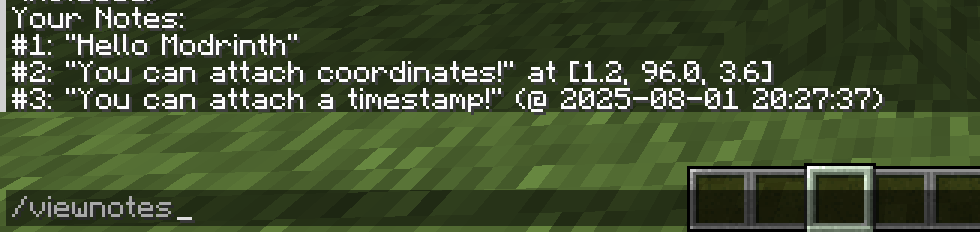
- Note creation / deletion
- Note filtering
- Attach coordinates to notes
- Attach timestamps to notes
Check out the Image Gallery for screenshots!
🚀 Installation
On Modrinth, click the Download button, select your Minecraft version, and click Download!
🎮 Usage
All commands are executed through the Minecraft chat. Press T to open the chat.
- Add a Note:
/note <your note content> - Example:
/note Remember to mine diamonds here -c - View All Notes:
/viewnotes - Filter Notes:
/filternotes -c(shows notes with coordinates, can also do -t, -nc, -nt) - Example:
/filternotes -nc -t(shows notes with no coordinates, just timestamps) - Delete a Note:
/deletenote <note ID> - Find the note ID by viewing all notes (
/viewnotes). - Example:
/deletenote 5(deletes the note with ID 5) - Clear All Notes:
/clearnotes - Export Notes:
/exportnotes
📜 License
Quicknote is licensed under the MIT License. See the LICENSE file for more details.
常见问题
Quicknote 支持哪些 Minecraft 版本?
Quicknote 支持 Minecraft Java 版 1.21–1.21.8,共 9 个版本,可用的加载器:Fabric。下载时注意选择和你游戏版本一致的文件。
Quicknote 怎么安装?
先用 PCL2 或 HMCL 启动器安装对应版本的 Fabric,再把下载的 .jar 文件放进游戏目录的 mods 文件夹,重新启动游戏即可。开启了版本隔离的,mods 文件夹在 versions/版本名 下面。运行环境:客户端 / 服务端。

评论
登录后评论和评分