
Fast Kits
QuickKit lets you save your entire Minecraft inventory as named kits and instantly load them whenever you need them. It includes commands, a GUI, and reusable Kit Binders while preserving enchantments, components, armor, offhand items, and custom names.
截图
介绍
QuickKit v1.0.0
Minecraft 1.21.11 (Fabric)
WHAT IT DOES
QuickKit allows you to save your entire inventory as named kits and restore them instantly whenever you need them. Every kit preserves the complete state of your inventory, including your hotbar, armor, offhand items, enchantments, components, lore, custom names, and all other item data.
Kits are serialized using Minecraft’s ItemStack.CODEC, ensuring accurate and future-proof storage of item information. Each player’s kits are stored in individual JSON files located under:
pvppractice_kits/.json
within the server’s run directory.
COMMANDS
All commands require Operator Level 2.
/kit save
Saves your current inventory as a named kit. Kit names can be up to 64 characters long.
/kit load
Clears your current inventory and restores the selected kit.
/kit delete
Permanently deletes the specified kit.
/kit rename
Renames an existing kit.
/kit list
Displays all saved kits in chat.
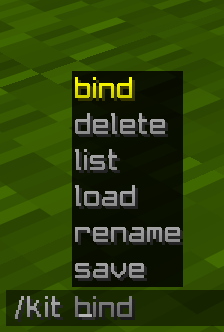
/kit bind
Creates a special binder item that instantly loads the selected kit when used.
Tab completion is available for kit names on the load, delete, bind, and rename commands.
GUI
Press K (configurable under Controls → PVP Practice Mod) to open the kit management interface.
The GUI displays all saved kits in a scrollable list.
Kit List Actions
• Left-click a kit → Instantly loads the kit and closes the GUI.
• Right-click a kit → Selects the kit and highlights it in blue for management actions.
Buttons
Load Kit
• Loads the currently selected kit.
Save Inventory
• Prompts for a kit name and saves your current inventory.
Delete Kit
• Opens a confirmation dialog before permanently deleting the selected kit.
Rename Kit
• Prompts for a new name and renames the selected kit.
Refresh
• Reloads the kit list directly from the server.
KIT BINDERS
Running:
/kit bind
gives you a glowing Nether Star with:
• Custom Name: “Kit: ” (gold, bold)
• Lore: “Right-click to load kit” (gray, italic)
• Hidden component: pvppractice:kit_name
Right-clicking the binder instantly loads the linked kit.
To prevent accidental loss, if the binder would be overwritten during kit loading, QuickKit automatically moves it to the next available inventory slot, ensuring it remains in your inventory whenever possible.
TECHNICAL DETAILS
• Uses Fabric API networking through custom payloads:
• C2SKitActionPayload
• S2CKitListPayload
• Uses a custom data component:
• pvppractice:kit_name (String type) for binder identification.
• Server-side kit caching is handled through a ConcurrentHashMap per player UUID and persisted to disk.
• Kits are automatically loaded when a player joins and automatically saved when they disconnect.
• Fully server-authoritative architecture — the client only sends requests, while all validation, kit management, and inventory operations are handled exclusively on the server.
REQUIREMENTS
• Java 21
• Fabric Loader 0.18.4+
• Fabric API 0.141.3+
• Minecraft 1.21.11
常见问题
Fast Kits 支持哪些 Minecraft 版本?
Fast Kits 支持 Minecraft Java 版 1.21.11,可用的加载器:Fabric。下载时注意选择和你游戏版本一致的文件。
Fast Kits 怎么安装?
先用 PCL2 或 HMCL 启动器安装对应版本的 Fabric,再把下载的 .jar 文件放进游戏目录的 mods 文件夹,重新启动游戏即可。开启了版本隔离的,mods 文件夹在 versions/版本名 下面。运行环境:客户端和服务端都要装。
评论
登录后评论和评分