
QuickControls
A fast and intuitive radial menu for using your favorite items without moving them into your hotbar.
截图
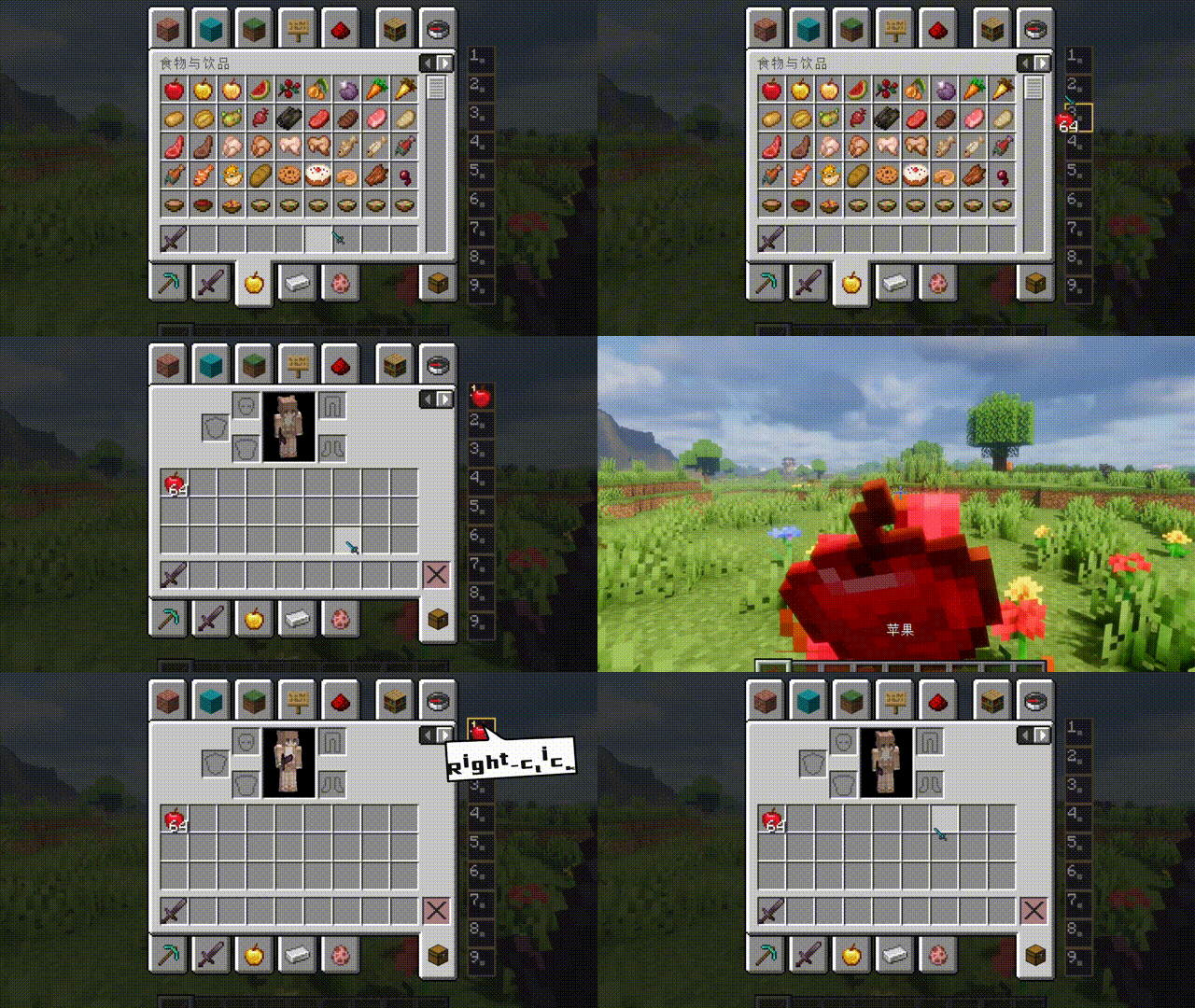
介绍
Quick Controls
A fast and intuitive radial menu for using your favorite items without moving them into your hotbar.
Quick Controls adds a lightweight Pie Menu that lets you instantly use frequently needed items directly from your inventory. Simply bind an item once, then access it anytime with a single key.
Designed for players who want a cleaner hotbar and faster gameplay.
✨ Features
- 🎯 Radial (Pie) Menu
- Press the configured key to open a circular quick-access menu.
- Select a bound item with your mouse.
- 📦 9 Quick Bind Slots
- A dedicated binding panel appears on the right side of the inventory.
- Bind up to 9 different items.
- ⚡ Instant Item Usage
- Use bound items without manually moving them into your hotbar.
- Great for food, potions, tools, utility items, and more.
- 🪶 Lightweight
- Client-focused implementation.
- Minimal performance impact.
- Vanilla-style experience.
🎮 Default Controls
| Key | Action |
|——|——–|
| Tab | Open the Pie Menu |
The key can be changed through Minecraft’s Controls settings.
Right-click to unbind.
📖 How to Use
- Open your inventory.
- Locate the Quick Controls binding bar on the right side.
- Drag or assign items to any of the 9 binding slots.
- Close the inventory.
- Press Tab to open the Pie Menu.
- Move your cursor over the desired item and release/select to use it instantly.
💡 Perfect For
- Food
- Potions
- Buckets
- Ender Pearls
- Firework Rockets
- Utility Tools
- Any frequently used item
⚙ Requires:
📌 Notes
- Items must exist in your inventory to be used.
- Unsupported items will simply not activate.
- Bindings update automatically as your inventory changes.
🤝 Feedback
Found a bug or have a feature suggestion?
Feel free to open an issue or leave a comment on the Modrinth page.
Suggestions and contributions are always welcome!
❤️ Credits
Developed for players who want faster inventory interaction while keeping their hotbar clean.
Enjoy!
常见问题
QuickControls 支持哪些 Minecraft 版本?
QuickControls 支持 Minecraft Java 版 1.20.1–1.21.11,共 3 个版本,可用的加载器:Fabric / Forge / NeoForge。下载时注意选择和你游戏版本一致的文件。
QuickControls 怎么安装?
先用 PCL2 或 HMCL 启动器安装对应版本的 Fabric / Forge / NeoForge,再把下载的 .jar 文件放进游戏目录的 mods 文件夹,重新启动游戏即可。开启了版本隔离的,mods 文件夹在 versions/版本名 下面。运行环境:仅客户端。


评论
登录后评论和评分