
Quick Climb
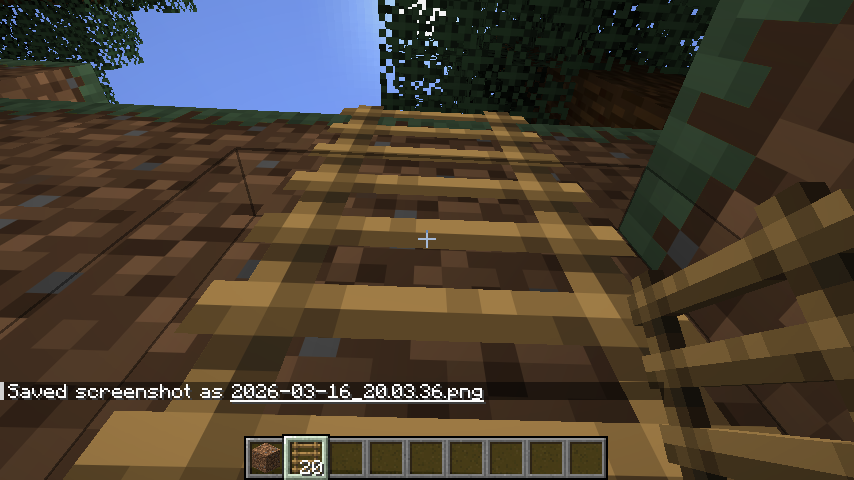
Scale any height in half the time by looking up while climbing. A lightweight, vanilla-friendly boost that makes long ladder climbs faster and more intuitive.
截图
介绍

Verticality, Accelerated.
Tired of the slow, tedious crawl up massive ravines or base towers? Quick Climb is a performance-optimized utility datapack that doubles your climbing speed without breaking the “Vanilla” feel of the game.
How it Works:
The mechanic is simple and reactive:
- Look Up to Boost: When you are on a ladder and your crosshair is pointed upward, you will receive a subtle motion boost.
- Release to Normal: Simply look toward the horizon to return to the standard Minecraft climbing speed.
- Precision Control: The boost is calculated per-tick, meaning the moment you hop off or look away, the effect stops instantly—no “floaty” physics or accidental flying.
Key Features:
- Ladder Focused: Specifically tuned for Ladders to ensure it doesn’t interfere with other mechanics like scaffolding or vines.
- Multiplayer Ready: Uses efficient predicates and a 1-tick refresh cycle to ensure zero lag, even on busy servers.
- No Particles: The boost is seamless and invisible; no annoying potion bubbles cluttering your screen.
- Plug & Play: No configuration required. Just drop the zip into your world’s datapacks folder and start climbing.
常见问题
Quick Climb 支持哪些 Minecraft 版本?
Quick Climb 支持 Minecraft Java 版 1.18–26.1.1,共 29 个版本,可用的加载器:Fabric / Forge / NeoForge / Quilt。下载时注意选择和你游戏版本一致的文件。
Quick Climb 怎么安装?
先用 PCL2 或 HMCL 启动器安装对应版本的 Fabric / Forge / NeoForge / Quilt,再把下载的 .jar 文件放进游戏目录的 mods 文件夹,重新启动游戏即可。开启了版本隔离的,mods 文件夹在 versions/版本名 下面。运行环境:客户端 / 服务端。
StaticLabs 的其他作品
查看全部 →
Craftable Bells
A mod that makes bells craftable in minecraft.
Instant Smelt
Quality-of-Life mod that smelts all raw ores instantly upon mining, letting you skip the smelting queue

Instant Smelt
A simple quality-of-life mod that smelts all raw ores instantly upon mining, letting you skip the smelting queue.

Advanced Tool Stats
Real-time, high-precision durability tracking directly in your action bar—no F3+H required.
评论
登录后评论和评分