
介绍

Made with love, sweat and tears
Fabric only


Whatever the Summary and title said.
Icons that you can use for your quest book or other rewards or anything you wish for.
Do whatever you want with the items and be creative.
If you want a custom Icon let me know and give me the pixel art I will add it 😀
This can become a giant collaboration of icons and logos etc.
New in 1.0.0 for Minecraft 26.3: Quest Icons is now also a complete quest book.
It works in the style of FTB Quests: chapters, quest maps, tasks, rewards, loot crates, teams and an in-game editor. Your quests are plain SNBT files that you can edit by hand or right in the game.
My modpack Dreamcraft uses it for its story of over 160 quests.
Needs Fabric API. On a server, install it on the server and on every client.


If you right click with the Treasure Chest in hand you will receive a random item from the game. Compatible with any mod.
In 26.3 the chest is called Mystery Reward. It has 5 uses, and each one gives you 1 to 3 of a random item.
32 icons for your quests and chapters
Portals, locks, a crown, a key, a backpack, a sword, a shield, a gear, a potion, a map, a trophy, a raft and many more.
You find all of them in the Quest Icons creative tab.
The Quest Book
Press J, right-click the Quest Book or use the ✉ button in your inventory.
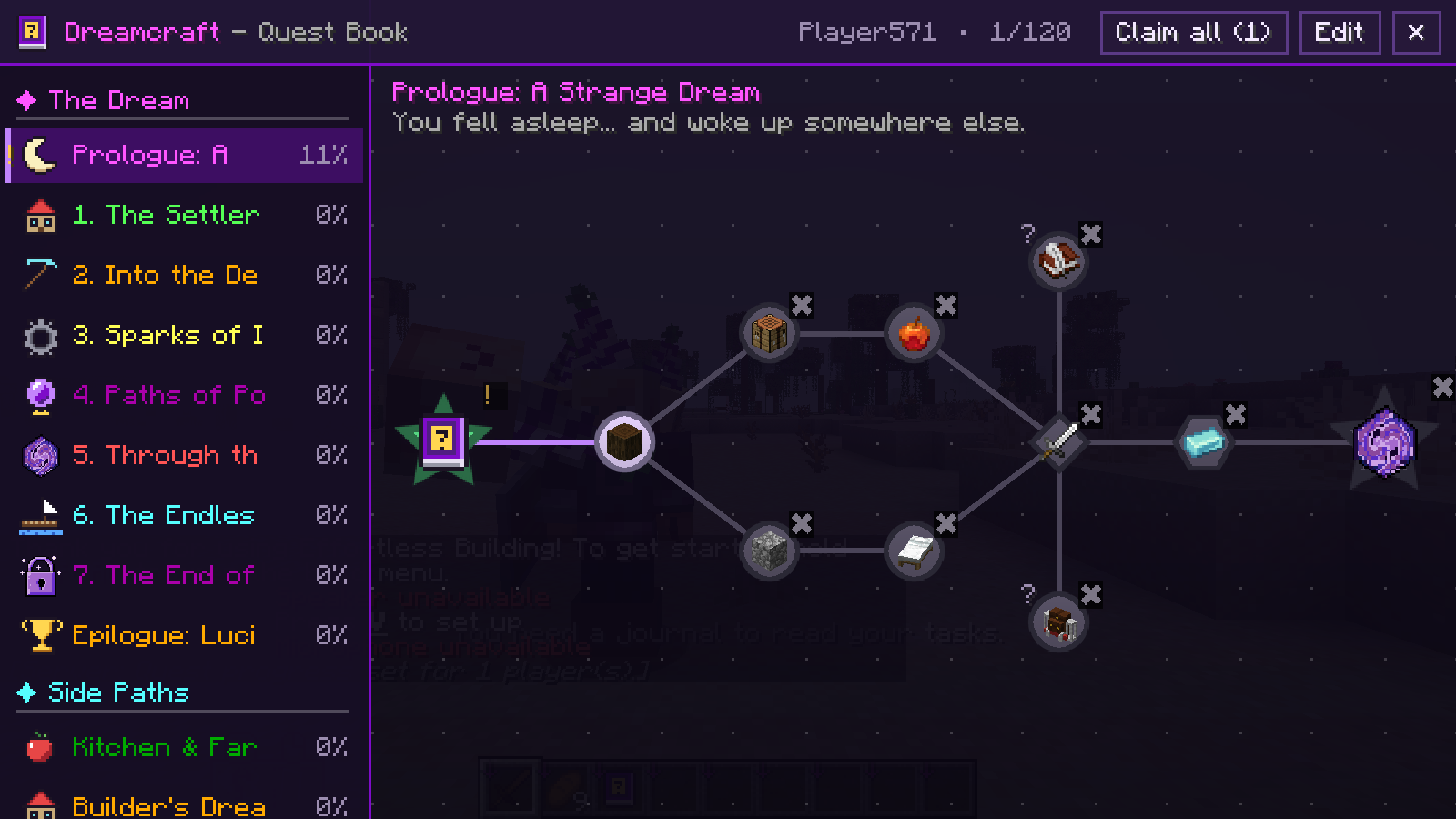
Pick a chapter on the left and explore its quest map: drag to move, scroll to zoom.
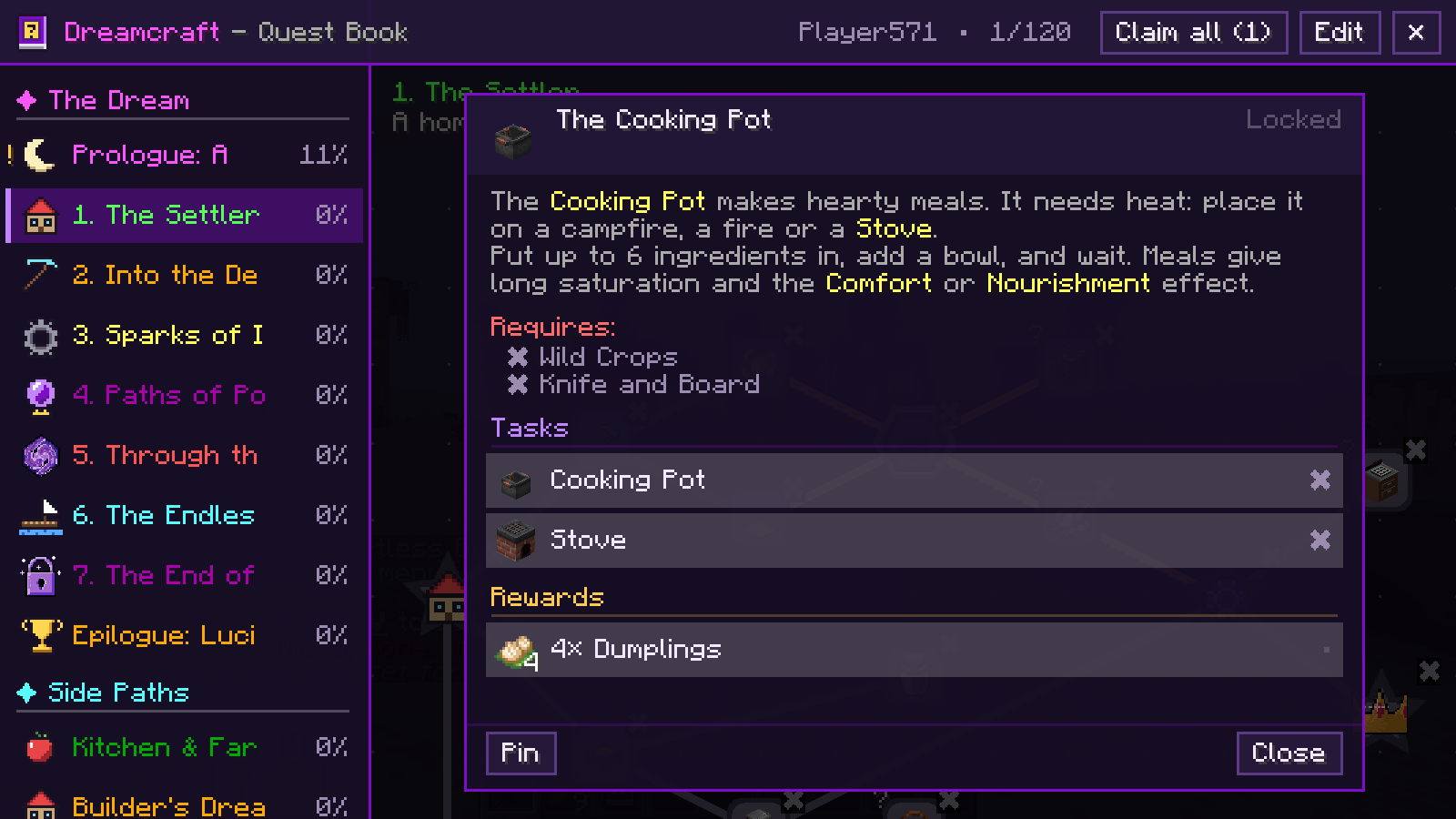
Click a quest to read its story, check its tasks and claim your rewards.
Locked quests stay grey, finished ones turn green, and a golden ! shows rewards that wait for you.
Screenshots of the quest book, a quest and all icons and quest shapes

Opening the book
- Press J. You can change the key in the Controls settings. Press it again to close the book.
- Right-click the Quest Book item. Every new player gets one on the first join (the pack can turn this off with give_book_on_first_join in data.snbt).
- Open your inventory and click the small ✉ button in the top-left corner of the screen.
- Or type /quests open.
Commands
- /quests open: opens the book. Everyone can use it.
- /quests reload: reloads the quest files from disk.
- /quests givebook <players>: gives a Quest Book.
- /quests complete <quest|all> [players]: completes one quest or all of them.
- /quests reset <quest|all> [players]: resets one quest or all progress.
- /quests team info | create | invite | join | leave: teams, see below. Everyone can use them.
reload, givebook, complete and reset need operator rights (permission level 2). /questbook works the same as /quests.
Tasks and rewards
11 task types and 8 reward types, from “collect 8 logs” to “look at a diamond ore” or “pick one of three swords”.
Quests can depend on other quests, be optional or stay hidden until they unlock.
All task and reward types
Tasks
- Item: have items in your inventory. Item tags work too. With consume_items you hand them in with a Submit button.
- Checkmark: just tick the box.
- Kill: defeat a number of mobs of one type or an entity tag.
- Advancement: earn an advancement, or only one of its criteria.
- Dimension: visit a dimension.
- Biome: find a biome or a biome tag.
- Structure: stand inside a structure, for example a village.
- XP: reach a number of levels or XP points, or pay them with a button.
- Statistic: reach a value of a statistic, for example jumps.
- Observation: look at a block or a mob for a while.
- Location: reach a place in a dimension, within a radius.
Rewards
- Item: any item, any amount.
- XP and XP levels.
- Command: runs a command for the player, with {p}, {x}, {y}, {z} and {quest} as placeholders.
- Random: one weighted pick from a reward table.
- Choice: the player picks one of several items.
- Loot: rolls a loot table, vanilla or from a data pack.
- Advancement: grants an advancement.
A reward can be claimed per player or once for the whole team (team_reward), and it can be claimed automatically (auto). The Claim all button in the top bar collects everything that waits, except choice rewards and rewards marked exclude_from_claim_all.
Loot Crates
Common, Rare, Epic and Legendary. Right-click a crate to open it and get a random reward from its table.
The pack fills the tables, so the crates fit any modpack.
How the crates work
- Each crate rolls the reward table with its own name: reward_tables/common_crate.snbt, rare_crate.snbt, epic_crate.snbt and legendary_crate.snbt.
- A reward table is a list of entries with an item, a count and a weight. Higher weight means more likely.
- If a table is missing, the crate tells you that it is empty and stays in your hand.
- Crates are normal items, so you can give them as quest rewards.
Play together
Make a team with your friends and share your quest progress.
How teams work
- Everyone starts in a team of their own.
- /quests team create <name> gives your team a name. If you are in a shared team, it starts a new team for you.
- /quests team invite <player> invites a player. They join with /quests team join <your name>.
- Team members share task progress and finished quests. When you join a team, your own progress is replaced by the team’s.
- Rewards are claimed by each player, unless a reward is a team reward. Then one claim counts for everyone.
- /quests team info shows your team, its members and how many quests you have done.
- /quests team leave leaves the team. You start over with empty progress of your own.
Pins and notifications
Pin a quest and keep an eye on its tasks while you play.
A toast pops up when you finish a quest or a whole chapter.
More about pins
- Click Pin in a quest’s window. Up to 4 pinned quests show in the top-left corner of your screen, each with the progress of its tasks.
- Click Unpin to remove it again.
- Pins are saved on your own computer, in config/questsicons-pinned.txt.
For pack makers
Write your quests in SNBT files or build them in the game with the editor.
Every change is saved to the files and sent to all players at once.
Where the quest files are and how they look
- All files are in config/questsicons/quests, in the familiar FTB Quests layout: data.snbt (book settings), chapter_groups.snbt, one file per chapter in chapters/ and the reward tables in reward_tables/.
- On the first start the mod writes a small example chapter, so you can see how it works.
- Commas between entries are optional. IDs are 16-digit hex numbers, or any readable name you like.
- Text supports & colour codes, translation keys in braces like {mypack.quest.title} and JSON text.
- Descriptions can show pictures: {image:namespace:path.png width:120 height:60}.
- Chapters can sit in groups, show pictures on the quest map and use their own quest shape. There are 10 shapes: circle, square, rounded square (rsquare), diamond, pentagon, hexagon, octagon, heart, gear and star.
- Quests can need all or just one of their dependencies, be optional, stay hidden until they unlock, or be invisible.
- After editing the files, run /quests reload.
The in-game editor
- Operators (permission level 2) see an Edit button in the top bar of the book.
- In edit mode you drag quests around the map.
- Right-click a quest to edit it as SNBT, add or remove dependencies, set its icon from the item in your hand, add an item task or item reward from that item, add a checkmark task or an XP reward, change its shape, duplicate it or delete it.
- Right-click an empty spot for a new quest, the chapter settings or “Reload files from disk”.
- In the chapter list: + New chapter, and right-click a chapter to move it, change its settings or icon, or delete it (hold Shift if it still has quests).

Check out my other projects here
Questions, ideas or your own icon? Join my Discord here
常见问题
Quest Icons 支持哪些 Minecraft 版本?
Quest Icons 支持 Minecraft Java 版 1.19.2–26.3,共 4 个版本,可用的加载器:Fabric。下载时注意选择和你游戏版本一致的文件。
Quest Icons 怎么安装?
先用 PCL2 或 HMCL 启动器安装对应版本的 Fabric,再把下载的 .jar 文件放进游戏目录的 mods 文件夹,重新启动游戏即可。开启了版本隔离的,mods 文件夹在 versions/版本名 下面。
Kasax007 的其他作品
查看全部 →
Dreamcraft [FABRIC]
在这款全能型 Minecraft 整合包中,打造属于自己的命运!包含 800 多个任务,以及涵盖建筑、冒险、魔法和科技等各个类别的丰富模组,带来终极游戏体验。立即开始游玩吧!

Dreamcraft [FORGE]
Adventure | Tech | Magic | Custom Terrain | Quests | Dont Play Vanilla Play This!

Lightspeed Performance
SHADERS, FAST WORLD GENERATION, MORE FPS

Challenge Craft
⚔️ Play the challenges from your favorite YouTubers! ⚔️ 38 challenge modes, randomizers, and chaos mechanics combined with lifetime XP progression. Every world is a new challenge run.
评论
登录后评论和评分