
PWlastcoords
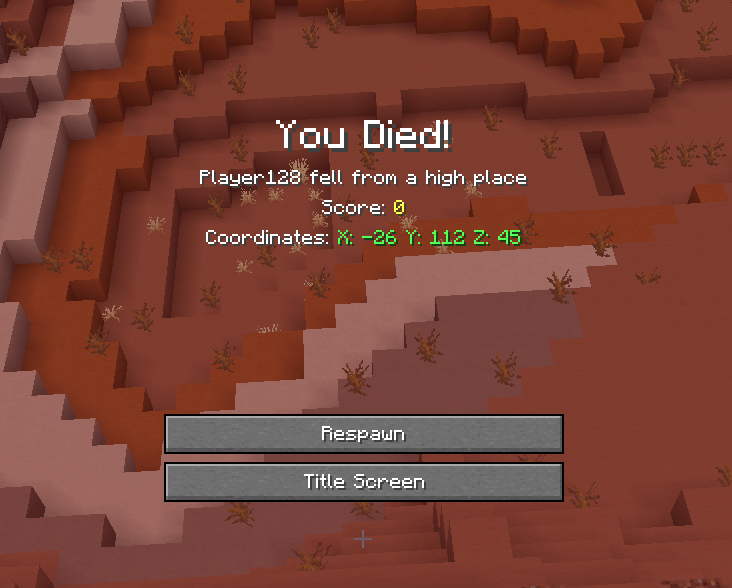
Shows your death coordinates and lets you copy them directly from the death screen.
截图
介绍
PWLastCoords
PWLastCoords is a lightweight client-side Fabric mod that displays your last death coordinates directly on the Minecraft death screen.
No commands, extra screens, or server-side installation are required.
Features
Death coordinates — displays your X, Y, and Z coordinates on the death screen.
One-click copying — click directly on the coordinates to copy them to your clipboard.
Clear visual design — coordinates are displayed in green and highlighted when hovered.
Mod Menu support — enable or disable the mod directly from Mod Menu.
Client-side only — the mod does not need to be installed on the server.
How It Works
When you die, PWLastCoords adds your death coordinates to the death screen below the Score text.
Example:
Coordinates: X: 125 Y: 64 Z: -342
The coordinates themselves are clickable. Click them to instantly copy:
X: 125 Y: 64 Z: -342

常见问题
PWlastcoords 支持哪些 Minecraft 版本?
PWlastcoords 支持 Minecraft Java 版 26.1–26.3,共 5 个版本,可用的加载器:Fabric。下载时注意选择和你游戏版本一致的文件。
PWlastcoords 怎么安装?
先用 PCL2 或 HMCL 启动器安装对应版本的 Fabric,再把下载的 .jar 文件放进游戏目录的 mods 文件夹,重新启动游戏即可。开启了版本隔离的,mods 文件夹在 versions/版本名 下面。

评论
登录后评论和评分