
PteroControl
PteroControl is a powerful, client-side Minecraft mod that seamlessly integrates your Pterodactyl game server panel directly into the multiplayer screen. Manage your servers without ever leaving the game!
截图
介绍
Tired of alt-tabbing to a web browser just to start, stop, or restart your Pterodactyl-hosted game server? PteroControl is the solution!
This powerful, client-side utility mod seamlessly integrates your Pterodactyl panel directly into Minecraft’s multiplayer screen, giving you essential server controls right where you need them.
Watch a short video about the features in the gallery.
✨ Key Features
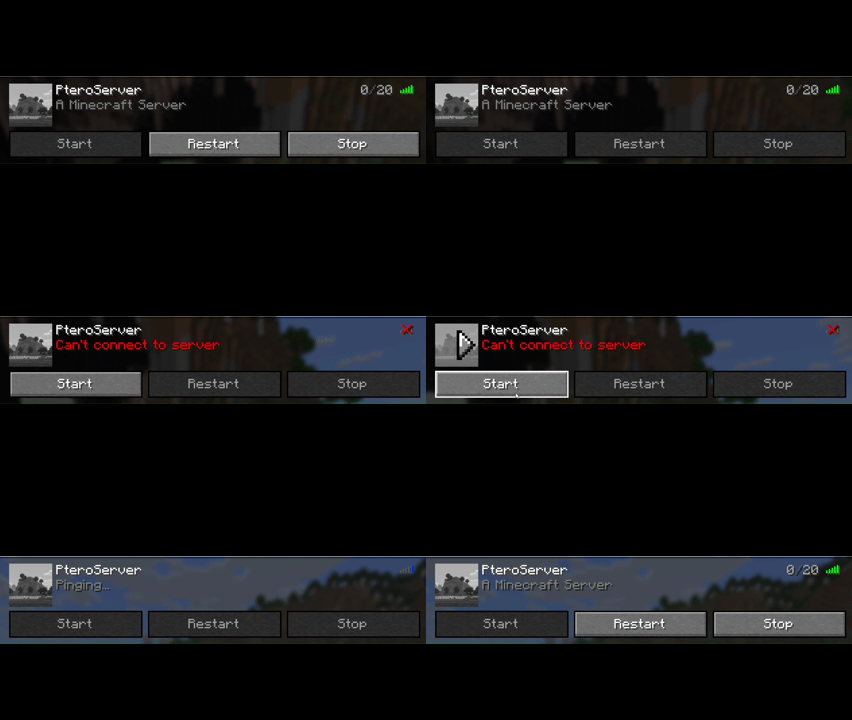
- In-Game Server Controls: Adds Start, Stop, and Restart buttons directly to your server entries in the multiplayer list.
- Smart Display: Buttons only appear for servers that match the configurable node address, keeping your server list clean.
- Dynamic Status: The buttons are intelligent! They automatically enable or disable based on the server’s live ping status in Minecraft (Online, Offline, or Pinging) to prevent mistakes.
- Offline? Only the “Start” button is active.
- Online? Only “Restart” and “Stop” are active.
- Pinging? All buttons are temporarily disabled.
- Automatic Refresh: After sending a command, the buttons will temporarily disable and then automatically update to reflect the server’s new state after a few seconds.
- Easy Configuration: A simple in-game settings screen (via Mod Menu) lets you set up your Pterodactyl panel URL, API key, and node address in seconds.
⚙️ How to Set Up
- Install the mod and all required dependencies (see below).
- Launch Minecraft and go to the Mods menu from the main screen.
- Find PteroControl in the list and click the gear icon (⚙️).
- Enter your Pterodactyl Panel URL (e.g.,
https://panel.yourdomain.com). - Enter your Client API Key. This must be generated from your user account’s “API Credentials” page on the panel and usually starts with
ptlc_. - Enter the Node Address of your servers (e.g.,
node.yourdomain.com). The buttons will only appear for servers matching this address. - Click Save, and you’re all set!
⚠️ Requirements
This mod is for the Fabric modloader. It requires the following mods to be installed:
📜 License
PteroControl is licensed under CC0-1.0 Universal. It is in the public domain, meaning you are free to use, modify, and distribute it as you see fit.
常见问题
PteroControl 支持哪些 Minecraft 版本?
PteroControl 支持 Minecraft Java 版 1.21.8–1.21.11,共 2 个版本,可用的加载器:Fabric。下载时注意选择和你游戏版本一致的文件。
PteroControl 怎么安装?
先用 PCL2 或 HMCL 启动器安装对应版本的 Fabric,再把下载的 .jar 文件放进游戏目录的 mods 文件夹,重新启动游戏即可。开启了版本隔离的,mods 文件夹在 versions/版本名 下面。运行环境:仅客户端。
评论
登录后评论和评分