介绍
Proximity Chat
Overview
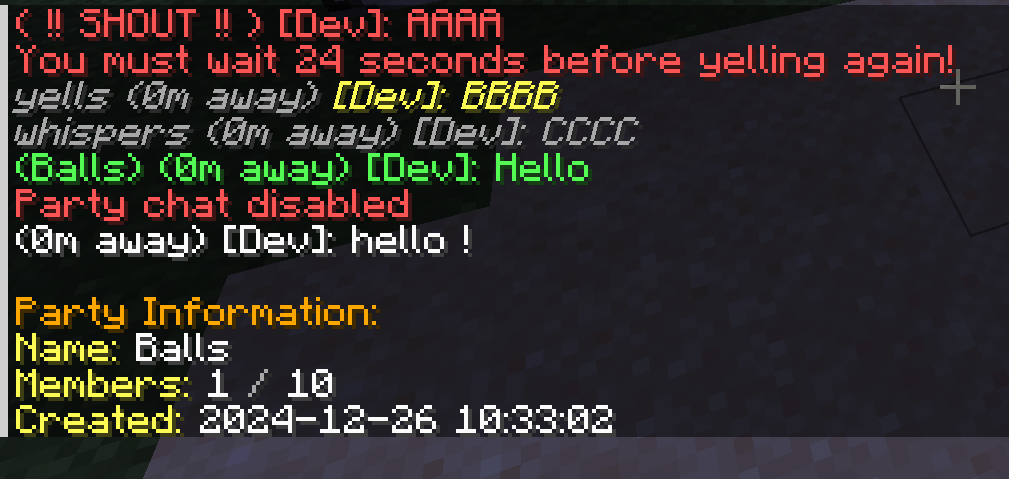
Proximity Chat adds realistic distance-based chat functionality to Minecraft, allowing players to communicate based on their physical proximity in the game world. Chat messages are only visible to players within configurable ranges, making communication more immersive and strategic.
Features
Distance-Based Chat
- Proximity Chat: Messages are only visible to players within a configurable range
- Multiple Chat Modes:
- Normal Chat: Standard proximity-based communication
- Whisper: Shorter range for private conversations
- Yell: Extended range for reaching distant players
- Shout: Server-wide announcements with cooldown
Party System
- Create and manage player parties
- Party-specific chat channel
- Comprehensive party management commands:
- Create/disband parties
- Invite/kick players
- Promote/demote moderators
- Party member listing
- Configurable party sizes
- Optional party persistence across server restarts
Commands
/proximitychat party create <name>– Create a new party/proximitychat party invite <player>– Invite a player to your party/proximitychat party join <name>– Join a party you’ve been invited to/proximitychat party leave– Leave your current party/proximitychat party list– List party members/proximitychat whisper <message>(or/w) – Send a whispered message/proximitychat yell <message>(or/y) – Send a yelled message/proximitychat shout <message>(or/s) – Send a server-wide shout/proximitychat pc– Toggle party chat mode
Configuration
- Customizable chat ranges for each chat mode
- Configurable colors for different chat types
- Adjustable cooldowns for yell and shout commands
- Customizable maximum party size
- Blacklist for forbidden party names
- Party persistence settings
- Message colors
Mod Integration
- Integration with Fakename mod for roleplay servers
- Support for Chat Heads mod integration.
Support:
- Open an issue on our GitHub repository
- Join our Discord server
If you’d like to support me and the development of my mods, I recommend trying out BisectHosting. Use code “project8gbderam” to get 25% off your first month of a gaming server for new customers. They offer 24/7 support and lightning-fast response times, ensuring you’re in great hands and providing exceptional assistance for all your gaming needs. https://www.bisecthosting.com/project8gbderam

常见问题
Proximity Chat 支持哪些 Minecraft 版本?
Proximity Chat 支持 Minecraft Java 版 1.19.2–1.21.1,共 3 个版本,可用的加载器:Forge / NeoForge。下载时注意选择和你游戏版本一致的文件。
Proximity Chat 怎么安装?
先用 PCL2 或 HMCL 启动器安装对应版本的 Forge / NeoForge,再把下载的 .jar 文件放进游戏目录的 mods 文件夹,重新启动游戏即可。开启了版本隔离的,mods 文件夹在 versions/版本名 下面。
Project8gbDeRam 的其他作品
查看全部 →
Leaderboards
恢复了 FTB Utilities 的经典排行榜,现在功能更丰富!

Replication RS2 Bridge
为 Replication 和精致存储 2 添加联动。

Chisel Modern
建筑党的最佳伙伴。支持现代版本!

MooFluids Modern
会流体的牛!
评论
登录后评论和评分