
截图

介绍

_Fabric and newer Minecraft versions coming soon._


Vanilla ping/latency calculation always seemed incredibly inaccurate and delayed to me.
Info
They only send the latency value to clients once every 30 seconds:
public void tick() {
   if (++this.sendAllPlayerInfoIn > 600) {
      this.broadcastAll(new ClientboundPlayerInfoPacket(ClientboundPlayerInfoPacket.Action.UPDATE_LATENCY, this.players));
      this.sendAllPlayerInfoIn = 0;
   }
}
And this is how they “calculate” it:
int i = (int)(Util.getMillis() - this.keepAliveTime);
this.player.latency = (this.player.latency * 3 + i) / 4;
This mod goes around Vanilla and measures latency with a similar custom packet, but takes a proper average of 5 last RTT (round-trip-time) results.
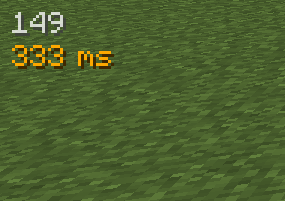
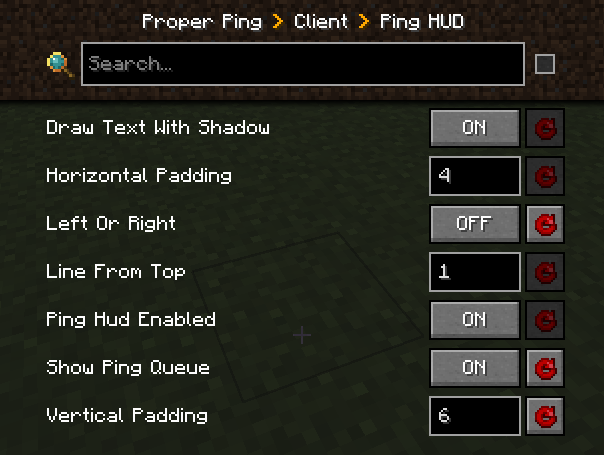
Besides that, it also adds a customizable hud element to always see your ping with options such as:
- Hide completely
- Position anywhere on the screen
- Show last 5 latency measurements in the same hud element
- Show numerical readings for other players on the server instead of abstract bars (there is a config option serverside to change the frequency of the server broadcasting these values to everyone)
Example config with default values
["Ping HUD"]
	#Enable ping HUD
	pingHudEnabled = true
	#Additionally show 5 last ping values
	showPingQueue = false
	#Draw text with a shadow
	drawTextWithShadow = true
	#Draw ping either on the left side (true), or on the right (false)
	leftOrRight = true
	#How many scaled GUI pixels to start drawing from the edge of the screen
	#Range: > 0
	horizontalPadding = 4
	#On which line counting from the top to start drawing from
	#Range: > 0
	lineFromTop = 1
	#How many scaled GUI pixels to start drawing from the top of the screen
	#Range: > 0
	verticalPadding = 4

[Other]
	#Show numbers in milliseconds in player list
	playerListNumbers = true
Example of a full display with the last 5 measurements turned on, numerical player list values, positioned on the right side of the screen:

FAQ
Q: Forge?
A: Forge.
Q: Can I include your mod in a video?
A: As long as you include a link to the mod/modpack (if it happens to be in one), absolutely
Q: Can I add your mod to a modpack?
A: CurseForge/Modrinth modpacks are cool.
常见问题
Proper Ping 支持哪些 Minecraft 版本?
Proper Ping 支持 Minecraft Java 版 1.19.2–1.20.1,共 2 个版本,可用的加载器:Forge。下载时注意选择和你游戏版本一致的文件。
Proper Ping 怎么安装?
先用 PCL2 或 HMCL 启动器安装对应版本的 Forge,再把下载的 .jar 文件放进游戏目录的 mods 文件夹,重新启动游戏即可。开启了版本隔离的,mods 文件夹在 versions/版本名 下面。运行环境:客户端和服务端都要装。
unixkitty 的其他作品
查看全部 →
Time Control
Want longer or shorter in-game days/nights? So did I.

Finally Farmable Dyes
Grow vanilla flowers that produce essential dyes as crops.

Overworld Quartz (FORGE)
Dead simple forge mod for overworld quartz.

Overworld Quartz
Dead simple forge mod for overworld quartz.
评论
登录后评论和评分