截图

介绍

Fabric and newer Minecraft versions coming soon.


Vanilla ping/latency calculation always seemed incredibly inaccurate and delayed to me.
public void tick() {
   if (++this.sendAllPlayerInfoIn > 600) {
      this.broadcastAll(new ClientboundPlayerInfoPacket(ClientboundPlayerInfoPacket.Action.UPDATE_LATENCY, this.players));
      this.sendAllPlayerInfoIn = 0;
   }
}int i = (int)(Util.getMillis() - this.keepAliveTime);
this.player.latency = (this.player.latency * 3 + i) / 4;This mod goes around Vanilla and measures latency with a similar custom packet, but takes a proper average of 5 last RTT (round-trip-time) results.
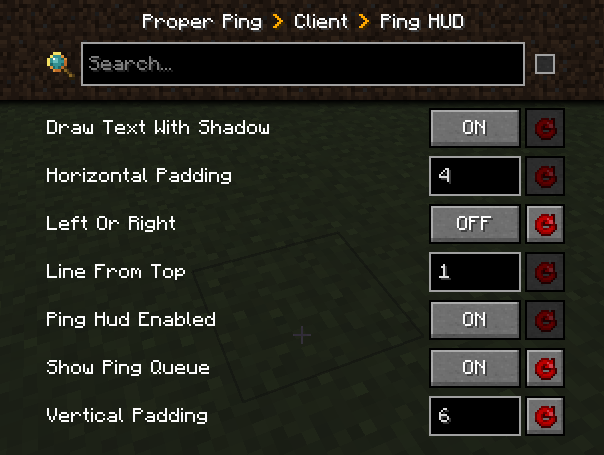
Besides that, it also adds a customizable hud element to always see your ping with options such as:
- Hide completely
- Position anywhere on the screen
- Show last 5 latency measurements in the same hud element
- Show numerical readings for other players on the server instead of abstract bars (there is a config option serverside to change the frequency of the server broadcasting these values to everyone)
["Ping HUD"]
      #Enable ping HUD
      pingHudEnabled = true
      #Additionally show 5 last ping values
      showPingQueue = false
      #Draw text with a shadow
      drawTextWithShadow = true
      #Draw ping either on the left side (true), or on the right (false)
      leftOrRight = true
      #How many scaled GUI pixels to start drawing from the edge of the screen
      #Range: > 0
      horizontalPadding = 4
      #On which line counting from the top to start drawing from
      #Range: > 0
      lineFromTop = 1
      #How many scaled GUI pixels to start drawing from the top of the screen
      #Range: > 0
      verticalPadding = 4

   [Other]
      #Show numbers in milliseconds in player list
      playerListNumbers = true
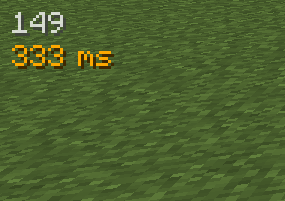
Example of a full display with the last 5 measurements turned on, numerical player list values, positioned on the right side of the screen: 
FAQ
Q: Forge?
A: Forge.
Q: Can I include your mod in a video?
A: As long as you include a link to the mod/modpack (if it happens to be in one), absolutely
Q: Can I add your mod to a modpack?
A: CurseForge/Modrinth modpacks are cool.
常见问题
Proper Ping 支持哪些 Minecraft 版本?
Proper Ping 支持 Minecraft Java 版 1.19.2–1.20.1,共 2 个版本,可用的加载器:Forge。下载时注意选择和你游戏版本一致的文件。
Proper Ping 怎么安装?
先用 PCL2 或 HMCL 启动器安装对应版本的 Forge,再把下载的 .jar 文件放进游戏目录的 mods 文件夹,重新启动游戏即可。开启了版本隔离的,mods 文件夹在 versions/版本名 下面。
unixkitty 的其他作品
查看全部 →
Time Control
想让游戏里的白天或夜晚更长或更短吗?我也想。

Finally Farmable Dyes
种植原版花卉作物,收获必需的染料。

Overworld Quartz (FORGE)
非常简单的 Forge 模组,为主世界添加石英。

Overworld Quartz
一款让主世界也能生成石英的极简 Forge 模组。
评论
登录后评论和评分