介绍
Project Boards
A Project Management mod for Minecraft
Summary
Project Boards is a mod that lets you organize projects by planning, starting, and finishing tasks using collections of Task Boards.
Task Boards
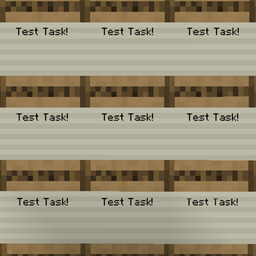
You can place down Task Boards which let you display text in the world.
These work a lot like Signs, but the text is stored in an item called a Task Slip.
The name of the Task Slip item is what is shown on the Task Board.
You can right-click the task board with a Task Slip to swap it for the slip inside.
When you interact with an empty Task Board with a slip in your hand it gets inserted and the text appears.
You can shift right-click a Task Board to take out the Task Slip inside.
When you break a Task Board, the Task Slip inside will disappear.
This is intentional, since Task Boards create new slips during use.
Task Owner
You can right-click the space above the task’s text on a Task Board to put your name down as the owner.
You can shift right-click the same spot to remove the owner (whether it was you or another player).
Task Status
You can right-click the space below the task’s text on a Task Board to advance its status from Planned to Started, or
from Started to Completed.
You can shift right-click the same spot to move the status backwards instead.
常见问题
Project Boards 支持哪些 Minecraft 版本?
Project Boards 支持 Minecraft Java 版 1.21.1,可用的加载器:NeoForge。下载时注意选择和你游戏版本一致的文件。
Project Boards 怎么安装?
先用 PCL2 或 HMCL 启动器安装对应版本的 NeoForge,再把下载的 .jar 文件放进游戏目录的 mods 文件夹,重新启动游戏即可。开启了版本隔离的,mods 文件夹在 versions/版本名 下面。
frenzyboys3 的其他作品
查看全部 →
StaTech Industry: GoG
一个以植物魔法空岛开局为基础的科技整合包
CottagePunk
一个温馨的农业整合包,加入了一点科技、魔法和冒险元素
CottagePunk
一个温馨的农业整合包,加入了一点科技、魔法和冒险元素
Wild Robotics 3: War
A light, tech-focused warfare pack for the average airship enjoyer
评论
登录后评论和评分