
Progress Renderer
Progress Renderer is a lightweight, client-side Fabric mod that automatically creates a visual history of your Minecraft world through periodic screenshots.
截图

介绍
Progress Renderer is a lightweight, client-side Fabric mod that automatically creates a visual history of your Minecraft world through periodic screenshots.
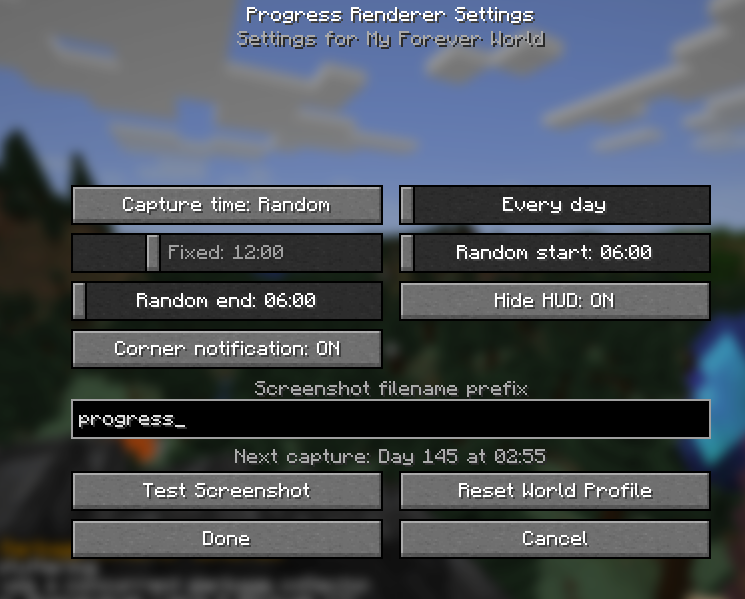
Choose between a random or fixed capture time, set screenshots to occur every few in-game days, and configure everything through the in-game settings menu. Progress Renderer maintains separate settings and schedules for each world or server, avoids duplicate captures after reconnecting, and accounts for time skipped by sleeping.
Features
- Random or fixed screenshot times
- Configurable random-time window
- Capture every 1–30 in-game days
- Separate settings for each world and server
- Sleep-aware scheduling
- Optional HUD hiding during screenshots
- Optional corner notifications
- Custom filename prefix
- Test Screenshot button
- Displays the next scheduled capture
- Remappable settings key, bound to
Jby default - No server installation required
Screenshots are saved in Minecraft’s normal screenshots folder. Mod Menu is recommended for convenient access to settings, but it is not required.
常见问题
Progress Renderer 支持哪些 Minecraft 版本?
Progress Renderer 支持 Minecraft Java 版 26.1.2,可用的加载器:Fabric。下载时注意选择和你游戏版本一致的文件。
Progress Renderer 怎么安装?
先用 PCL2 或 HMCL 启动器安装对应版本的 Fabric,再把下载的 .jar 文件放进游戏目录的 mods 文件夹,重新启动游戏即可。开启了版本隔离的,mods 文件夹在 versions/版本名 下面。运行环境:仅客户端。
评论
登录后评论和评分