
介绍
中文介绍正在准备中,下面暂时显示原文。
PresenceCraft
Adds Discord Rich Presence support to Minecraft.
Features
- Shows your current dimension on Discord.
- Shows your current survival day count.
- Updates status when:
- Viewing menus
- Pausing your game
- Actively playing in the world.
- Shows details depending on what you are doing:
- Singleplayer – ‘Singleplayer’
- Joining a LAN World – ‘Multiplayer (LAN)’
- Hosting a LAN World – ‘Multiplayer (Hosting LAN)’
- Playing on a Server – ‘Multiplayer (Server)’
- Playing on a Realm – ‘Multiplayer (Realm)’
- (Optional) Shows the server IP of the server you are playing on.
- Shows player count in multiplayer worlds.
- Uses your Minecraft Avatar as the Small Image in Discord’s RPC
- Shows your Minecraft username in the Small Image text.
- Uses your Minecraft version and current dimension in the Rich Presence tooltip.
- Has a fully customizable Discord Rich Presence.
Settings
- Enable Discord RPC: Whether Discord Rich Presence is enabled.
- Show Server IP: Whether to show the IP of the server you are playing on (disabled by default).
- Show Player Count: Whether to show the number of players in a multiplayer world.
- Show Player Avatar: Whether to use your Minecraft avatar as the Small Image.
- Show Minecraft Version: Whether to show your Minecraft version in the Rich Presence image tooltip.
- Show Dimension: Whether to show your current dimension in your Rich Presence.
- Show Survival Day: Whether to show your survival day count.
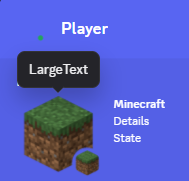
Preview
Dependencies
Required mods:
常见问题
PresenceCraft 支持哪些 Minecraft 版本?
PresenceCraft 支持 Minecraft Java 版 1.21.11,可用的加载器:Fabric。下载时注意选择和你游戏版本一致的文件。
PresenceCraft 怎么安装?
先用 PCL2 或 HMCL 启动器安装对应版本的 Fabric,再把下载的 .jar 文件放进游戏目录的 mods 文件夹,重新启动游戏即可。开启了版本隔离的,mods 文件夹在 versions/版本名 下面。运行环境:仅客户端。
评论
登录后评论和评分