介绍
中文介绍正在准备中,下面暂时显示原文。
🧪 Potion Bar
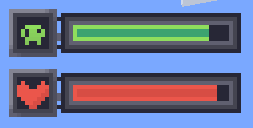
Potion Bar adds clean and simple progress bars for active potion effects.
No more guessing — see exactly how much time is left for each effect, with a bar and an icon on the side.

✅ Features:
- Displays potion duration as a progress bar
- Colored bars depending on the potion type
- Fully client-side — no need to install on servers
⚙️ Commands:
Position Hud:
- /potionbar position center (default)
- /potionbar position left
- /potionbar position right
- /potionbar position custom — opens HUD editor (drag \& drop)
Show Vanilla effects:
- /potionbar vanilaEffects show
- /potionbar vanilaEffects hide (default)
Timer system:
- /potionbar timer on — enable potion effect timer
- /potionbar timer off — disable potion effect timer
- /potionbar timer left — show timer on the left
- /potionbar timer right — show timer on the right (default)
- /potionbar timer above — show timer above the icon
- /potionbar timer below — show timer below the icon
Custom icons:
- /potionbar CustomIcons on — enable custom textures (default)
– /potionbar CustomIcons off — disable (vanilla textures)
📸 Screenshots:

🧪 Stay informed. Stay alive. Use Potion Bar.
常见问题
Potion Bar 支持哪些 Minecraft 版本?
Potion Bar 支持 Minecraft Java 版 1.20.1–26.3,共 20 个版本,可用的加载器:Fabric / NeoForge。下载时注意选择和你游戏版本一致的文件。
Potion Bar 怎么安装?
先用 PCL2 或 HMCL 启动器安装对应版本的 Fabric / NeoForge,再把下载的 .jar 文件放进游戏目录的 mods 文件夹,重新启动游戏即可。开启了版本隔离的,mods 文件夹在 versions/版本名 下面。
Hainer 的其他作品
查看全部 →
Potion Bar
by Hainer
Potion bar mod that adds a progress bar for potions
4万
1 个月前
Modrinth

Achievement Style
by Hainer
This mod redesigns the look of achievements!
1.7万
1 个月前
Modrinth
Achievement Style
by Hainer
This mod redesigns the look of achievements!
1.7万
1 个月前
Modrinth

Achievement Style
by Hainer
This mod redesigns the look of achievements!
4,019
1 个月前
CurseForge
评论
登录后评论和评分