
PlayerScale
A client-side Fabric mod for Minecraft that lets you visually resize player models. The scaling is purely cosmetic and only visible to you, other players are not affected.
截图


介绍
PlayerScale
A client-side Fabric mod for Minecraft 1.21.11 that lets you visually resize player models. The scaling is purely cosmetic and only visible to you – other players are not affected.
Features
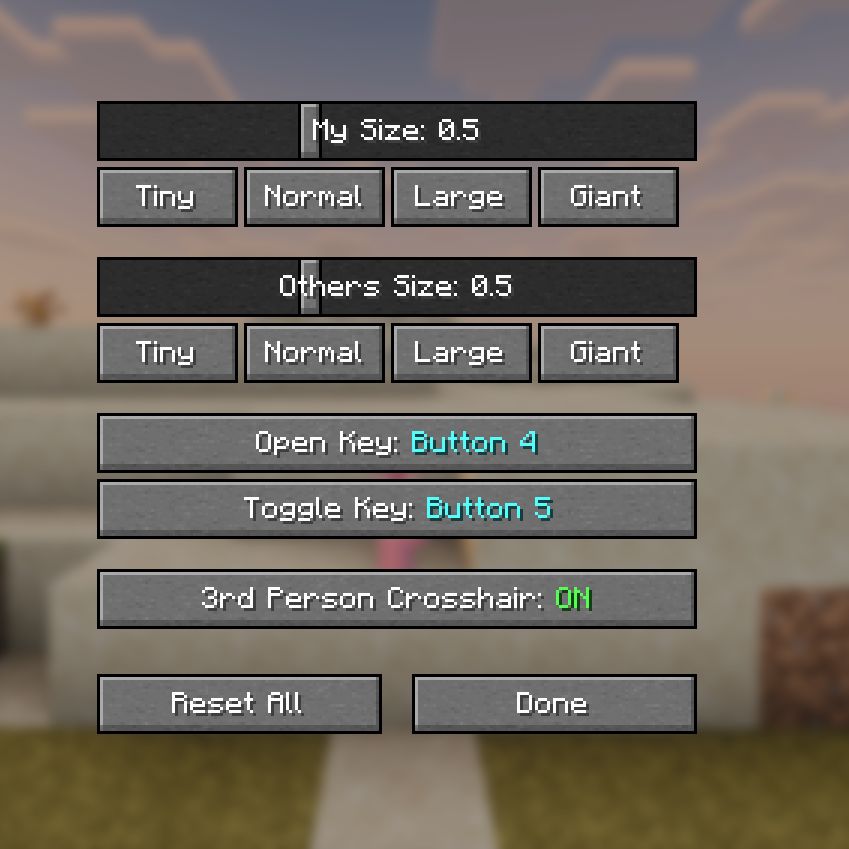
- Scale your own player model and other players’ models (0.1x – 10x)
- Toggle keybind to quickly switch your scale on/off
- Toggle crosshair visibility in 3rd person view
- Mod Menu integration
- Client-side only – no server installation needed
- Works in singleplayer and multiplayer
Usage
Open the settings screen using any of these methods:
/playerscalecommand- Keybind (set one in Options -> Controls -> PlayerScale, or in the mod’s config screen)
- Mod Menu -> PlayerScale -> Config button
Commands
| Command | Description |
|—|—|
| /playerscale | Open the config GUI |
| /playerscale set <player> <scale> | Set a player’s visual scale (0.1 – 10.0) |
| /playerscale reset <player> | Reset a player to normal size |
| /playerscale resetall | Reset all players to normal size |
Requirements
- Minecraft 1.21.11
- Fabric Loader 0.18.0+
- Fabric API
- Mod Menu (optional)
Support
If you enjoy this mod, consider supporting me on Ko-fi!
常见问题
PlayerScale 支持哪些 Minecraft 版本?
PlayerScale 支持 Minecraft Java 版 1.21.11,可用的加载器:Fabric。下载时注意选择和你游戏版本一致的文件。
PlayerScale 怎么安装?
先用 PCL2 或 HMCL 启动器安装对应版本的 Fabric,再把下载的 .jar 文件放进游戏目录的 mods 文件夹,重新启动游戏即可。开启了版本隔离的,mods 文件夹在 versions/版本名 下面。运行环境:仅客户端。
评论
登录后评论和评分