PlayerCompassMOD
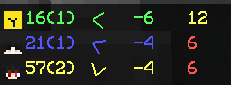
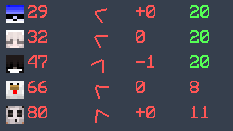
This mod helps you track nearby players in a simple and customizable way.
截图
介绍
This mod helps you track nearby players in a simple and customizable way.
It displays player information on your screen and allows you to adjust how it looks and behaves.
Features:
- Toggle the display on/off
- Customize tracking range and maximum players shown
- Move and scale the display
- Optional background and transparency settings
- Simple commands for easy control
Commands:
/pcm → Open settings overview
/pcm toggle → Enable/disable the mod
/pcm range → Set tracking range
/pcm max → Set maximum displayed players
/pcm move → Move the display position
/pcm scale → Adjust display size
/pcm bg → Toggle background
/pcm bga → Adjust background transparency
/team team mode
This mod is designed for general gameplay use and does not modify server behavior.
常见问题
PlayerCompassMOD 支持哪些 Minecraft 版本?
PlayerCompassMOD 支持 Minecraft Java 版 1.8.9,可用的加载器:Forge。下载时注意选择和你游戏版本一致的文件。
PlayerCompassMOD 怎么安装?
先用 PCL2 或 HMCL 启动器安装对应版本的 Forge,再把下载的 .jar 文件放进游戏目录的 mods 文件夹,重新启动游戏即可。开启了版本隔离的,mods 文件夹在 versions/版本名 下面。运行环境:仅客户端。
评论
登录后评论和评分