
截图
介绍
中文介绍正在准备中,下面暂时显示原文。
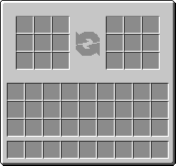
Player Trade adds the function to trade between Player to Player inside Minecraft!
HOW TO USE:
Client 1:
Use /trade
Client 2:
Press the accept text in chat, then enter, or type /accept to begin trading.
List of commands and uses:
- /trade (Trade a user)
- /trade on (Enables trading)
- /trade off (Disable trading)
- /accept (Accept a user’s trade request)
- /decline (Decline a user’s trade request
When done trading, both sides must press accept to register the trade. Then an item will appear in the recipient’s inventory or hotbar. Simply right-click to use the item, and the traded loot will appear in their hotbar or inventory
REQUIRES FABRIC API
常见问题
Player Trade 支持哪些 Minecraft 版本?
Player Trade 支持 Minecraft Java 版 1.21.5–1.21.11,共 7 个版本,可用的加载器:Fabric。下载时注意选择和你游戏版本一致的文件。
Player Trade 怎么安装?
先用 PCL2 或 HMCL 启动器安装对应版本的 Fabric,再把下载的 .jar 文件放进游戏目录的 mods 文件夹,重新启动游戏即可。开启了版本隔离的,mods 文件夹在 versions/版本名 下面。运行环境:客户端和服务端都要装。
评论
登录后评论和评分