Player Tags, Prefixes & Health
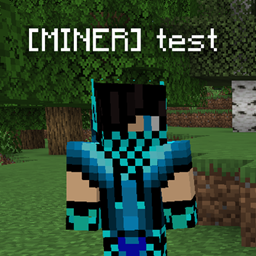
Add custom player tags and prefixes, and display player health in Minecraft.
介绍
MORI[NICK CHANGE]– Works on Client & Server
If you are a server owner, just upload it to the server:no need to install it on the client.
1) /nickchange “player name” “tag to add” – Adds a tag next to the player’s name
2) /nickchange default “old player name” – Resets the selected player’s tag
3) /nickchange alldefault – Resets all players’ tags
4) /nickmeter “on” or “off” – (Player#1,#X Adds player counter like] (The player turns off the counter like) Does not work with the Fabric version.
KUKI[Show Players’ Health(nick)] – Works on Client
It’s enough to install it on the client; it works on all servers. There’s no need to install it on the server as well.
Press “F7” key to show player health within a 5-block radius/ Press “F7” key again to hide it
A lightweight Minecraft mod that lets you add custom tags and prefixes next to player names and display player health.
Features:
– Add custom prefixes to player names
– Display tags such as [MINER]Mori
– Show player health
– Customize player name tags
– Useful for multiplayer servers
– Simple and lightweight
常见问题
Player Tags, Prefixes & Health 支持哪些 Minecraft 版本?
Player Tags, Prefixes & Health 支持 Minecraft Java 版 1.19–26.2,共 17 个版本,可用的加载器:Forge。下载时注意选择和你游戏版本一致的文件。
Player Tags, Prefixes & Health 怎么安装?
先用 PCL2 或 HMCL 启动器安装对应版本的 Forge,再把下载的 .jar 文件放进游戏目录的 mods 文件夹,重新启动游戏即可。开启了版本隔离的,mods 文件夹在 versions/版本名 下面。

评论
登录后评论和评分