
Picture Mode
This mod adds an isometric view of the world dedicated for taking pictures.
截图


介绍
Picture Mode is a mod that adds an isometric picture taking mode to Minecraft.
It is inspired by the Photo Mode from Better than Adventure. The interface is simple to use
and the isometric perspective gives a unique way to capture images of structures.
Features
- An isometric perspective for screenshotting
- Controls for the camera orientation
- Panning controls for advanced cropping
- Environment controls to make the image more pretty
- Filters to spice up your screenshots
Screenshot
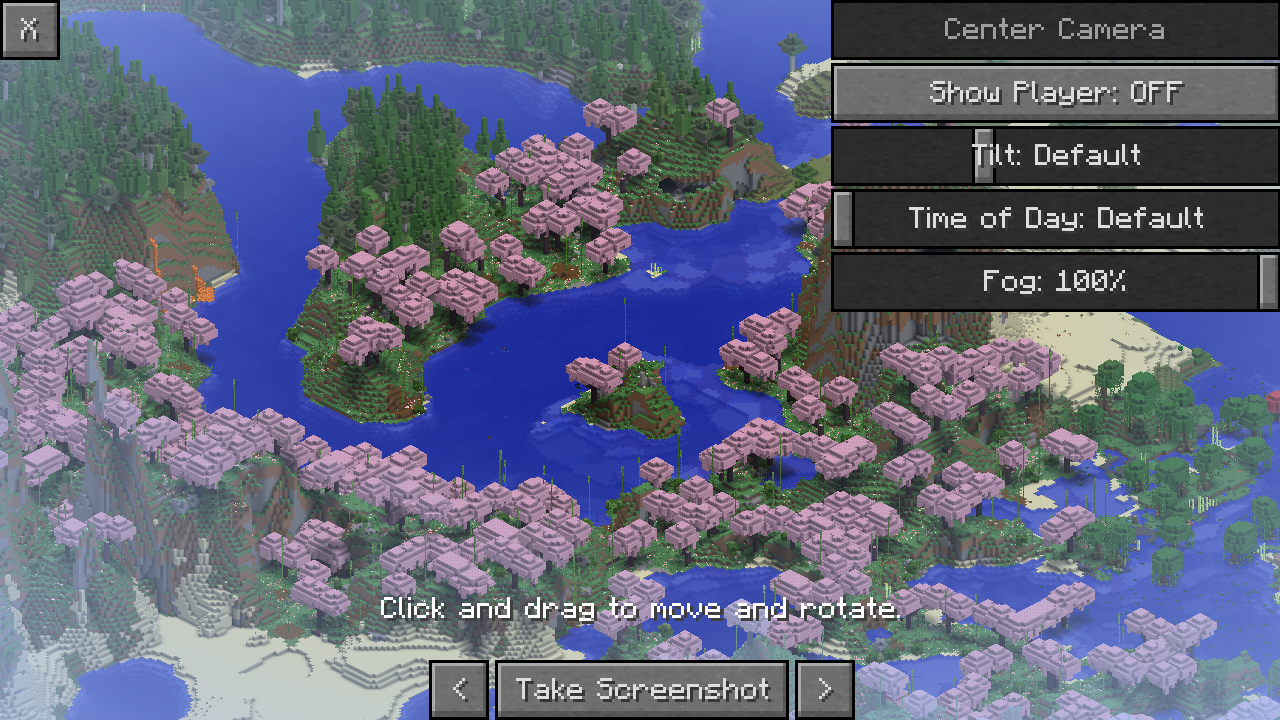
Below is a screenshot of the main interface of the mod.
Disabling for a dimension
Server owners or modpack makers can disable Picture Mode in a dimension by adding its
dimension type to the picturemode:disabled tag. The button will be disabled once
the player is in a dimension of the disabled type
Credits
Thanks to the Better than Adventure! team for the original Photo Mode, which is a huge inspiration for this mod.
Thanks to Bestsoft100 for letting me use their shader code for the filters.
常见问题
Picture Mode 支持哪些 Minecraft 版本?
Picture Mode 支持 Minecraft Java 版 1.20–26.3,共 9 个版本,可用的加载器:Fabric / Forge / NeoForge / Quilt。下载时注意选择和你游戏版本一致的文件。
Picture Mode 怎么安装?
先用 PCL2 或 HMCL 启动器安装对应版本的 Fabric / Forge / NeoForge / Quilt,再把下载的 .jar 文件放进游戏目录的 mods 文件夹,重新启动游戏即可。开启了版本隔离的,mods 文件夹在 versions/版本名 下面。运行环境:仅客户端。
icanttellyou 的其他作品
查看全部 →
Moderner Beta
为现代 Minecraft 带来新旧世界生成!
Moderner Beta
Old (and not so old) world generation for modern Minecraft!

Nostalgic Tweaks
Brings back Minecraft alpha, beta, post-release lost gameplay elements. Made for nostalgic enthusiasts or for those who want to give the game a new aesthetic by tweaking the mod to their preference.

ClarityMod
Utility for modpack devs that improves upon the support and debugging experience
评论
登录后评论和评分