
PickupHighlight
Never lose track of newly picked-up items — a golden star marks every new item in your hotbar and inventory.
介绍
✦ PickupHighlight
Never lose track of newly picked-up items again. Every new item in your hotbar or inventory gets an animated golden star — plus a count badge showing how many you picked up.
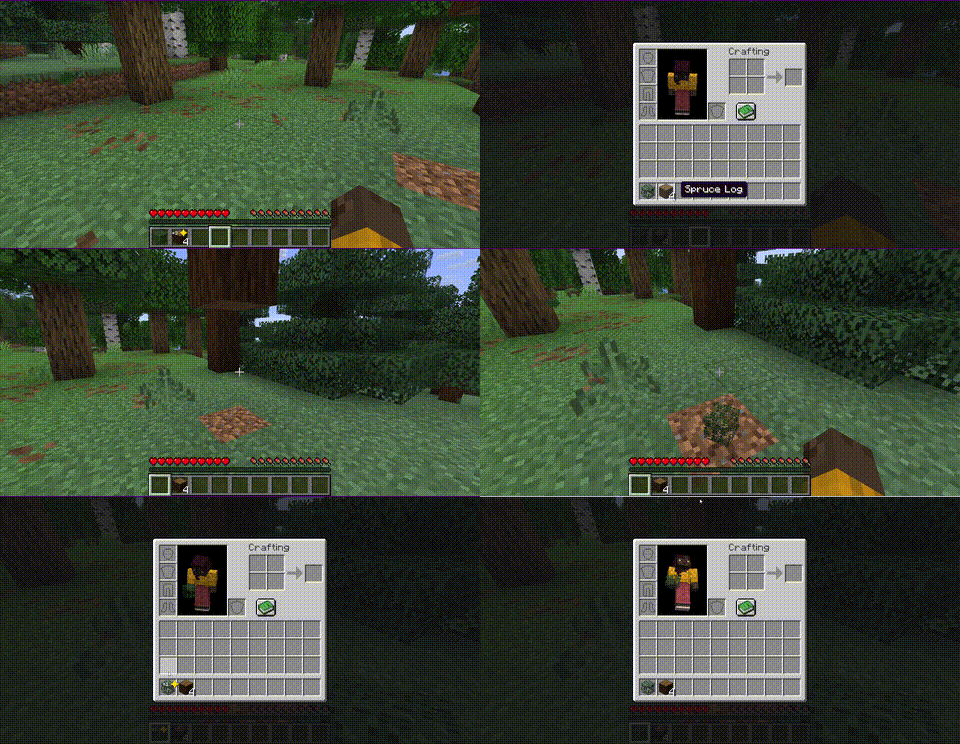
Features
- ⭐ Animated star pulses on every newly picked-up item
- 🔢 Count badge shows exactly how many items you picked up (
+1,+5, …) - 🎯 Works in hotbar and inventory
- 🔄 Highlights auto-clear on hover, inventory close, or hotbar selection
- ⏱️ Optional timeout — auto-clear after X seconds
- 🎨 Configurable color — gold by default, any hex color works
- ⚙️ Full config GUI when used with Cloth Config + Mod Menu
Configuration
Config file: .minecraft/config/pickuphighlight.json
| Option | Default | Description |
|——–|———|————-|
| clearOnHover | true | Remove highlight when hovering over the item |
| clearOnClose | true | Remove all highlights when closing inventory |
| clearOnSelect | true | Remove highlight when selecting on hotbar |
| highlightColor | 0xFFD700 | Star color (gold by default) |
| timeoutSeconds | 0 | Auto-clear after X seconds (0 = never) |
| showCount | true | Show count badge next to the star |
If Cloth Config and Mod Menu are installed, you can configure the mod in-game from the Mods screen — no manual file editing needed.
License
MIT — see LICENSE
常见问题
PickupHighlight 支持哪些 Minecraft 版本?
PickupHighlight 支持 Minecraft Java 版 26.1–26.1.2,共 3 个版本,可用的加载器:Fabric / Forge / NeoForge。下载时注意选择和你游戏版本一致的文件。
PickupHighlight 怎么安装?
先用 PCL2 或 HMCL 启动器安装对应版本的 Fabric / Forge / NeoForge,再把下载的 .jar 文件放进游戏目录的 mods 文件夹,重新启动游戏即可。开启了版本隔离的,mods 文件夹在 versions/版本名 下面。运行环境:仅客户端。
Cukkoo 的其他作品
查看全部 →
Sound Culling
Dynamically limits and dampens overlapping sounds to reduce audio clutter and improve performance in sound-heavy areas.

Sound Culling
Dynamically limits and dampens overlapping sounds to reduce audio clutter and improve performance in sound-heavy areas.

Free Camera
A powerful client-side cinematic camera mod with Free, Orbit, Tripod, Follow, recording, paths, roll, zoom, and collision.

Free Camera
A powerful client-side cinematic camera mod with Free, Orbit, Tripod, Follow, recording, paths, roll, zoom, and collision.
评论
登录后评论和评分