
介绍
Picker
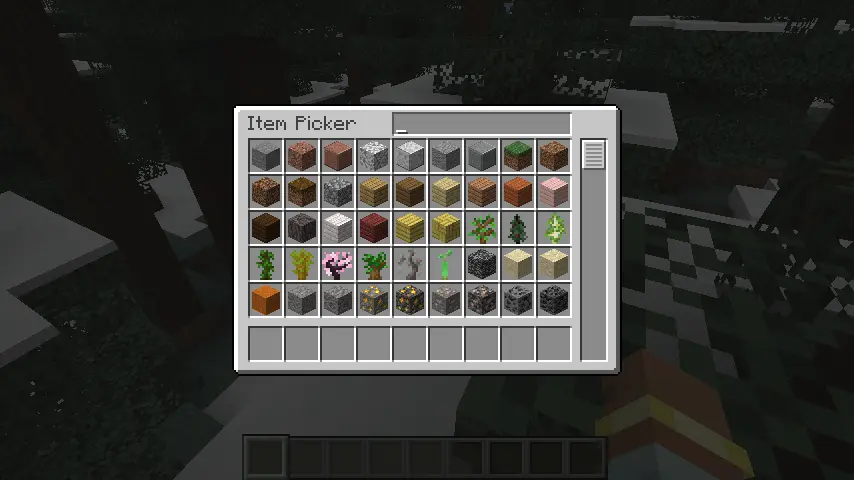
A creative-mode search page over datapack registries.
/picker opens the grid over every category the installed mods registered, /picker <category> over one of them
(minecraft:block, …).
The picker registers two categories of its own: minecraft:item and minecraft:block.
For mod authors
A category names one datapack registry and turns an entry of it into the rows that stand for it. Register it once,
while your mod class is being constructed:
PickerCatalogue.registerSingle(MyRegistries.SPIRIT_ROOT, holder -> new PickerRow(
        MyItems.SPIRIT_ROOT.toStack(),
        List.of(Component.literal(holder.key().identifier().toString()))));
PickerCatalogue.register(...) is the same for a definition that stands for several items, and
PickerCatalogue.registerCategory(...) hands over the whole category for a definition that answers in its own order
or reads a second registry.
Reading goes through PickerContents and always takes the registry access to read from, so the client reads the
registries it has synced and the server its own:
List<ItemStack> stacks = PickerContents.stacksOf(registryAccess, MyRegistries.SPIRIT_ROOT);
常见问题
Picker 支持哪些 Minecraft 版本?
Picker 支持 Minecraft Java 版 26.1.2,可用的加载器:NeoForge。下载时注意选择和你游戏版本一致的文件。
Picker 怎么安装?
先用 PCL2 或 HMCL 启动器安装对应版本的 NeoForge,再把下载的 .jar 文件放进游戏目录的 mods 文件夹,重新启动游戏即可。开启了版本隔离的,mods 文件夹在 versions/版本名 下面。
IAFEnvoy 的其他作品
查看全部 →
Jupiter
一个强大的自动同步配置前置库。

Uranus
一个前置库,包含动画引擎、对象辅助工具等功能。部分基于 LLibrary 和 Citadel。

IceAndFire Community Edition
Ice and Fire 的社区版

Ice And Fire Patcher
一个简单的 Ice And Fire 补丁
评论
登录后评论和评分