
Personal Effects [FORGE]
Saves your inventory and experience to your ender chest when you die
截图




介绍
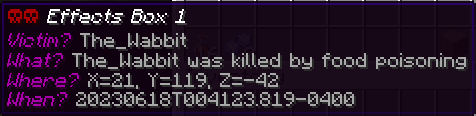
Got tired of waiting for my favorite grave mod to upgrade past 1.8.9, so I created Personal Effects, the lazy player’s grave mod. When you die, this mod saves your items, and optionally your experience, to a Personal Effects Box you’ve put in your ender inventory (the inventory tied to your player accessible normally via an Ender Chest). That’s it. The mod can be paired with other grave mods as a backup or a preferred method for advanced players who prefer the ender chest route over the corpse run route. There are two commands ‘/pefput’ and ‘/pefget’ that allow you to stash and retrieve boxes from your ender inventory if you do not have access to an Ender Chest. (Note these commands do NOT open your ender inventory.)
MC 1.19.4 Mod Requirements
- Minecraft 1.19.4
- Forge (latest build to match 1.19.4)
- Client and Server use
MC 1.16.4 Mod Requirements
- Minecraft 1.16.4
- Forge (use recommended build)
- Client and Server use
MC 1.15.2 Mod Requirements
- Minecraft 1.15.2
- Forge (use recommended build)
- Client and Server use
MC 1.14.4 Mod Requirements
- Minecraft 1.14.4
- Forge (use recommended build)
MC 1.12/.1/.2 Mod Requirements
- Minecraft 1.12,1.12.1,1.12.2
- Forge (use recommended version for the MC you’re using)
To Use [1.19.4+]:
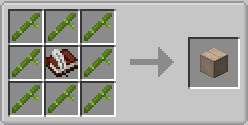
- Create one of the three types of Personal Effects Box (see Images tab for recipes)
- Put the boxes in any Ender Chest (use any slot and you can put multiple boxes to be super-safe)
- If you do not yet have an Ender Chest, use the “/pefput” command to stash your box into your ender inventory
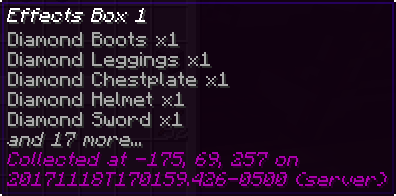
When you die, the mod will try to put your items including your armor, inventory, hotbar, and curios into your empty Personal Effects boxes. The mod will combine items in an effort to save as many items as possible in as little space as possible. Note that items removed due to a Curse of Vanishing enchantment are NOT saved by this mod. Custom, non-standard inventories may also be excluded depending on how their items are dropped on death.
To also save your experience, make sure you use an effects box that captures experience as well as items. If you have a lot of curios or other trinkets, you might want to invest in the 64-slot multi-use effects boxes if getting back to your death location to collect dropped items will be difficult. Another option for handling heavy inventories, is to use the config to prioritize what gets saved first and what items can be dropped (the mod already flags certain items like cobblestone as ‘unimportant- save last’).
After you respawn, to retrieve your items, get the (now filled) effects box from your Ender Chest and right-click it. If you cannot get to an Ender Chest, use the “/pefget” command to retrieve the most-recently filled effect box’s contents directly.
To Use [pre-1.19]:
- Create one or more black shulker boxes
- Rename each one ‘Personal Effects’
- Put them in your ender chest (any slot)
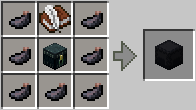
Don’t have any Shulker Boxes to spare? Use this recipe:
(any ‘dyeBlack’ [pre-mc1.14] or ‘forge:dyes/black” [mc1.14+] works)
When you die, the mod will try to put your inventory contents including your armor, offhand items, and baubles/curios items into your empty shulker boxes. Note that items removed due to a Curse of Vanishing enchantment are NOT saved by this mod. Custom, non-standard inventories may also be excluded depending on how their items are dropped on death.
To make sure your valuable stuff is saved first, the mod will not save items like dirt blocks or cobblestone to the effects box. You can add other “disposable” items and blocks to the mod’s configuration file.
Reset [pre-1.19]
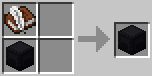
After you’ve respawned and retrieved your items, you’ll need to “reset” your personal effects shulker box so it’s available for your next inevitable untimely death. To reset your effects shulker box, use this recipe:
Don’t forget to put it back into your ender chest!
Integration
- By default the mod is configured to run as late in the “death event” processing as possible, so if you’ve got other mods that can “save your stuff” selectively (for instance via enchantments), they should get executed before Personal Effects. However, starting with 1.0.3, you can also setup the mod to run as early as possible before any other grave mods; you would do this if you want personal effects to be an optional setup for more advanced players (with enderchests and shulkerboxes) while having a more typical “corpse run” grave mod as the default.
- If you’re running with the ‘keepInventory’ game rule activated, this mod does nothing.
常见问题
Personal Effects [FORGE] 支持哪些 Minecraft 版本?
Personal Effects [FORGE] 支持 Minecraft Java 版 1.12–1.19.4,共 9 个版本,可用的加载器:Forge。下载时注意选择和你游戏版本一致的文件。
Personal Effects [FORGE] 怎么安装?
先用 PCL2 或 HMCL 启动器安装对应版本的 Forge,再把下载的 .jar 文件放进游戏目录的 mods 文件夹,重新启动游戏即可。开启了版本隔离的,mods 文件夹在 versions/版本名 下面。
The_Wabbit0101 的其他作品
查看全部 →
Carrots Library [FORGE]
The_Wabbit 的模组所使用的基础前置库

Armor Underwear Mod [FORGE]
《Tough As Nails》的粉丝们:还在饱受冻伤或中暑之苦吗?试试 Armor Underwear 吧——它能为现有护甲添加降温和保暖内衬。尽管去岩浆里裸泳、在冰山上钓鱼吧,想怎么玩就怎么玩。

VanillaFoodPantry Mod [FORGE]
仅使用原版的简单食物和材料,新增大量高品质食谱。

PinklySheep Mod [FORGE]
粉色羊的神秘魔法揭晓(提示:超棒的)!同时也是一个轻量冒险RPG辅助模组,包含大量战利品武器、附魔、药水和奇奇怪怪的小玩意。
评论
登录后评论和评分