
Pebble’s Crate
Weighted randomiser crate mod for Minecraft Fabric 1.19.2-1.20.1 Great for vote crates, premium crates and whatever else you want to use it for.
截图

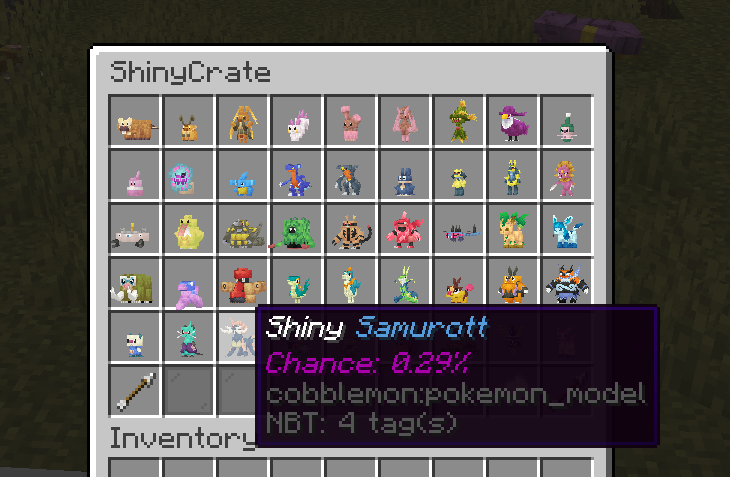

介绍
Pebble’s Lootcrate
Pebble’s Lootcrate mod for Fabric Minecraft version 1.19.2, 1.20.1 and 1.21.1

Make sure you have Fabric Language Kotlin installed!
If you would like to convert your configs from AdvancedCrates to Pebble’s Crate, I have written a converter that will help speed up the process a little bit, it can be found here along with a crate config creator/editor (WIP):
https://pebblescrate.sethi.tech/
Go to source:

Feel free to drop me a star on Github 🙂
Come try out the crates on one of the servers I manage 🙂
IP: dynastymc.org
Permissions
For all admin commands, if you have LuckPerm installed, the following is required:
pebbles.admin.crate
Available Commands
/padmin crate Displays all available crate in the config and lets you grab a crate transformer/crate key
/padmin getcrate <name> Get a crate transformer
/padmin givekey <player> <amount> <cratename> Gives cratekey to a specific player
How to use?
After installing the mod, you may navigate to /config/pebbles-crate/crates or create the folders then create a file, for example example.json
You may use the follow example as reference for the structure:
{
"crateName": "Vanilla Items Crate",
"screenName": "&6Vanilla Items Crate",
"crateKey": {
"material": "minecraft:tripwire_hook",
"name": "&#FFBF00Vanilla Key",
"lore": [
"&#FFDC73• Opens a Vanilla Items Crate"
]
},
"prize": [
{
"name": "?BC5DDiamond",
"material": "minecraft:diamond",
"amount": 1,
"nbt": "{species:\"cobblemon:bulbasaur\",aspects:[\"shiny\"]}",
"commands": [
"give {player_name} minecraft:diamond 1"
],
"broadcast": "&6{player_name} &fhas received {prize_name} &ffrom {crate_name}",
"messageToOpener": "&6[Pebble's Crates] &f&lYou got {prize_name} &f&lfrom Vanilla Items Crate",
"lore": [
"Chance of getting the drop: {chance}%"
],
"chance": 40
},
{
"name": "&rElytra",
"material": "minecraft:elytra",
"amount": 1,
"commands": [
"give {player_name} minecraft:elytra 1"
],
"broadcast": "&6{player_name} &fhas received {prize_name} &ffrom {crate_name}",
"messageToOpener": "&6[Pebble's Crates] &f&lYou got {prize_name} &f&lfrom Vanilla Items Crate",
"lore": [
"Chance of getting the drop: {chance}%"
],
"chance": 5
},
{
"name": "&rGolden Apple",
"material": "minecraft:golden_apple",
"amount": 1,
"commands": [
"give {player_name} minecraft:golden_apple 1"
],
"broadcast": "&6{player_name} &fhas received {prize_name} &ffrom {crate_name}",
"messageToOpener": "&6[Pebble's Crates] &f&lYou got {prize_name} &f&lfrom Vanilla Items Crate",
"lore": [
"Chance of getting the drop: {chance}%"
],
"chance": 55
}
]
}Note that the mod supports legacy formatting (e.g. ?BC5D, &4, &f, &r) as demonstrated in the example.
Todo
- Admin UI for editing the loot in-game
- Better/more error handling
- Finish writing todos
常见问题
Pebble’s Crate 支持哪些 Minecraft 版本?
Pebble’s Crate 支持 Minecraft Java 版 1.19.2–1.21.1,共 3 个版本,可用的加载器:Fabric。下载时注意选择和你游戏版本一致的文件。
Pebble’s Crate 怎么安装?
先用 PCL2 或 HMCL 启动器安装对应版本的 Fabric,再把下载的 .jar 文件放进游戏目录的 mods 文件夹,重新启动游戏即可。开启了版本隔离的,mods 文件夹在 versions/版本名 下面。运行环境:仅服务端。
lilpebs 的其他作品
查看全部 →
Cobblemon
一个支持 Fabric 和 NeoForge 的 Pokémon 模组

Cobblemon Official Modpack [Fabric]
Cobblemon 模组的官方整合包,适用于 Fabric!

Cobblemon Official Modpack [NeoForge]
Cobblemon 模组的官方 NeoForge 整合包!

Flan Cobblemon Extension
Flan extension that supports Pokemon spawn prevention for Cobblemon and a few other stuff.
评论
登录后评论和评分