Peace and Quiet
Optional turn off all in game annoyances like toasts and the splash text on title and more.
介绍
Peace and Quiet
(Fabric)
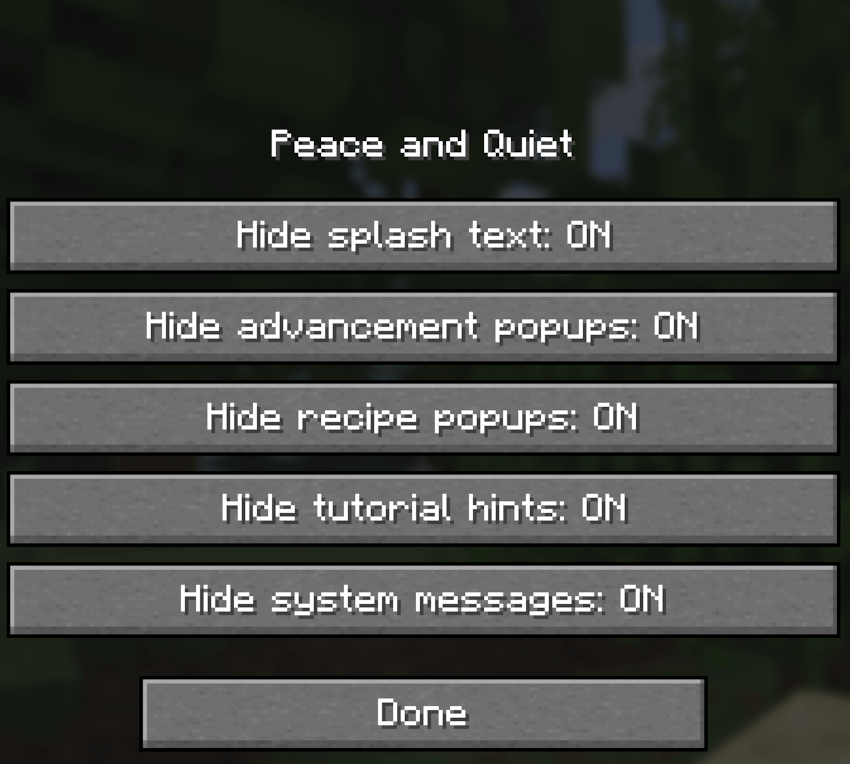
Less noise on your screen. Hides the yellow splash text on the title screen and
the popups in the top-right corner: advancements, recipes, tutorial hints and
system messages. Everything is hidden by default; turn back on what you want.
—————————————————————-
FEATURES
—————————————————————-
Splash text
– Hides the yellow text on the title screen.
– This is vanilla’s own Options > Accessibility > Hide Splash Texts switch:
Peace and Quiet turns it on the first time it runs, and both places change
the same setting.
Toast popups
Each kind can be hidden or shown on its own:
– Advancements: “Advancement Made!”, “Goal Reached!”, “Challenge Complete!”
– Recipes: “New Recipe(s) Unlocked!”
– Tutorial hints: tips for new players, like “Open your inventory” or “Move
with WASD”.
– System messages: everything else, like world backups, resource pack and
save problems, friend notices, and popups from other mods.
All worlds
– The settings are saved in your game, not in a world, so they apply to every
world and server.
—————————————————————-
COMMANDS
—————————————————————-
/peaceandquiet Open the settings: one on/off switch for the splash text
and each kind of popup. Hover over a switch to see what it
covers.
—————————————————————-
SETTINGS
—————————————————————-
Change them with /peaceandquiet. Saved in config/peaceandquiet.json (the
splash text switch is saved with Minecraft’s own options).
Hide splash text on The title screen’s yellow text.
hide_advancements true Advancement popups.
hide_recipes true Recipe popups.
hide_tutorials true Tutorial hints.
hide_system true System messages and other mods’ popups.
—————————————————————-
HQ COMPATIBILITY
—————————————————————-
With HQ installed, a “Peace and Quiet” button in the HQ list opens
/peaceandquiet. Without HQ the mod works exactly the same.
—————————————————————-
COMPATIBILITY & NOTES
—————————————————————-
– Client only: it doesn’t need to be on the server.
– Hidden popups are simply never shown; advancements and recipes are still
unlocked as normal.
– The music “Now Playing” popup has its own vanilla setting under Music &
Sounds.
—————————————————————-
CHANGELOG
—————————————————————-
1.0.0
– First release: hide the splash text and advancement, recipe, tutorial and
system popups, each with its own switch. Everything hidden by default.
常见问题
Peace and Quiet 支持哪些 Minecraft 版本?
Peace and Quiet 支持 Minecraft Java 版 26.3,可用的加载器:Fabric。下载时注意选择和你游戏版本一致的文件。
Peace and Quiet 怎么安装?
先用 PCL2 或 HMCL 启动器安装对应版本的 Fabric,再把下载的 .jar 文件放进游戏目录的 mods 文件夹,重新启动游戏即可。开启了版本隔离的,mods 文件夹在 versions/版本名 下面。
catastrophic_impact 的其他作品
查看全部 →
Tameful
Tame all animal entities in Minecraft. Name them and even ride them as mounts with additional custom orders.

Skindependence
Change your skin and cape to any local skin file on your system with official capes included.

Populations
Replace Minecraft villagers with actual human villagers that defend themselves.

Identifiable
Identifies what you are looking at with custom settings and themes. Zoom feature and third party crosshair that can be toggled on and off.
评论
登录后评论和评分