
截图
介绍
中文介绍正在准备中,下面暂时显示原文。
MCPVP Party Inviter
Host a party by typing a number — everyone who replies with it becomes one click to invite.
Type 222 for axe, and the next players who type 222 in chat get a clickable [+Invite] on their message. Click it (or let it auto-invite) and they’re in. No more squinting at chat and re-typing names.
How it works
- You host — send a message with a number and
for(e.g.222 for axe). - Joiners light up — anyone who then types
222gets their message highlighted with a clickable [+Invite]. - One click invites them — runs your invite command (
/p invite {player}by default). - Someone else claims it? If another player posts the same number with
for, your party hands off and your invites stop.
Features
- One-click invites — joiner messages become clickable; the whole line or a tidy
[+Invite]button. - Auto-invite mode — skip the click entirely. The first joiner is invited instantly, the rest are queued and released one per interval (default 700 ms) so you don’t get muted for spam.
- Hand-off detection — if another host claims your number, your invites switch off automatically.
- Smart auto-stop — the party ends when you enter a match or switch sub-servers.
- Anti-spam aware — if the server blocks your host message (“sending too quickly”, “too similar”), the party simply never starts.
- Fully configurable — color, underline, invite command, keywords, sounds, and more.
Config
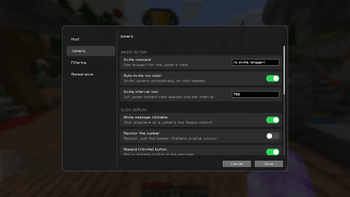
Open it from Mod Menu → MCPVP Party Inviter, or with /pinv config. Every option is also settable via command and saved to config/partyinviter.json.
| Setting | Default | What it does |
|---|---|---|
inviteCommand |
/p invite {player} |
Command run on invite ({player} = name) |
autoInvite |
false |
Invite automatically, no click |
autoInviteCooldownMs |
700 |
Spacing between queued invites |
requireForToHost |
true |
Only host when your message has for |
stopPartyOnServerChange |
true |
End the party when you enter a match |
cancelPartyOnDeniedMessage |
true |
Don’t start if the server blocks your message |
Commands
| Command | Description |
|---|---|
/pinv status |
Show current party and settings |
/pinv host <number> |
Start hosting a number manually |
/pinv clear |
Stop hosting |
/pinv set <key> <value> |
Change a setting |
/pinv config |
Open the config GUI |
/pinv test <text> |
Preview how a chat line is parsed |
常见问题
Party Inviter 支持哪些 Minecraft 版本?
Party Inviter 支持 Minecraft Java 版 1.21.2–26.1,共 11 个版本,可用的加载器:Fabric。下载时注意选择和你游戏版本一致的文件。
Party Inviter 怎么安装?
先用 PCL2 或 HMCL 启动器安装对应版本的 Fabric,再把下载的 .jar 文件放进游戏目录的 mods 文件夹,重新启动游戏即可。开启了版本隔离的,mods 文件夹在 versions/版本名 下面。

评论
登录后评论和评分