
介绍

PageBlock is a Minecraft Forge mod that allows you to read real PDF documents directly inside Minecraft.
Whether you’re creating adventure maps, RPG servers, educational worlds, or simply want to keep manuals and documentation available in-game, PageBlock provides an immersive reading experience without requiring players to leave Minecraft.
Features
- Read PDF files inside Minecraft.
- Custom PDF Book item.
- Supports reading books placed on lecterns.
Installation
- Install Minecraft Forge 1.20.1.
- Place the PageBlock mod inside your mods folder.
- Launch Minecraft once.
After the first launch, the mod will automatically create the following folder:
pageblock/Simply copy your PDF files into this folder.
How to Use
- Place your PDF files
Copy your PDF documents into the pageblock folder.
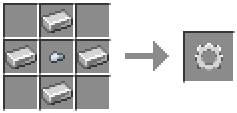
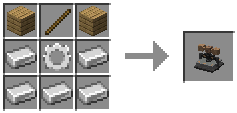
- Craft the Printing Press
Craft and place the Printing Press.
- Select a PDF
Open the Printing Press and choose one of the available PDF files.
- Print the Paper
Insert a paper into the Printing Press to create a printed paper.
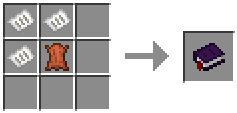
- Craft the printed book
- Read your PDF
Right-click the PDF Book to open the document.
You can also place the book on a Lectern and read it from there.
常见问题
PageBlock 支持哪些 Minecraft 版本?
PageBlock 支持 Minecraft Java 版 1.20.1–1.20.6,共 6 个版本,可用的加载器:Forge。下载时注意选择和你游戏版本一致的文件。
PageBlock 怎么安装?
先用 PCL2 或 HMCL 启动器安装对应版本的 Forge,再把下载的 .jar 文件放进游戏目录的 mods 文件夹,重新启动游戏即可。开启了版本隔离的,mods 文件夹在 versions/版本名 下面。运行环境:客户端和服务端都要装。
评论
登录后评论和评分