
截图
介绍
PackWiz-ard

Load and update your modpack with ease. PackWiz-ard is a mod that supports the PackWiz ecosystem by default, while also
supporting Packweave as an alternative backend. With PackWiz-ard, you can keep your modpack up to date with the latest
versions of mods and easily manage your pack source.
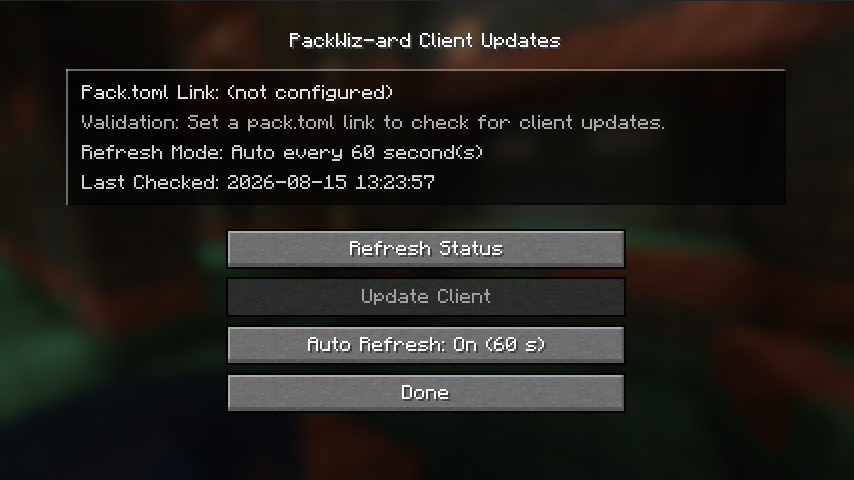
Optionally, you can also install this mod on the client to provide additional functionality, such as a client update screen,
update notifications, and the ability to easily update the client-side mods to match the active modpack source.
Features
- Easy configuration: PackWiz uses the
pack_tomlURL in/config/packwiz_ard/common.toml. Packweave readsmodpack.urlfrom the game directory root. - Easy updating: Use the
/packwizard updatecommand to download and load the mods specified by the active updater, and keep them up to date with the latest versions. - Automatic updates: Enable
auto_updatein the config and setauto_update_interval_minutesto run the update process on a schedule. - Server-side mod: PackWiz-ard is a server-side mod, so it does not require any client-side installation. This means that players can join your server without needing to install any mods on their end.
- Dependency management: PackWiz-ard will automatically manage your modpack’s dependencies, ensuring that all required mods are downloaded and loaded correctly.
- Flexible Modloader support: PackWiz-ard supports both Fabric and NeoForge modpacks, so you can use it with a wide variety of modpacks.
- Lightweight: PackWiz-ard is designed to be lightweight and efficient, so it won’t add any unnecessary overhead to your server.
- WebHook support: PackWiz-ard supports sending Discord webhooks, allowing you to notify your discord server when updates are in progress or completed. Or changes to the mod’s configuration are made.
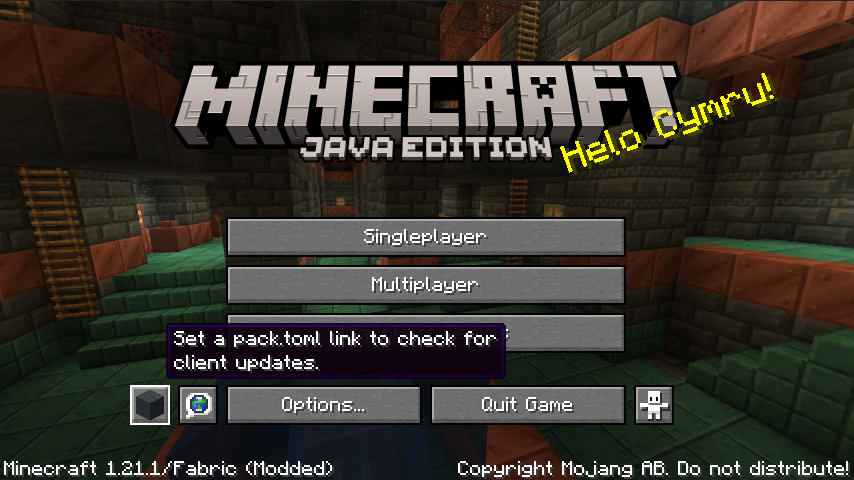
- Client update screen: A title-screen button opens a client update screen that validates the configured
pack.tomllink, shows whether an update is available, and lets you run the client update manually. - Refresh control: The client update screen can refresh automatically at a lightweight interval, or you can switch it to manual-only refresh mode.
- Restart reminder: After a client update completes, the screen will tell you to restart the game before the new files take effect.
Requirements
- Matthiesen Core
- Fabric API (Fabric only)
- Forge Config API Port (Fabric only)
Pack Source Integration
PackWiz-ard supports two updater backends:
- PackWiz: the default mode. Set the
pack_tomlURL in the mod config and PackWiz-ard will use PackWiz to resolve and update the pack. - Packweave: an alternative mode. Place a
modpack.urlfile in the root of the game directory and put the Packweave source URL in it. Packweave v2 is supported here! Older v1 state files are discarded automatically on first use after upgrading.
Use /packwizard update to sync the currently selected backend.
– To learn more about PackWiz checkout their Documentation, or their Github.
– To learn more about Packweave checkout their Website, or their Github.
Client Updates
When the game reaches the title screen, PackWiz-ard adds a button that opens a dedicated client update screen.
That screen shows the current pack link validation result, whether a client update is available, and whether the client needs to be restarted.
By default, the screen performs lightweight refresh checks while it is open. If you prefer, you can switch refresh mode to manual-only from the screen itself.
Client updates are always started manually; PackWiz-ard does not try to auto-install updates on your behalf.
Server Commands
/packwizard update– Runs an immediate update./packwizard link <url>– Sets your pack link URL./packwizard minimumPermissionLevel <0-4>– Sets the minimum permission level for command usage./packwizard autoUpdate <true|false>– Enables or disables scheduled automatic updates./packwizard autoUpdateInterval <minutes>– Sets the schedule interval used by auto-update./packwizard autoUpdateStatus– Shows whether auto-update is enabled and when the next run should happen.
Docs
Documentation for this mod can be found at mods.matthiesen.dev
Version Compatibility
| Minecraft Version | Matthiesen Core Version | Mod Version |
|——————-|————————-|—————-|
| 1.21.1 | Unsupported | 1.0.0-beta.1+ |
| 1.21.1 | 1.0.0-beta.38+ | 1.0.0-beta.4+ |
| 1.21.1 | 1.3.0+ | 1.0.0-beta.9+ |
| 1.21.1 | 2.0.0+ | 1.0.0-beta.12+ |
Before
v1.0.0-beta.4, this mod relied on Matthiesen Lib API for it’s API’s, which has since been replaced by Matthiesen Core.
FastStats Metrics
This mod uses FastStats to collect anonymous usage statistics. This helps the developer understand
how this mod is being used and improve it over time. You can learn more about the data collected and how it is used by visiting
FastStats: Information.
You can also view the data collected by this mod on the FastStats: PackWiz-ard page.
To opt out of this data collection, set the enabled property to false in the <game_directory>/config/faststats/config.properties file.
License
MIT – see LICENSE.
常见问题
PackWiz-ard 支持哪些 Minecraft 版本?
PackWiz-ard 支持 Minecraft Java 版 1.21.1,可用的加载器:Fabric / NeoForge。下载时注意选择和你游戏版本一致的文件。
PackWiz-ard 怎么安装?
先用 PCL2 或 HMCL 启动器安装对应版本的 Fabric / NeoForge,再把下载的 .jar 文件放进游戏目录的 mods 文件夹,重新启动游戏即可。开启了版本隔离的,mods 文件夹在 versions/版本名 下面。运行环境:客户端 / 服务端。
Adammatthiesen 的其他作品
查看全部 →
Cobblemon Move Tutor
Adds a Cobblemon NPC for Tutor moves!

Matthiesen Core
A library mod for NeoForge and Fabric that enables developers to create mods with a shared common codebase.

Cobblemon Pokestops
This mod adds Pokemon GO inspired Pokestops to Cobblemon. Pokestops can be used to get items, and they have a cooldown period after being used.

Cobblemon Escape Rope
A lightweight Cobblemon add-on that adds an Escape Rope item for returning to the last safe place where you were under open sky.
评论
登录后评论和评分