介绍
Overlay Hud
A small, client-side mod that shows useful info while you play survival. One key turns your overlay on and off, and you choose which modules it shows.
Modules
Light Overlay
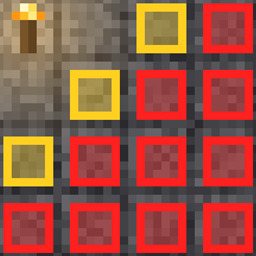
Marks block tops where monsters can spawn, so you can light up your base, farms and caves properly.
- 🟥 Red: monsters can spawn at any time.
- 🟨 Yellow: monsters can only spawn at night or during thunderstorms.
FPS
Shows your frame rate in the top right corner. It moves below your potion effect icons and hides while the F3 screen is open.
More modules will follow.
Controls
| Key | Action |
|---|---|
F7 |
Toggle the overlay (all modules you switched on) |
F8 |
Open the settings |
You can also open the settings with the small button left of Options… in the pause menu.
Settings
- Choose which modules the overlay key turns on
- Light Overlay: scan radius (8–48 blocks) and update rate
- Change all key bindings right in the menu
Settings are saved in config/overlayhud.json.
Fair Play
Overlay Hud only shows information your game already has and that you could get with F3 or a bit of patience. No X-ray, no seeing mobs through walls, no automation. It’s client-side only, so you can use it on any server without installing anything there.
Compatibility
Works with Sodium, Iris, Lithium and Distant Horizons. With an Iris shader pack active, Light Overlay markers show as colored outlines without the fill.
Requirements
- Fabric Loader
- Fabric API
常见问题
Overlay Hud 支持哪些 Minecraft 版本?
Overlay Hud 支持 Minecraft Java 版 26.3,可用的加载器:Fabric。下载时注意选择和你游戏版本一致的文件。
Overlay Hud 怎么安装?
先用 PCL2 或 HMCL 启动器安装对应版本的 Fabric,再把下载的 .jar 文件放进游戏目录的 mods 文件夹,重新启动游戏即可。开启了版本隔离的,mods 文件夹在 versions/版本名 下面。
评论
登录后评论和评分