截图


介绍
OuterLayerGlow+
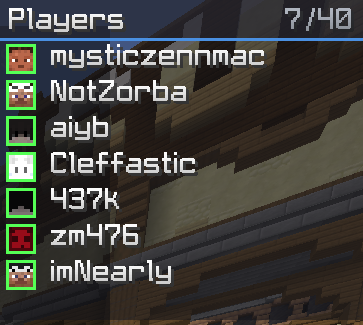
A lightweight, fully client-side mod for keeping track of the players around you. It shows a clean overlay listing everyone within your render distance, with their skin face and name, and can also highlight nearby players directly in the vanilla Tab list. Everything is set up through an in-game menu, including a built-in color picker.
Features:
- Player overlay with skin face and username, sorted closest-first
- Distance rings (green / yellow / red) with adjustable thresholds and a max range
- Friends list to highlight friends in your own color and pin them to the top
- Tab List Glow to recolor nearby players right in the vanilla Tab list
- Color Wheel to pick any color visually or type an exact hex code
- Movable and resizable overlay (open chat to drag or resize it)
- Config menu with categories and search, no commands needed
Opening the config:
Click the OuterLayerGlow+ button in the pause menu (Esc), or bind a key in Options, Controls, “OuterLayerGlow+”.
Requirements:
Minecraft 1.21.11 (Fabric) and Fabric API.
Please note:
This mod only shows players your client has already loaded. It sends nothing to the server and reveals no information you couldn’t already see. Even so, some servers don’t allow proximity or player-list mods, so please check your server’s rules and only use it where it’s allowed.
常见问题
OuterLayerGlow+ 支持哪些 Minecraft 版本?
OuterLayerGlow+ 支持 Minecraft Java 版 1.21.11,可用的加载器:Fabric。下载时注意选择和你游戏版本一致的文件。
OuterLayerGlow+ 怎么安装?
先用 PCL2 或 HMCL 启动器安装对应版本的 Fabric,再把下载的 .jar 文件放进游戏目录的 mods 文件夹,重新启动游戏即可。开启了版本隔离的,mods 文件夹在 versions/版本名 下面。运行环境:仅客户端。
评论
登录后评论和评分