
介绍

OptionSync allows you to synchronize multiple Options profiles between different Minecraft instances on one Computer saving both Video Settings and both vanilla and modded Keybindings!
The way it works is simple: Go to your options menu and you will find an OptionSync button at the bottom left. Once clicking it, the OptionSync menu will open.
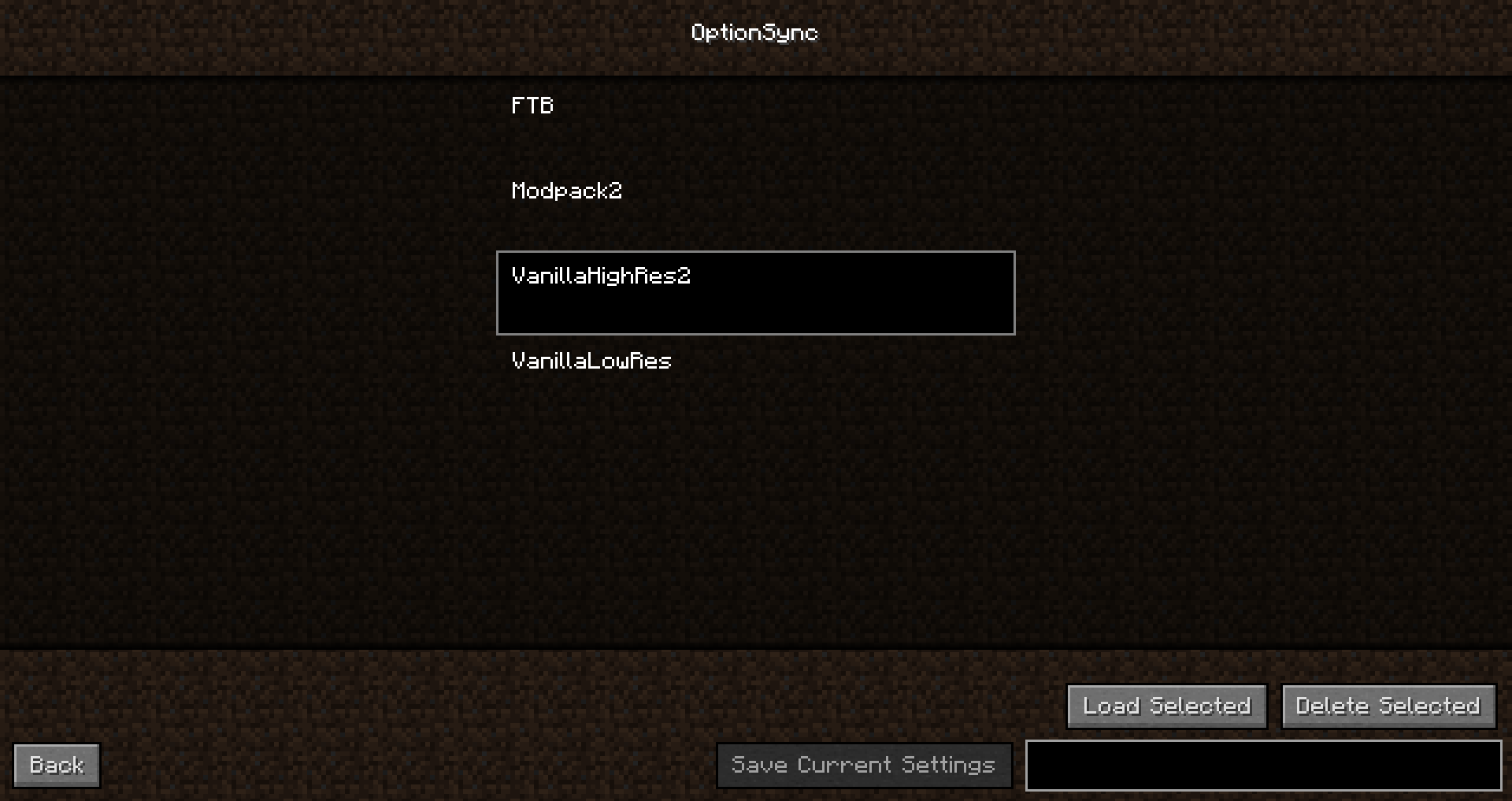
Inside the menu, you can save your current configuration by typing in a name and then clicking the save button.
If you want to load a configuration, select it in the menu and click the load button.
And if you were wondering, the different option files are being saved in .minecraft/OptionSync no matter where your Minecraft instance is stored.
Super simple, right?
And really useful if you have multiple Modpacks or Minecraft instances that have lots of Keybindings you would normally have to rebind all the time.
Like the mod? Why don’t support me on Patreon?
常见问题
OptionSync 支持哪些 Minecraft 版本?
OptionSync 支持 Minecraft Java 版 1.7.10–1.10.2,共 5 个版本,可用的加载器:Forge。下载时注意选择和你游戏版本一致的文件。
OptionSync 怎么安装?
先用 PCL2 或 HMCL 启动器安装对应版本的 Forge,再把下载的 .jar 文件放进游戏目录的 mods 文件夹,重新启动游戏即可。开启了版本隔离的,mods 文件夹在 versions/版本名 下面。
Ellpeck 的其他作品
查看全部 →
Actually Additions
备受玩家喜爱的魔法科技模组,充满有趣又实用的小工具

Nature’s Aura
收集、利用并补充世界中自然存在的灵气,创造实用装置和独特机制
Pretty Pipes
省心又全面的物品运输模组

Wopper
一个添加木漏斗的模组
评论
登录后评论和评分