Operation Phoenix
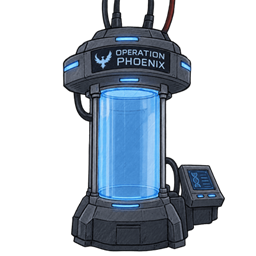
You have obtained a cloning chamber; after death, you respawn inside it.
介绍
Minecraft Mod: Project Phoenix
Death is not the end. It is the beginning of a new experiment.
Project Phoenix is a Minecraft Fabric mod inspired by cloning technology, biological engineering, cybernetic enhancements, and the Evil Morty Protocol.
Build advanced revival systems, collect DNA samples, create biological clones, control compatible entities with neural implants, and upgrade your body with powerful artificial organs.
Whether you want to prepare a backup revival system, clone a friend or a pet, build a cybernetic arsenal, or establish a network of Phoenix devices, the technology is in your hands.
But every experiment has its risks.
🧪 1. Phoenix Cloning Capsules
The Phoenix Cloning Capsule is the heart of the Phoenix system. It allows you to prepare a biological template and use it to restore a player or create a clone.
Each capsule has its own identity, owner, stored resources, and operating status. Build multiple capsules and manage them independently.
How cloning works
-
Craft and place a Phoenix Cloning Capsule.
-
Obtain a filled DNA vial containing the appropriate biological template.
-
Load the capsule with 32 raw beef and 32 units of Cloning Blood.
-
Make sure the capsule is enabled and has the necessary resources.
-
Let the Phoenix system handle the revival or clone-creation process.
Player revival
Load your own DNA into a suitable capsule to prepare it for your return after death. The system searches for an enabled, sufficiently supplied capsule containing your DNA.
A capsule does not need to belong to the player whose DNA it contains, allowing players to prepare revival systems for friends.
Cloning friends
Use an empty DNA vial on another player to collect their DNA sample. Successful sampling costs the target one heart.
A capsule containing that player’s DNA can be used to produce a clone of the sampled player.
Pet cloning
The DNA system also supports animals. Samples can preserve the animal’s species, name, and available variant information. A compatible capsule can create a real animal rather than just a visual mannequin.
Emergency redirection
If a suitable personal revival capsule is unavailable, the Phoenix system can search for an eligible reserve capsule. Reserve capsules must contain the required meat and blood and must not contain any DNA sample.
An automatic redirection sequence includes Phoenix terminal messages and a staged body-assembly animation.
🧬 2. DNA Sampling and Biological Materials
The Phoenix system depends on biological samples and carefully managed resources.
Empty DNA Vial
-
Collect your own DNA by using the vial in the air.
-
Sample another player or an animal by using the vial on the target.
-
Successful player sampling costs one heart.
Filled DNA Vial
-
Stores the biological template required by a capsule.
-
Player samples identify their target through saved identity information.
-
Animal samples retain supported species, name, and variant data.
Cloning Blood
-
Essential material for operating cloning capsules.
-
Can be synthesized using crafting materials or collected through the mod’s biological injury and blood-drop mechanics.
Radioactive Blood
-
A dangerous biological substance used in specialized experiments.
-
Can be extracted using your own DNA vial, at the cost of health.
Regeneration Catalyst
-
A specialized ingredient used in crafting advanced biological modules.
Manage your supplies carefully: a capsule cannot perform its intended cloning process without the correct template and required materials.
🗄️ 3. Phoenix Database Terminal
The Phoenix Database Terminal provides centralized management for your Phoenix infrastructure.
Place the terminal and use its interface to manage your capsules and their operating status. The database can list capsules belonging to its owner and provides independent controls for individual devices.
You can:
-
Enable or disable individual capsules.
-
Temporarily stop a capsule without removing its stored resources.
-
Manage your cloning network from a single interface.
-
Manage supported neural-control chip records through the database system.
A disabled capsule does not operate as an active revival or clone-release unit. Its stored materials and capsule state are preserved.
👁️ 4. Phoenix Override Visor
The Phoenix Override Visor is a wearable interface for interacting with Phoenix technology.
Equip the visor and press V to open its control menu.
The interface contains device-access and neural-chip management sections. Use it to work with available Phoenix devices and manage compatible control systems without relying exclusively on direct interaction with individual blocks.
The visor’s interface is designed to make managing a larger Phoenix installation more convenient.
💉 5. Neural Control System
The Neural Control Chip and Neural Control Remote introduce a separate control system for players, animals, and compatible mobs.
Neural Control Chip
Use the chip on a compatible target to implant it. Once the system is active, the controller can issue commands through the Neural Control Remote.
Player control applies restrictions to normal movement and interaction, preventing the controlled player from freely acting as usual while the chip remains active.
Neural Control Remote
Use the remote to open the command interface for supported neural implants.
Available commands include:
-
FOLLOW — Follow the controller.
-
STAY — Remain in place.
-
WANDER — Move around independently.
-
ATTACK — Attack a valid target.
-
GUARD — Guard the controller against nearby hostile threats.
-
LOOK_AWAY — Change the controlled player’s viewing direction.
-
RELEASE — Release control where supported.
Command availability depends on the target type. Player commands and hostile-mob commands do not necessarily behave identically.
Neural Chip Extraction
The Surgical Scalpel allows a player to attempt to remove a neural chip from themselves.
-
The extraction attempt has a 60% success chance.
-
A successful extraction removes the chip’s control effect.
-
A failed extraction leaves the chip in place and reduces the player’s health to 1 HP.
-
After an attempt, the scalpel has a 30-second cooldown.
-
The controller receives an alert when the controlled player attempts self-extraction. The associated warning sound is sent only to the controller.
The cooldown is intended to prevent repeated extraction attempts without waiting.
🦾 6. Body Customization and the Bio-Printer
Project Phoenix includes a body-modification system that lets you install biological and cybernetic upgrades.
Craft the Phoenix Body Interface to manage your own installed modules, or place a Bio-Printer and use its interface.
Modules must be available in your inventory when installing them. Installed body data is stored by player identity so that the configuration can persist between sessions.
Available upgrades
Bio-Arm
-
A biological replacement for an arm.
-
Can restore functionality associated with a missing limb.
Bio-Leg
-
A biological replacement for a leg.
-
Can restore functionality associated with a missing limb.
Reinforced Heart
-
Increases maximum health while installed.
Neural Chip
-
Provides a movement-speed benefit while installed.
Control Implant
-
Enables the use of the Phoenix Emergency Remote.
Artificial Lungs
-
Allow the user to breathe underwater.
Cybernetic Eye
-
Grants Night Vision.
The body system supports installing and removing modules through its interface. Modules returned through removal can be used again, subject to the module and body-state rules.
Missing-limb effects
Damaged cloning capsules can introduce persistent limb defects during cloning. Missing arms restrict the use of the affected hand and associated interactions. Missing legs impair movement, with both missing legs causing more severe mobility restrictions.
These defects are tracked independently from an individual capsule, so replacing a capsule does not automatically erase an existing defect.
🩺 7. Emergency Recovery
The Phoenix Emergency Remote is a survival tool for users with an installed Control Implant.
Using it restores health and grants a short regeneration effect.
-
Restores two hearts.
-
Provides brief regeneration.
-
Has a 60-second cooldown.
-
Requires the Control Implant to be installed.
⚡ 8. Yellow Rift Cybernetic Hand
The Yellow Rift Cybernetic Hand is an offensive cybernetic weapon.
Hold right-click to charge the yellow energy beam, then release to fire it.
-
Maximum beam reach: 64 blocks.
-
Longer charge increases damage.
-
Charging also increases the impact burst.
-
The beam can destroy blocks along its path, subject to the weapon’s world-destruction limits.
The cybernetic hand turns body customization into a combat system.
🟡 9. Evil Morty Eyepatch
The Evil Morty Eyepatch is a wearable cosmetic item inspired by the Evil Morty theme.
Craft it and wear it in the head equipment slot to display the yellow-and-black eyepatch on your character.
Complete the look with cybernetic upgrades and the rest of the Phoenix technology.
🔐 10. Capsule Security, Damage, and Repair
Not every capsule is freely accessible.
Capsule Decoder
The Capsule Decoder can be used to attempt access to a capsule owned by another player.
-
Each decoder is consumed by an access attempt.
-
The success chance is 72%.
-
A failed attempt triggers an alarm and adds damage to the capsule.
Capsule Damage
An iron axe can damage the capsule’s procedural glass shell.
The capsule can accumulate visible damage and cracks. After four damaging hits, it is destroyed. Using a damaged capsule also carries the risk of persistent limb defects during cloning.
Capsule Repair Kit
The Capsule Repair Kit is crafted from nine regular glass blocks.
Use it in the capsule interface to remove one damage stage. A completely destroyed capsule cannot be repaired; a replacement must be placed.
🛡️ 11. Optional Armor for Clones
The capsule interface includes optional equipment slots for a helmet, chestplate, leggings, and boots.
Place compatible armor into the corresponding slots to equip it on the next created clone. Armor is separate from the core DNA, meat, and blood requirements.
⚙️ 12. Designed for Persistent Worlds
Project Phoenix stores important state beyond a single interaction.
Capsule configuration, database information, neural-control data, and body modifications use persistent data systems. Multiple capsules can be placed and managed, allowing players to build larger installations instead of relying on a single device.
The mod combines survival mechanics, technology management, body modification, and multiplayer interactions in one system.
📦 Requirements
-
Minecraft Java Edition 26.1
-
Fabric Loader 0.19.2 or newer
-
Fabric API
-
Java 25 or newer
Make sure the Minecraft version and mod dependencies match before launching the game.
🧬 Project Phoenix: Evil Morty Protocol
Build the system. Preserve the DNA. Control the experiment. Defy death.
常见问题
Operation Phoenix 支持哪些 Minecraft 版本?
Operation Phoenix 支持 Minecraft Java 版 26.1–26.1.2,共 3 个版本,可用的加载器:Fabric。下载时注意选择和你游戏版本一致的文件。
Operation Phoenix 怎么安装?
先用 PCL2 或 HMCL 启动器安装对应版本的 Fabric,再把下载的 .jar 文件放进游戏目录的 mods 文件夹,重新启动游戏即可。开启了版本隔离的,mods 文件夹在 versions/版本名 下面。
评论
登录后评论和评分