介绍
中文介绍正在准备中,下面暂时显示原文。
OmniTranslation(万能翻译)
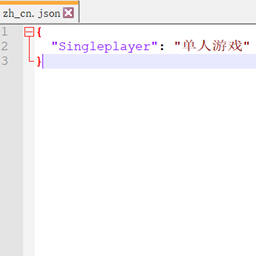
- 用ZIP打开MOD 在
assets\ot\lang\创建语言文件格式为JSON 左边原文右边翻译 - 修改
assets\ot\configlanguage的值为语言文件文件的文件名
语言文件模板 打开.minecraft\OmniTranslation\saveStringList.json (游戏关闭后会生成 要确保渲染过原文)
- Open the MOD with ZIP and create the language file format in
assets\ot\lang\as JSON, the original text on the left is translated on the right - Modify the value of
assets\ot\configlanguage to the file name of the language file
Language file template Open .minecraft\OmniTranslation\saveStringList.json (will be generated after the game is closed, make sure the original text is rendered)
template(模板)

language file(语言文件)


常见问题
OmniTranslation 支持哪些 Minecraft 版本?
OmniTranslation 支持 Minecraft Java 版 1.15.2–1.16.4,共 5 个版本,可用的加载器:Fabric。下载时注意选择和你游戏版本一致的文件。
OmniTranslation 怎么安装?
先用 PCL2 或 HMCL 启动器安装对应版本的 Fabric,再把下载的 .jar 文件放进游戏目录的 mods 文件夹,重新启动游戏即可。开启了版本隔离的,mods 文件夹在 versions/版本名 下面。



评论
登录后评论和评分