
截图
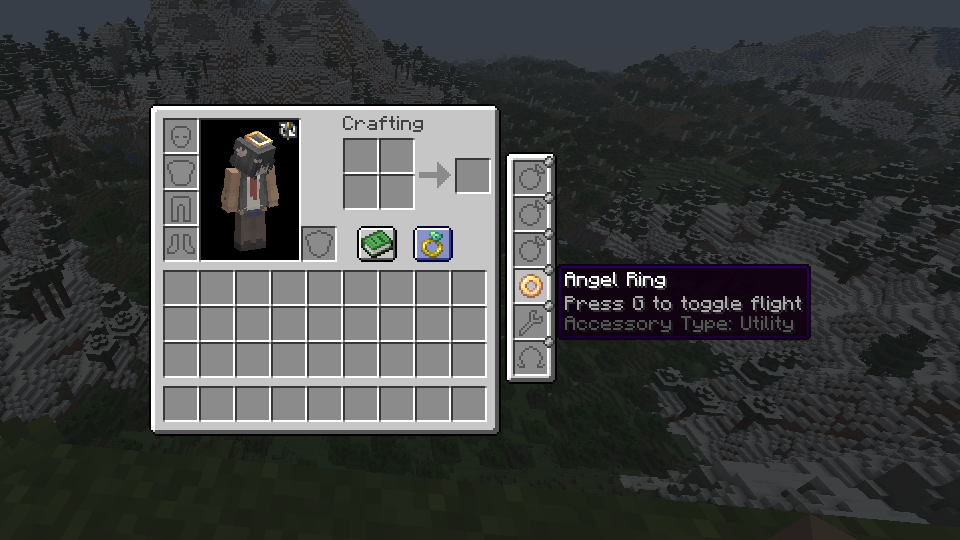


介绍
Ohmega
A modernised and lightweight data-driven, loader-agnostic accessory API for Minecraft, versions 1.18+
This mod aims to be a performant and stable alternative to other accessory API mods, while maintaining a plentiful amount of useful features both for users and developers
If you know another language and have some free time, consider helping to translate the mod here. There aren’t too many translations needed per language, and your contributions will be extremely helpful.
Features
The following table describes features and the mod’s version requirement in which they can be used. I am very open to feature requests, simply join the Discord and leave a message detailing what you would like to see added/changed, or create an issue report on the GitHub issue tracker.
| Feature | Version | Support / detail | Documentation |
|———————|———|————————-|—————|
| Multi-loader | >=1.4 | Fabric, Forge, NeoForge | N/A |
| Accessory rendering | >=1.6 | Broad (exp) | Yes |
| Custom slot types | >=1.3 | Full, data-driven | Yes |
| Data generation | >=1.5.8 | Accessory types, lang | Yes |
| Key-bound slots | Any | Built-in, dynamic | No |
| Accessory events | >=1.1 | Full (>=1.6) | Partial |
| Attribute modifiers | >=1.1 | Full, conditional | Yes |
| Custom screens | >=1.6 | Full (exp) | Yes |
| Configs | >=1.3 | Client & server config | N/A |
| UI Edit Screen | >=1.6 | Complete widget editing | N/A |
The Fabric version depends on the ‘Fabric API’ and ‘Forge Config API Port’ mods to function, whereas the Forge and NeoForge versions are standalone
For developers
Read the wiki to learn how to mod with Ohmega, and create your own functional accessories. If you have any questions or need support, join the Discord and leave a message with what you would like to know or need guidance with
常见问题
Ohmega 支持哪些 Minecraft 版本?
Ohmega 支持 Minecraft Java 版 1.18–26.3,共 30 个版本,可用的加载器:Fabric / Forge / NeoForge。下载时注意选择和你游戏版本一致的文件。
Ohmega 怎么安装?
先用 PCL2 或 HMCL 启动器安装对应版本的 Fabric / Forge / NeoForge,再把下载的 .jar 文件放进游戏目录的 mods 文件夹,重新启动游戏即可。开启了版本隔离的,mods 文件夹在 versions/版本名 下面。运行环境:客户端和服务端都要装。


评论
登录后评论和评分