Ocean Seam Fix (Physics Mod Ocean / Distant Horizons / Iris)
Fixes the dark band between Physics Mod's ocean and Distant Horizons' water with Iris shaders.
截图
介绍
Ocean Seam Fix (Physics Mod Ocean / Distant Horizons / Iris)
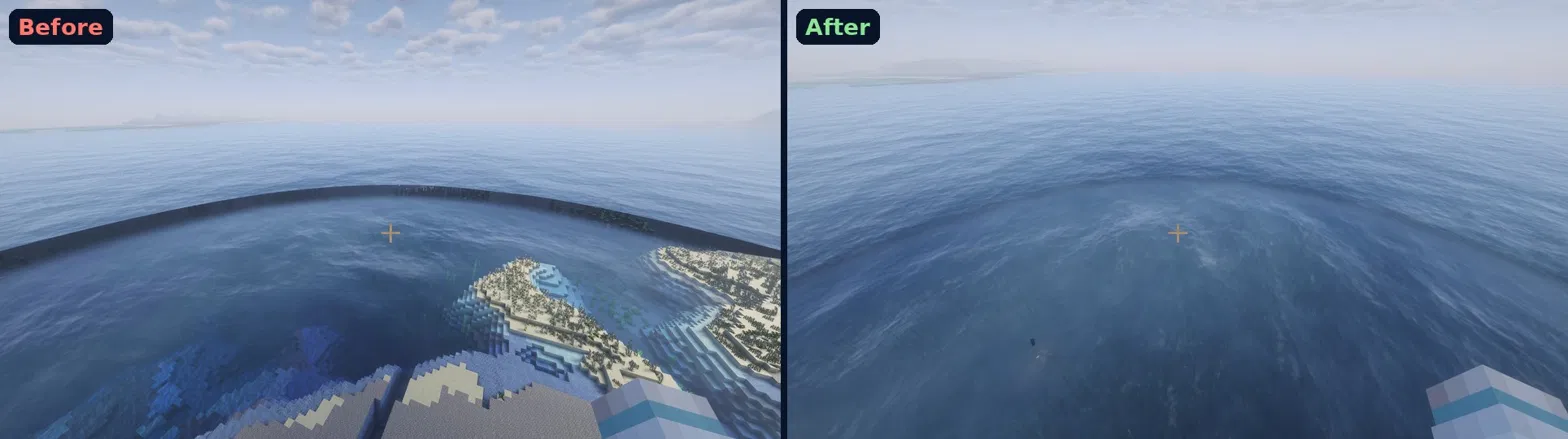
Fixes the dark ring at the edge of your render distance when using Physics Mod’s ocean waves together with Distant Horizons and Iris shaders.
The problem: Physics Mod’s ocean reaches slightly past your real chunks. Out there the shader pack fades it to invisible, but it also stops Distant Horizons from drawing its water in the same spot, so neither water shows and you see straight down to the sea floor as a dark band.
The fix: Distant Horizons water now fades in exactly where Physics Mod’s ocean fades out, and the waves gently calm down near the edge so the two meet smoothly. Works in storms too.
Requires: Iris (+ Sodium), Distant Horizons, Physics Mod with ocean physics.
Shader packs: tested with Complementary Unbound and Complementary Reimagined.
Config (config/oceanseamfix.properties):
– fillDhWater: the main fix, on by default
– handoverStart / handoverEnd: where Distant Horizons water fades in (fractions of render distance)
– fadeStart / fadeEnd: where Physics Mod waves calm down
– dumpShaders: writes the patched shaders to a folder, for bug reports
After changing settings, reload shaders.
Tested with Physics Mod Pro v188g, Distant Horizons 3.3.3, Iris 1.8.14-beta.1.
常见问题
Ocean Seam Fix (Physics Mod Ocean / Distant Horizons / Iris) 支持哪些 Minecraft 版本?
Ocean Seam Fix (Physics Mod Ocean / Distant Horizons / Iris) 支持 Minecraft Java 版 1.21.1,可用的加载器:NeoForge。下载时注意选择和你游戏版本一致的文件。
Ocean Seam Fix (Physics Mod Ocean / Distant Horizons / Iris) 怎么安装?
先用 PCL2 或 HMCL 启动器安装对应版本的 NeoForge,再把下载的 .jar 文件放进游戏目录的 mods 文件夹,重新启动游戏即可。开启了版本隔离的,mods 文件夹在 versions/版本名 下面。
评论
登录后评论和评分