截图
介绍
This mod allows you to disable specific functions for items and blocks.
A folder named “Object Disabler” will be created within the config folder, containing two files:
– ItemList: Contains a list of all items and blocks in the game, including those from mods. This file updates every time you launch Minecraft.
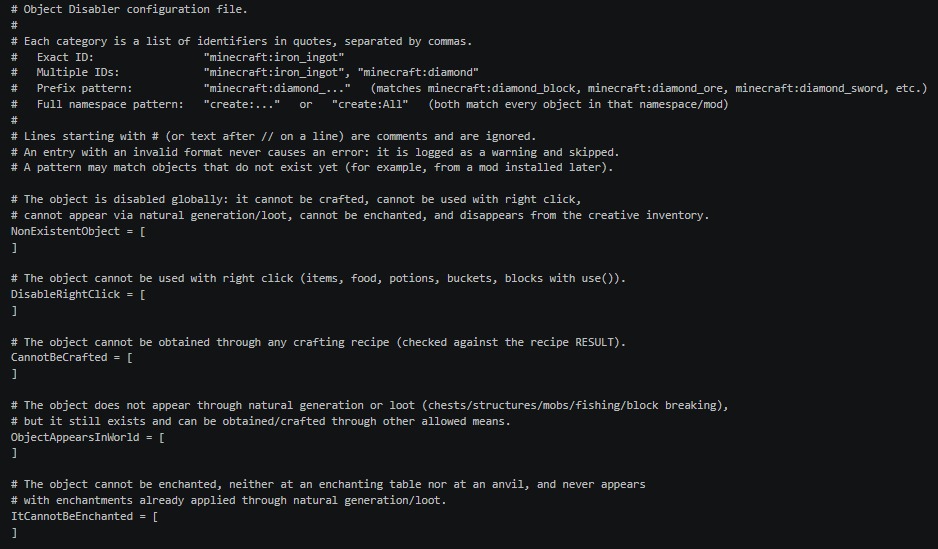
– ObjectDisabler: The configuration file where you can disable various functions.
ObjectDisabler
NonExistentObject: Disables the item’s existence entirely, including its generation and presence in inventories.
DisableRightClick: Disables right-clicking for the item or block.
CannotBeCrafted: Disables the crafting recipe for the item.
ObjectAppearsInWorld: Disables natural generation, including loot drops and world generation (for blocks).
ItCannotBeEnchanted: Disables the ability to enchant the object.
Extras
- Within the section brackets, you must enclose the item identifier in quotation marks, including the ModID (e.g., “minecraft:iron_ingot”).
- For faster selection, you can use the item group prefix followed by a period to select multiple items (e.g., “minecraft:netherite_…”).
- By specifying “{modID}”: and “All”, all objects from the indicated mod will automatically be included.
常见问题
ObjectDisabler 支持哪些 Minecraft 版本?
ObjectDisabler 支持 Minecraft Java 版 1.20.1,可用的加载器:Forge。下载时注意选择和你游戏版本一致的文件。
ObjectDisabler 怎么安装?
先用 PCL2 或 HMCL 启动器安装对应版本的 Forge,再把下载的 .jar 文件放进游戏目录的 mods 文件夹,重新启动游戏即可。开启了版本隔离的,mods 文件夹在 versions/版本名 下面。
Tamoide 的其他作品
查看全部 →
Culling Games (For Jujutsu Craft)
Jujutsu Craft 的附属模组,加入死灭回游。

Nations Mod
添加创建氏族的功能。

Jujustu Craft (Spanish)
将JujutsuCraft翻译成西班牙语的模组

JJSK (Spanish)
Mod that translates JJSK into Spanish
评论
登录后评论和评分