
截图
介绍

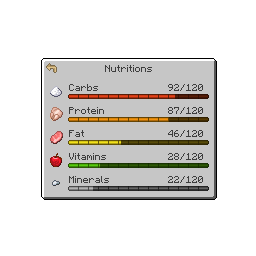
NutritionZ adds a nutrition system to enhance the gameplay.
Installation
NutritionZ is a mod built for the Fabric Loader. It requires Fabric API and Cloth Config API to be installed separately; all other dependencies are installed with the mod.
Adjustments
Default Datapacks & Mod Compat
NutritionZ provides some default datapacks for other mods. You can disable/enable them via config. You can add other mod compats via datapack. Just follow the structure data/somemod/nutrition/somename.json.
Here’s an example from the default vanilla datapack:
{
    "minecraft:cooked_cod": { // The default datapacks provide 5 points for half saturation
        "carbohydrates": 0,
        "protein": 16,
        "fat": 3,
        "vitamins": 0,
        "minerals": 6
    }
}
Nutrition Manager
You can tweak the default manager via datapack as well. data/somemod/nutrition_manager/somename.json
With this you can replace the positive effects & attributes from all 5 nutrients, as well as the negatives.
Example:
{
    "minerals": {
        "replace": true,
        "positive": {
            "generic.armor_toughness": { // attribute
                "operation": "ADD_VALUE", // ADD_VALUE, ADD_MULTIPLIED_BASE , ADD_MULTIPLIED_TOTAL
                "value": 1.0 // gives +1 Armor Toughness per level -> e.g. +20 max level
            },
            "minecraft:haste": { // effect
                "duration": 319, // wouldn`t recommend to lower this on effects
                "amplifier": 0 // equals Haste I
            }
        },
        "negative": {
            "generic.armor_toughness": {
                "operation": "ADD_VALUE",
                "value": 1.0 // needs to be positive value -> will be negative automatically
            },
            "minecraft:mining_fatigue": {
                "duration": 319,
                "amplifier": 0
            }
        }
    }
}
Max Nutrition & thresholds can be set in the nutritionz.json5 config.
{
    "maxNutrition": 100, // Max nutrition for one nutrient
    "negativeNutrition": 10, // 0 - 10 = negative effects / attributes (negative threshold)
    "positiveNutrition": 90, // 90 - 100 = positive effects / attributes (positive threshold)
}
Credits





常见问题
NutritionZ 支持哪些 Minecraft 版本?
NutritionZ 支持 Minecraft Java 版 1.20.1–1.21.1,共 2 个版本,可用的加载器:Fabric。下载时注意选择和你游戏版本一致的文件。
NutritionZ 怎么安装?
先用 PCL2 或 HMCL 启动器安装对应版本的 Fabric,再把下载的 .jar 文件放进游戏目录的 mods 文件夹,重新启动游戏即可。开启了版本隔离的,mods 文件夹在 versions/版本名 下面。
xR4YM0ND 的其他作品
查看全部 →
RAY’s 3D Rails
Minecraft 中铁轨的 3D 方块与物品模型材质

RAY’s 3D Ladders
《我的世界》梯子的 3D 方块与物品材质

Aged
适用于 Fabric 1.21.1 的写实中世纪渐进式整合包

NutritionZ
包含5种营养素的营养系统,挑战你的饮食搭配
评论
登录后评论和评分