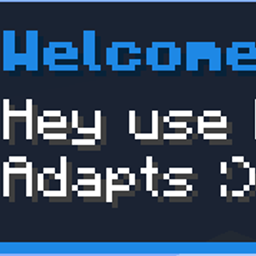
截图
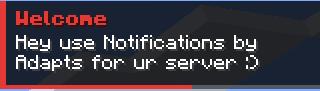
介绍
# Notifications Adapts (Join us on discord: https://discord.gg/B5sMcUThpv)
**A clean and simple HUD notification system for Minecraft 1.12.2 servers.**
Send stylish notifications to your players directly on their screen: no more messages lost in the chat! Each notification appears in the **top-right corner** for **5 seconds**, with a **progress bar** showing the remaining time.
## ✨ Features
– Notifications displayed in the top-right corner of the HUD
– Progress bar showing the remaining display time (5 seconds)
– 3 notification types, each with its own color
– Send to a specific player or to everyone
– Supports Minecraft color codes with `&`
– Up to 5 notifications stacked on screen at once
– Permission-based access (`notifications.admin`)
– Works in singleplayer and multiplayer
## 📜 Command
“`
/notifs <type> “<title>” “<message>” <target>
“`
| Argument | Description |
|—|—|
| `type` | The notification style: `alerts`, `message` or `nothing` |
| `title` | The notification title, **between quotes** |
| `message` | The notification content, **between quotes** (long messages wrap automatically) |
| `target` | A player name, `all` / `everyone`, or a selector like `@a` or `@p` |
### Notification types
| Type | Color | Usage |
|—|—|—|
| `alerts` | 🔴 Red | Important warnings (restarts, events, rules…) |
| `message` | 🔵 Blue | General information and announcements |
| `nothing` | ⚪ Gray | Neutral notifications |
### Examples
“`
/notifs alerts “Warning” “The server will restart in 5 minutes!” all
/notifs message “Welcome” “Have fun on the server!” Steve
/notifs nothing “&6Event” “&eA treasure hunt starts at spawn!” @a
“`
> 💡 **Tip:** use `&` color codes in the title and message (e.g. `&6` for gold, `&a` for green).
## 🔒 Permissions
| Permission | Description | Default |
|—|—|—|
| `notifications.admin` | Allows using the `/notifs` command | Operators only |
Players without this permission won’t see the command in tab completion or in `/help`.
To give this permission to non-operator players, use a permission mod compatible with Forge’s permission API (such as **FTB Utilities** or **ForgeEssentials**).
The server console and command blocks can also use the command.
## ⚙️ Installation
This mod is required on **both the server and the client**.
1. Install **Minecraft Forge 1.12.2**
2. Put the mod `.jar` file in the `mods` folder of the **server**
3. Put the same `.jar` file in the `mods` folder of **every player**
## 📋 Requirements
– Minecraft **1.12.2**
– Forge **14.23.5.2859** or newer
—
Made by **Adapts**
常见问题
Notifications system by Adapts 支持哪些 Minecraft 版本?
Notifications system by Adapts 支持 Minecraft Java 版 1.12.2,可用的加载器:Forge。下载时注意选择和你游戏版本一致的文件。
Notifications system by Adapts 怎么安装?
先用 PCL2 或 HMCL 启动器安装对应版本的 Forge,再把下载的 .jar 文件放进游戏目录的 mods 文件夹,重新启动游戏即可。开启了版本隔离的,mods 文件夹在 versions/版本名 下面。
Adapts 的其他作品
查看全部 →
Realistic Camera by adapts (shaking camera)
Immersive camera motion for Minecraft: walking sway, breathing, strafe tilt, landing impact, damage and explosion shake. Client-side only!
ModernMenu with customization by Adapts
A modern, animated main menu, pause menu and loading screens for Minecraft 1.12.2.
NovaPhone by Adapts
A complete smartphone for Minecraft 1.12.2: voice calls, messages with photos & live location, GPS maps, camera, music and more.
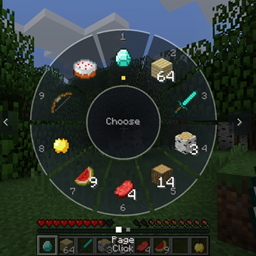
Inventory Wheel HUD system by Adapts
Tap E for a portable crafting table, hold E for a GTA V-style radial wheel to grab any item from your inventory in a flash.
评论
登录后评论和评分