Norths Schematics
A modification that can save and load structures for general gameplay.
介绍
North’s Schematics
A modification that is designed with survival mode in mind. Similar to how Structure blocks work but using JSON files, it is possible to save structures in both creative and survival or adventure mode. Once saved the player can place down their structure anywhere else in the world.
Modes
Survival Mode
When the player is in survival the structure will be removed when saved. Some items might drop that can’t be saved, things like Shulker boxes, item frames, armour stands, paintings things like that. Beds are also one of the few blocks that can’t be saved due to it being a multi-structure but I have made sure they drop instead for being fully removed.
Creative Mode
When the player is in creative mode the save block will act more like cloning the structure, the structure can also be placed more than once unlike survival mode, the same idea as survival inventories are not saved but blocks and block rotation are saved as much as possible.
Game Rules
nsMaximumSchematicSize
There is a game rule for setting the maximum size players can save structures. It is recommended to not go over 32 as this is the maximum size Minecraft generally uses for block updates and may cause severe lag when placing larger structures, for this reason, I have made sure there is an option for players to limit the structure save size though it can be changed any time by an operator when they like.
nsUseSchematicBackups
You can enable structure backups, an optional system to ensure that every time a structure is saved (even with the same name) that a new file will save to a backups folder for that player. Servers might not want this enabled as it could add up file size on a well-used server but it might be useful for people that want a copy of their structures just in case something happens to them. To roll back a structure all you need to do is place the structure JSON file into the folder and change the name of the file to something more usable like “structure_backup_1” and then use that file name when loading the structure.
Tags
- norths_schematics:dye | Item tag | Used for the crafting recipes.
- norths_schematics:placement/display | Block tag | Used for structure placement and generation.
- Signs, banners, etc.
- norths_schematics:placement/fire | Block tag | Used for structure placement and generation.
- Fire blocks.
- norths_schematics:placement/lights | Block tag | Used for structure placement and generation.
- Torches, lanterns, and candles.
- norths_schematics:placement/plants | Block tag | Used for structure placement and generation.
- For all plants that have placement conditions.
- norths_schematics:placement/redstone | Block tag | Used for structure placement and generation.
- For all Redstone blocks that have placement conditions.
- norths_schematics:placement/objects | Block tag | Used for structure placement and generation.
- All blocks that don’t fit under the categories above.
Recipes
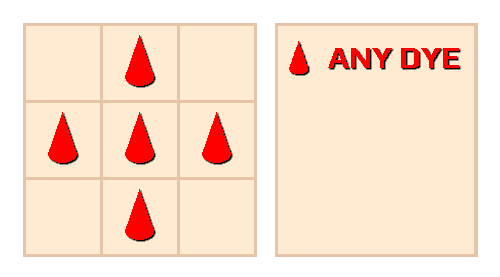
Target Block Crafting Recipe
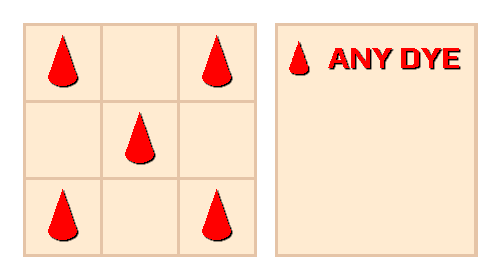
Structure Block Crafting Recipe
Features
- Can save most blocks and their rotations.
- Structure generation places one block at a time that looks like the structure is being 3D printed.
- Tag support for custom mod blocks with placement conditions.
- Designed for general gameplay and creativity, unlike structure blocks.
- Uses JSON files to save and load structures.
- Not overpowered in survival mode due to one-time use structures when not in creative.
- Possible to set the structure size to any size you like as long as it’s in the range for the game rule cap.
- Support for structure backups allows players to keep structures safe even in survival mode.
- Support for both Fabric and Forge
Planned Features
- Structure trading system
- Structure selling system
- Possibly more features later on.
Known Issues
Fixed in 1.1.0 – Large structures lagged when being placed in version 1.0.0.
常见问题
Norths Schematics 支持哪些 Minecraft 版本?
Norths Schematics 支持 Minecraft Java 版 1.18.2–1.19.2,共 2 个版本,可用的加载器:Fabric / Forge。下载时注意选择和你游戏版本一致的文件。
Norths Schematics 怎么安装?
先用 PCL2 或 HMCL 启动器安装对应版本的 Fabric / Forge,再把下载的 .jar 文件放进游戏目录的 mods 文件夹,重新启动游戏即可。开启了版本隔离的,mods 文件夹在 versions/版本名 下面。
NorthWestTreesGaming 的其他作品
查看全部 →
CCTVCraft
为游戏添加了新的机制和方块。

Real Time Mod
将世界时间与主机电脑时间同步,并提供其他一些功能。

MoreBlox
这款模组专注于中世纪主题,包括食物、作物、动物和游戏机制。

Portal Gates
Portal gates allow you to make blocks that can teleport you between worlds or other locations in your Minecraft save.
评论
登录后评论和评分