
NoForcedPacks: Hypixel SkyBlock Pack Disabler & Texture Mixer
Disable, bypass, skip, ignore or remove the Hypixel SkyBlock texture pack or any forced server resource pack. Mix and combine textures from multiple packs, turn off individual item textures or UI. Smaller held items: item size, swing speed.
截图
介绍
NoForcedPacks: Pack Disabler, Texture Mixer & Held Items
Three tools in one small client-side mod:
- 🚫 Disable any forced server pack, like the Hypixel SkyBlock texture pack.
- 🎨 Mix textures from multiple packs, item by item, or turn off single textures and a pack’s UI.
- 🗡️ Change your held items: make them smaller or bigger and change your swing speed.
No Fabric API needed. Nothing to install on the server. Works on Hypixel and any other server.
🚫 Disable or remove forced server resource packs
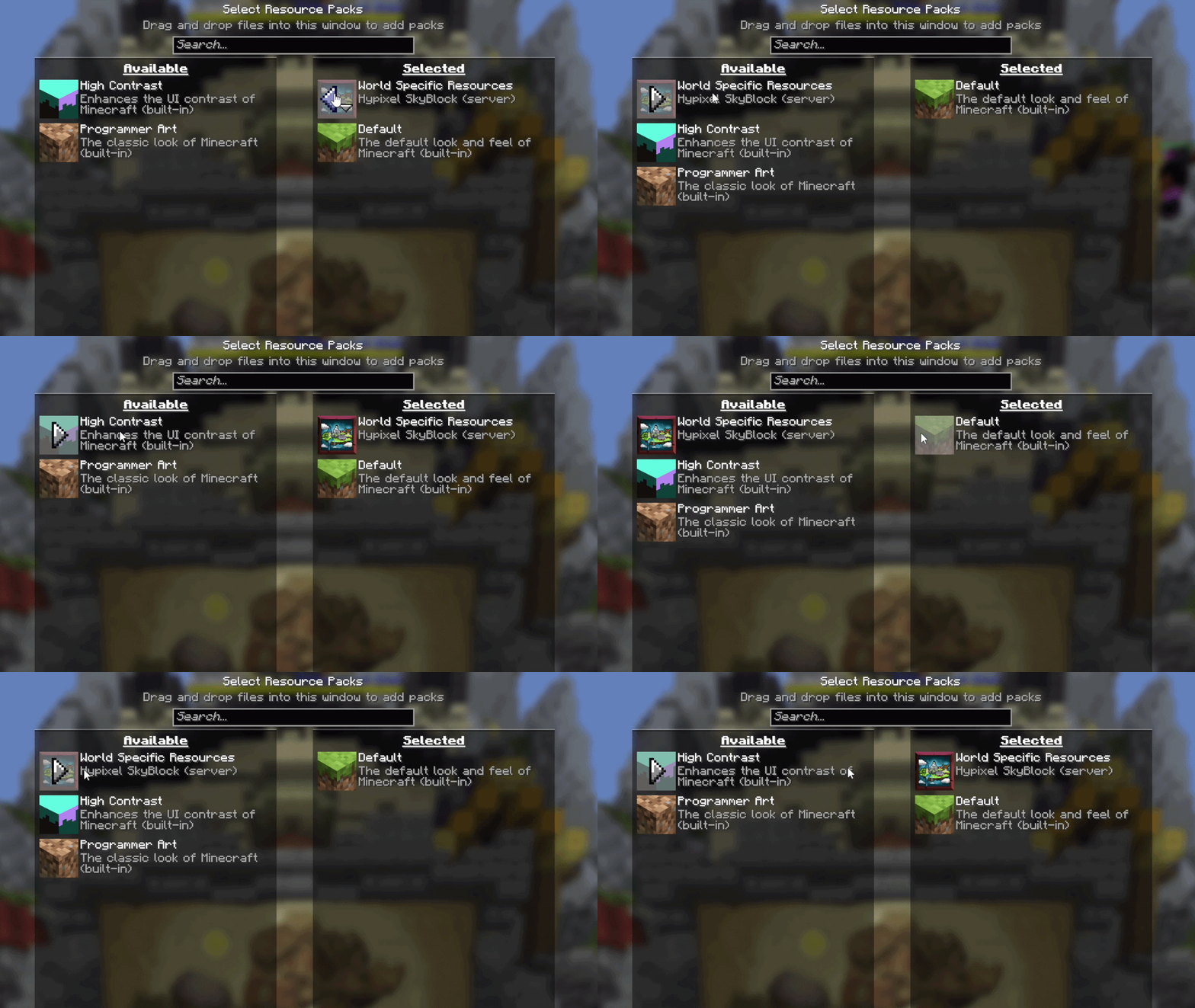
Hypixel SkyBlock, or any other server, forcing a texture pack on you? NoForcedPacks puts it in your normal Options → Resource Packs list. Move it off and it stays off, across rejoins and restarts. Your own packs are never touched.
🎨 Mix and combine textures from multiple packs
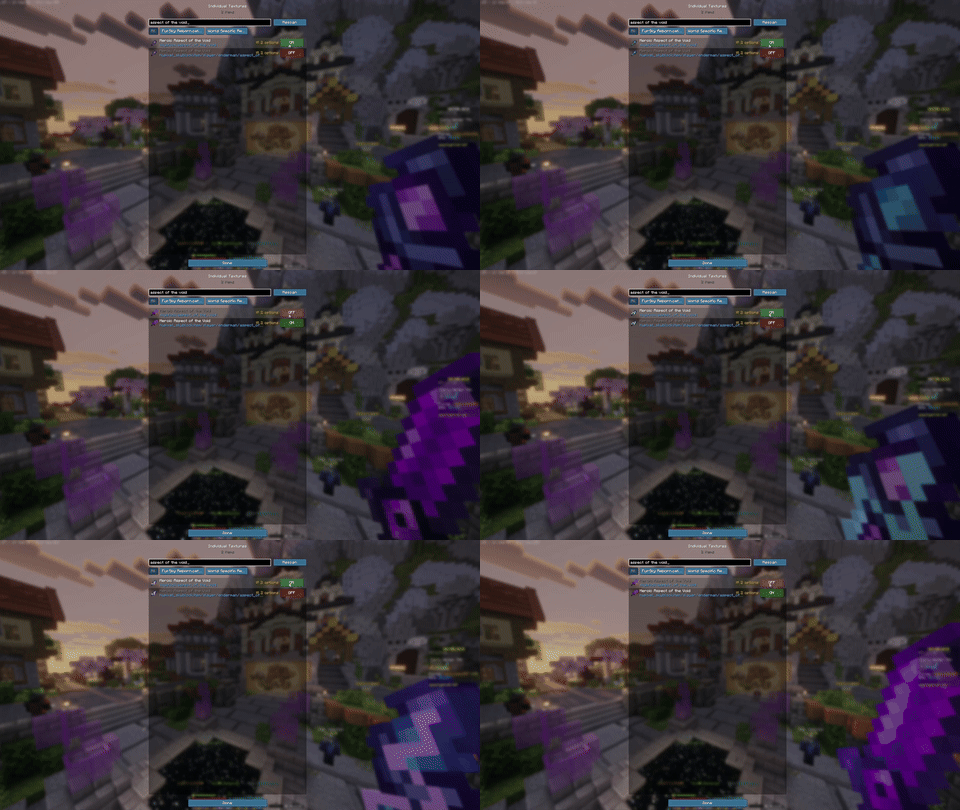
Why choose one pack when you can take the best parts of all of them? Open Individual Textures and, item by item:
- Pick which pack’s texture you see. Hypixel’s sword with FurSky’s armor and another pack’s pickaxe? Do it. Every loaded pack that textures that item is an option.
- Pick between variants. If a pack ships several looks for one item, choose one. Starred versions keep their own look.
- Turn a single texture off. Set any item to Vanilla and leave the rest of the pack alone.
- Turn off just a pack’s UI. UI off for… hides a pack’s HUD, inventory and menu backgrounds, tooltips, title screen and SkyBlock menu icons, while its item and armor textures stay.
- Search by name. Type
Aspect of the Voidand jump straight to it. Filter by pack, or Rescan after the server sends a new one.
Your worn armor follows your choice too (dye colors kept), and tooltips from a turned-off pack fall back to vanilla instead of magenta boxes.
🗡️ Smaller held items and custom swing speed
Open Held items at the bottom of the Individual Textures screen:
- Item size, 10% to 200%. Shrink the item in your hand so it stops blocking your view, or make it huge.
- Swing speed, 5% to 200%. Slow your swing animation right down or speed it up.
- Test swing lets you try it without hitting anything, and your hand stays visible while you adjust.
It only changes what you see. Attacks, mining and what the server gets are exactly the same, and other players see you as usual.
🔧 How to use
- Install Fabric Loader and drop NoForcedPacks into your
modsfolder. That’s it, no Fabric API. - Join a server. Its pack loads as normal.
- Whole pack off: Options → Resource Packs, move the server pack to the left.
- Textures, UI and held items: open Individual Textures from
- the TXT Packs button in the pause menu,
- the Individual textures button on the Resource Packs screen, or
- a key of your choice (Options → Controls → Key Binds, unbound by default so it never clashes with other mods).
Everything you choose is saved across reconnects and restarts.
❓ FAQ
How do I disable or remove the Hypixel SkyBlock texture pack?
Install Fabric Loader and NoForcedPacks, join Hypixel, then open Options → Resource Packs and move the SkyBlock pack off. It stays off next time you join. To keep part of it, leave it on and turn off only the items you don’t want in Individual Textures.
How do I turn off a server’s forced resource pack in Minecraft?
Vanilla Minecraft only lets you accept the pack or leave the server. NoForcedPacks puts the forced pack in your normal Resource Packs list, where you can disable it like any other pack, on any server.
Can I combine or mix texture packs in Minecraft?
Yes. Load the packs you want, then in Individual Textures pick, for each item, which pack’s texture to use. No need to merge files by hand.
How do I make held items smaller in Minecraft?
Open Individual Textures → Held items and lower Item size. It works with any pack, or none.
How do I change my swing speed or swing animation?
Held items → Swing speed. It only changes your own animation on your screen, not your attack speed.
My tooltips turned into magenta boxes after removing the pack. How do I fix it?
NoForcedPacks fixes this automatically: tooltips fall back to the vanilla style when their pack is off.
Do I need Fabric API?
No. Only Fabric Loader.
Do I need it on the server?
No. It’s fully client-side; only you need it installed.
Does it work with Catharsis, FurSky, Packed Packs, Skyblocker or modpacks?
Yes. It’s been tested in SkyBlock modpacks with Catharsis and Packed Packs installed, and works with Catharsis packs like FurSky. Modpack makers who want server packs off by default can ship config/notxtpacks.txt containing serverPackOn=false.
NoForcedPacks vs Detexturify, PackDisabler, Server Pack Unlocker or My Resource Pack, My Choice?
They all let you get rid of a forced pack. NoForcedPacks also works on any server, needs no Fabric API, lets you mix textures from multiple packs item by item, and adds held item size and swing speed.
Is this bannable?
It only changes what you see on your own screen and gives no gameplay advantage. Still, check your server’s rules: you’re responsible for how you use it.
🧩 Compatibility
- Loader: Fabric
- Minecraft: 1.21.11, 26.1.x, 26.2, 26.3
- Requires: Fabric Loader only (no Fabric API)
- Side: Client only
- Languages: 22
- Updates: a chat message tells you when a new version is out (turn it off in
config/notxtpacks-updates.txt)
Website & full docs: https://merenotnoonereal.github.io/noforcedpacks/
常见问题
NoForcedPacks: Hypixel SkyBlock Pack Disabler & Texture Mixer 支持哪些 Minecraft 版本?
NoForcedPacks: Hypixel SkyBlock Pack Disabler & Texture Mixer 支持 Minecraft Java 版 1.21.11–26.3,共 6 个版本,可用的加载器:Fabric。下载时注意选择和你游戏版本一致的文件。
NoForcedPacks: Hypixel SkyBlock Pack Disabler & Texture Mixer 怎么安装?
先用 PCL2 或 HMCL 启动器安装对应版本的 Fabric,再把下载的 .jar 文件放进游戏目录的 mods 文件夹,重新启动游戏即可。开启了版本隔离的,mods 文件夹在 versions/版本名 下面。运行环境:仅客户端。

评论
登录后评论和评分