
截图
介绍
中文介绍正在准备中,下面暂时显示原文。
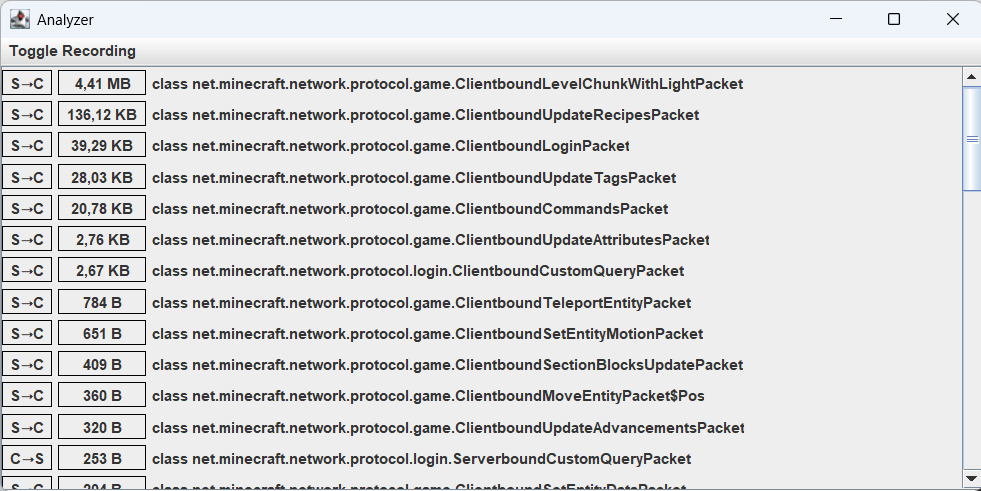
This client-side mod adds a window that, when enabled, monitors the size of packets transferred between the server and the client. Recommended for those who swear that it’s not their internet that’s making their ping bad.
How to use:
- Check/Change the keybind (default: Numpad 0).
- Press the key to activete the window.
- Click Toggle Recording and then enable C→S or S→C or both. (C→S means Client To Server, S→C means Server To Client)
- Join a singleplayer/multiplayer world.
How to read:
Example packet: S→C | 10 B | class net.minecraft.network.protocol.game.Clientbound.CustomPayloadPacket→somemod:channel[0]
- Direction is Server To Client: S→C
- Size is 10 bytes: 10 B
- Vanilla packet: net.minecraft.network.protocol.game.Clientbound.CustomPayloadPacket
- Custom network channel registered by a mod: somemod:channel
- Packet id of 0: [0]
Technical information/limitations:
- The mod does not store the packet data, only the size of its content (empty packets are shown as 0 B).
- The content of the packet cannot be viewed with this mod.
- The units go up to Terrabytes.
- 1000 bytes = 1 kilobyte, 1000 kilobytes = 1 megabyte, …
- The content size is stored as a long → upper limit = 9,223,372,036,854,775,807 bytes.
- The window is written in Swing, may cause problems on other platforms.
- Mixins are at a low-level, this may cause instability with other mods that try to modify network traffic.
常见问题
Network Analyzer 支持哪些 Minecraft 版本?
Network Analyzer 支持 Minecraft Java 版 1.20.1,可用的加载器:Forge。下载时注意选择和你游戏版本一致的文件。
Network Analyzer 怎么安装?
先用 PCL2 或 HMCL 启动器安装对应版本的 Forge,再把下载的 .jar 文件放进游戏目录的 mods 文件夹,重新启动游戏即可。开启了版本隔离的,mods 文件夹在 versions/版本名 下面。

评论
登录后评论和评分