截图
介绍

NETHERRACKED
(10k Downloads TYSM!!!)
A Mod that Adds Recipe for Netherrack Which needs
Minecraft Furnace or Fan Blasting from Create Mod
Datapack Version: CLICK HERE!
So, no more you upset because of “Can’t Farm Netherrack”. especially if you want to make Create Mod Blaze Burners have a fully-auto source of “Blaze Cakes”.
Here is how it works:
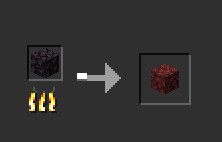
1. Minecraft Furnaces: Simply add Blackstone to input and wait for it smelt and finally you get Netherrack! (Hardly, it’s difficult to farm Blackstone, sorry but I didn’t find any respective Block for that.)
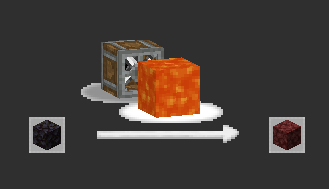
2. Create Mod Fan-Blasting: throw Blackstone in front of fan and lava so after a time it turns into Netherrack!

How to Install? (Datapack)
– put datapack into .minecraft/saves/(YOUR_WORLD)/datapacks
– go to your world and do: /datapack enable “file/Netherracked.zip”
– do /reload so datapack gets loaded
– here we go and you successfully loaded the datapack
doing this process for one world is enough. so once you load it, it’s done.
but for other worlds, you should add it.
“Netherracked” by Arman Studios – IranMine123 Presents
Under CCPL (See License).
credit this CurseForge Page when you want to use it.
Visit my site: Arman Studios (Persian)
常见问题
Netherracked 支持哪些 Minecraft 版本?
Netherracked 支持 Minecraft Java 版 1.18–1.21,共 14 个版本,可用的加载器:Fabric / Forge / Quilt。下载时注意选择和你游戏版本一致的文件。
Netherracked 怎么安装?
先用 PCL2 或 HMCL 启动器安装对应版本的 Fabric / Forge / Quilt,再把下载的 .jar 文件放进游戏目录的 mods 文件夹,重新启动游戏即可。开启了版本隔离的,mods 文件夹在 versions/版本名 下面。
评论
登录后评论和评分