Nearby Item Pickup
A polished nearby-item list that lets you choose and collect dropped items with F.
介绍

Nearby Item Pickup replaces automatic ground-item collection with a deliberate, polished pickup interface inspired by action RPGs. Approach dropped items, choose exactly what you want, and press F to collect it.

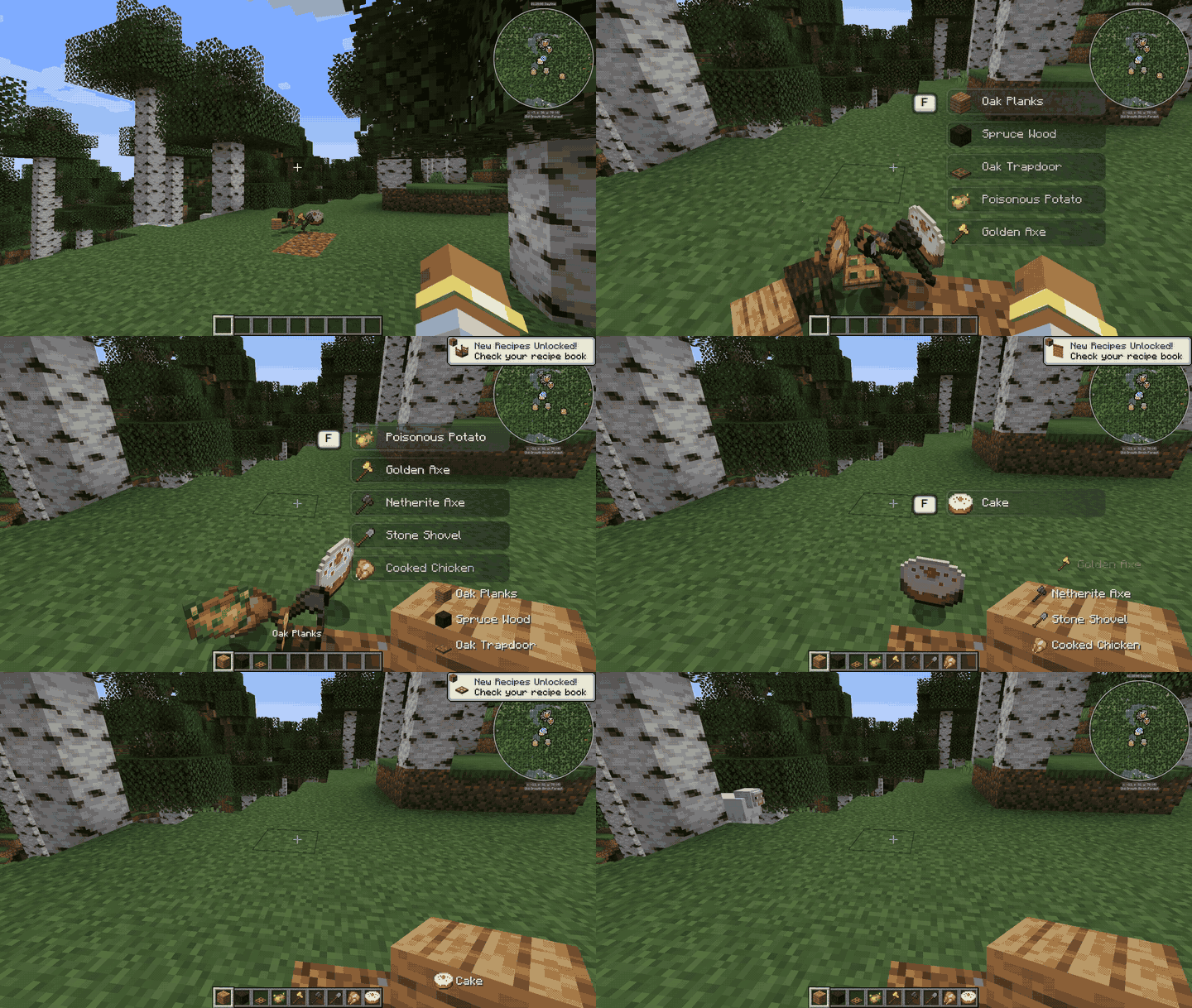

- A compact animated list appears only when eligible dropped items are close enough.
- Matching stacks are grouped and shown with one clear total count.
- Nearby items keep a stable order while you remain in the same pickup area.
- Every list entry animates when it appears, moves, is collected, or disappears.
- The mouse wheel changes the selected item while the list is open without moving the hotbar.
- Small, background-free pickup notifications appear in the lower-right corner.
- Items from other mods work automatically through Minecraft’s standard item system.
- Server-side validation checks distance, pickup delay, entity state, and inventory rules.

- Walk close to one or more dropped items.
- Choose an item with the mouse wheel or Up / Down Arrow keys.
- Press F to collect the selected item.
- Move away to close the list. Minecraft’s automatic ground pickup stays disabled while the mod controls collection.

| Input | Action |
|---|---|
| F | Pick up the selected nearby item |
| Mouse wheel | Move through the nearby-item list while it is visible |
| Up / Down Arrow | Select the previous or next item |
The mod consumes F only while the nearby-item list is active, preventing Minecraft’s default off-hand action from triggering at the same time.

| Minecraft | Fabric | Forge | NeoForge |
|---|---|---|---|
| 1.20.1 | ✓ | ✓ | ✓ |
| 1.21.1 | ✓ | ✓ | ✓ |
| 1.21.11 | ✓ | ✓ | ✓ |
| 26.2 | ✓ | ✓ | ✓ |
| 26.3 | ✓ | ✓ |
Choose the file that exactly matches both your Minecraft version and mod loader. The mod is designed to recognize standard dropped item entities, including items added by content mods.
常见问题
Nearby Item Pickup 支持哪些 Minecraft 版本?
Nearby Item Pickup 支持 Minecraft Java 版 1.20.1–26.3,共 5 个版本,可用的加载器:Fabric / Forge / NeoForge。下载时注意选择和你游戏版本一致的文件。
Nearby Item Pickup 怎么安装?
先用 PCL2 或 HMCL 启动器安装对应版本的 Fabric / Forge / NeoForge,再把下载的 .jar 文件放进游戏目录的 mods 文件夹,重新启动游戏即可。开启了版本隔离的,mods 文件夹在 versions/版本名 下面。
Haider_x 的其他作品
查看全部 →
Luna shader
Luna 光影:优化了水面反射,呈现深蓝色调,并为末地传送门加入独特的旋转黑洞效果。

Aetheria Shaders
Aetheria Shaders 是 Complementary Reimagined 的一款华丽奇幻改版光影。拥有自定义维度氛围、发光的青绿色水体、银河主题的下界传送门、流动的熔岩,以及体积化的末地龙卷风。性能表现有保障。

Quanta Shader
快速呈现精美的《Minecraft》画面。柔和的阴影、动态云朵、波光粼粼的水面和绚丽天空,同时优化性能,畅玩高帧率游戏。

Vanilla Rebuild
保留 Minecraft 的经典风格,同时增强光照效果,呈现逼真的天空、体积云、柔和阴影,以及各维度独具特色的浓郁氛围。
评论
登录后评论和评分