
Nearby Crafting
Allows crafting to access nearby chests or other containers, because that's how it should be!
截图


介绍
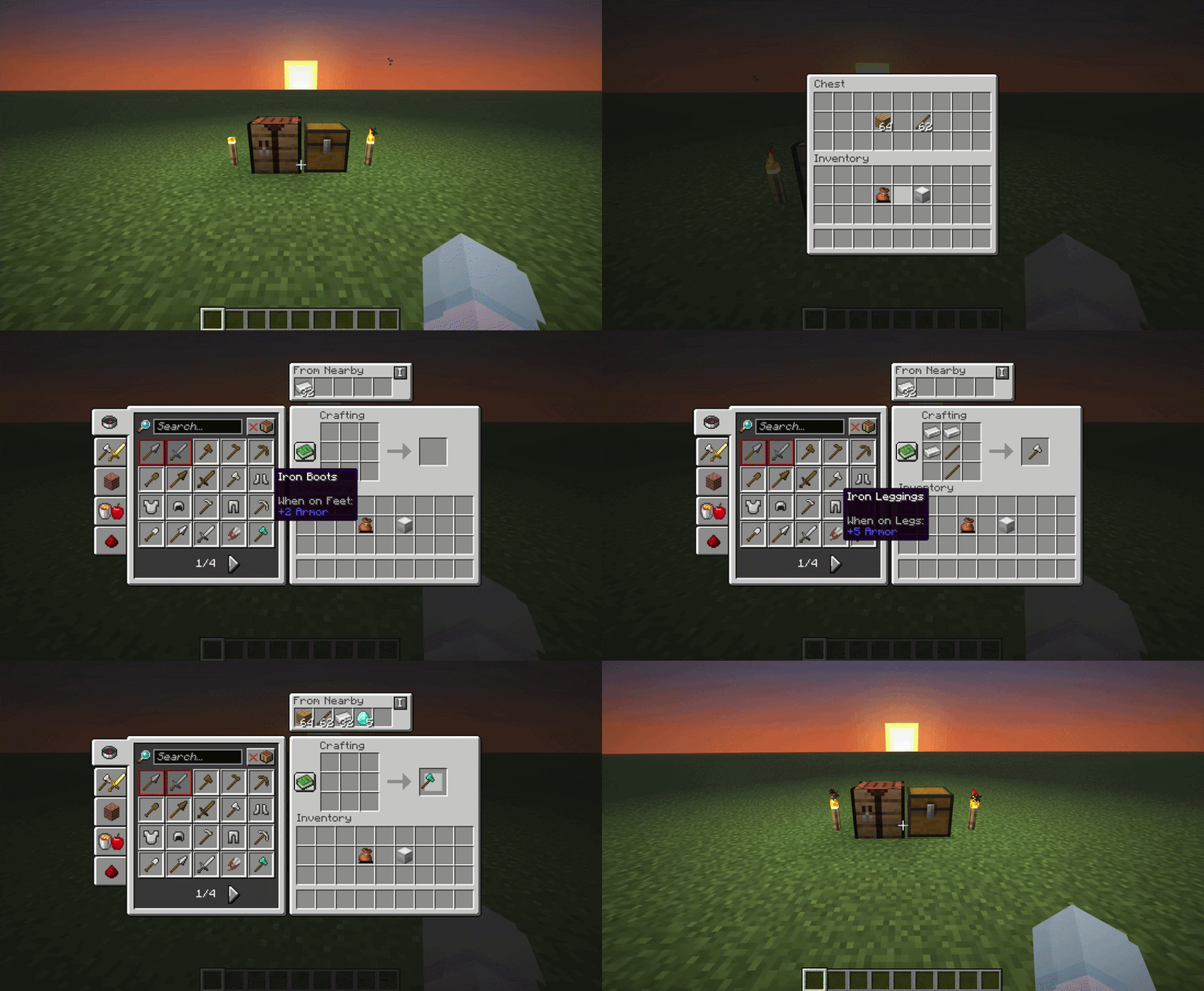
Nearby crafting is a simple mod for Fabric and NeoForge which enables crafting from nearby container blocks (such as barrels and chests) and from containers you’re carrying (like shulker boxes and bundles). \
A massive timesaver, and absolute essential for your survival world or server modpacks.
Features
Crafting from nearby containers
No more rummaging through chests endlessly, this works for both crafting tables and crafting within the player’s inventory
Crafting from carried containers
Craft from shulker boxes in your inventory without having to place them, and from bundles without having to empty them
A live “From Nearby” panel
See what’s available from nearby containers at a glance, from inside the recipe book’s page. Toggle it on/off and reposition it from the config screen.
Two crafting modes
- Default: Lets the crafter access a cube around itself, with a radius can you change.
- Connected: Only lets the crafter access containers physically connected to the crafting table, directly or through other connected containers, up to a depth you can change.
Completley Customisable
Nearby Crafting supports customising the reach radius (or depth, in Connected mode), toggling the reach functionality altogether, and enabling/disabling individual container block types (useful if, let’s say, it crafting from hoppers messes up your machine or sorting system!).
_By default, the reach functionality is enabled and the radius is 8 blocks (or depth is 10) for all crafting scenarios._
These can be changed using ModMenu, or commands. \
Use commands for changing configuration on a server.
FAQs
- Q: I think I found an issue… \ A: Feel free to create an issue on Github or reach out directly by email “
[email protected]“.
- Q: Will you release support for _x_ ? \ A: Whenever I have time and feel like it, I make sure this mod comes to support the latest versions, but sometimes I get busy! Again, feel free to reach out with reqeusts to support certain versions or other mods.
Commands Guide
Use the /nearbycrafting command to customize server-wide behavior for Nearby Crafting. You must be a server operator to change the server’s Nearby Crafting configuration. \
The command follows a simple, modular format:
/nearbycrafting <target> <action> [value]Command Structure
<target>
This defines which crafting scenario you’re configuring:
mode– Switches between Default and Connected crafting modes.craftingTable– Affects vanilla crafting tables.playerInventoryCrafting– Affects the player’s inventory crafting (2×2 crafting grid).CONTAINERS– Enables or disables individual container block types.
<action>
Defines the type of action you want to perform. Available actions depend on the target:
enable/disable– Turns the functionality ON or OFF.setReach <number>/getReach– Sets or displays the radius (in blocks) from which inventories are accessible.setDepth <number>/getDepth– Sets or displays how many containers deep Connected mode will access from the crafting table.default/connected/get– Sets or displays the current crafting mode.get <block>/list– Displays whether a specific container block is enabled, or lists all of them.
Examples
Enable crafting table inventory access:
/nearbycrafting craftingTable enableDisable player inventory crafting access:
/nearbycrafting playerInventoryCrafting disableSet reach radius to 10 blocks for crafting tables:
/nearbycrafting craftingTable setReach 10Switch to Connected mode:
/nearbycrafting mode connectedDisable a specific container:
/nearbycrafting CONTAINERS disable minecraft:barrelNote: These commands require operator permissions on the server.
常见问题
Nearby Crafting 支持哪些 Minecraft 版本?
Nearby Crafting 支持 Minecraft Java 版 1.20.1–26.2,共 17 个版本,可用的加载器:Fabric / NeoForge。下载时注意选择和你游戏版本一致的文件。
Nearby Crafting 怎么安装?
先用 PCL2 或 HMCL 启动器安装对应版本的 Fabric / NeoForge,再把下载的 .jar 文件放进游戏目录的 mods 文件夹,重新启动游戏即可。开启了版本隔离的,mods 文件夹在 versions/版本名 下面。运行环境:客户端和服务端都要装。
Jomlom 的其他作品
查看全部 →
JamLib
JamCoreModding 所有模组使用的基于 Architectury 的跨平台前置库

RightClickHarvest
右键即可收获作物

Shut Up GL Error
修复了无效键码会记录烦人且持续不断的日志消息的问题

Utility Belt
新增可穿戴的副快捷栏,方便管理工具,减少背包杂物。
评论
登录后评论和评分