
NBTtooltips
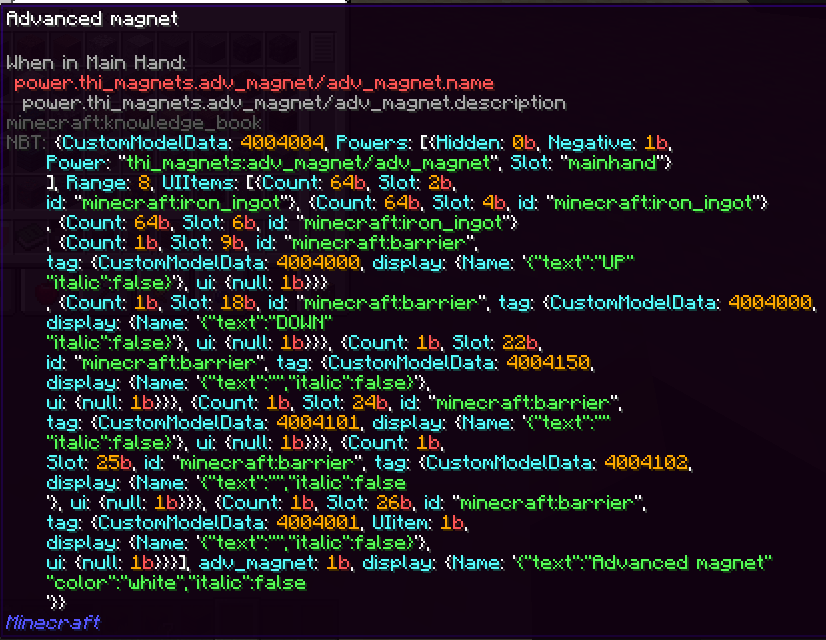
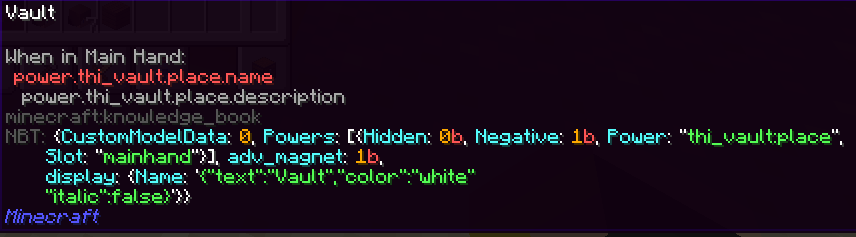
A simple fabric Minecraft mod which adds a feature that allows you to see the custom NBT data of an item when you hover over it and press your shift key.
截图

介绍
NBTtooltips
NBTtooltips is a simple Minecraft fabric mod, which adds a feature that allows you to see the custom NBT data of an item when you hover over it and hold your shift key.
You will only be able to see the custom NBT data when you have your advanced tooltips on (F3+H).
From update 0.1.3 – 1.19.x and above the keybind isn’t hardcoded anymore.
Config
Since version 0.1.0 – 1.18.x there was a config added to the mod.
In the config file, you’re able to set the colours from the different text elements and the maximum line size.
Configurable data:
nbttooltips.line.length= 50
nbttooltips.stringColour= blue
nbttooltips.quotationColour= white
nbttooltips.separationColour= white
nbttooltips.integerColour= gold
nbttooltips.typeColour= red
nbttooltips.fieldColour= aqua
nbttooltips.lstringColour= yellow
FAQ
Is the mod clientside?
Yes, the mod is clientside only!
常见问题
NBTtooltips 支持哪些 Minecraft 版本?
NBTtooltips 支持 Minecraft Java 版 1.18–1.21.1,共 15 个版本,可用的加载器:Fabric / Quilt。下载时注意选择和你游戏版本一致的文件。
NBTtooltips 怎么安装?
先用 PCL2 或 HMCL 启动器安装对应版本的 Fabric / Quilt,再把下载的 .jar 文件放进游戏目录的 mods 文件夹,重新启动游戏即可。开启了版本隔离的,mods 文件夹在 versions/版本名 下面。
MisionThi 的其他作品
查看全部 →
NBTtooltips
A simple fabric Minecraft mod which adds a feature that allows you to see the custom NBT data of an item when you hover over it and press the by you defined key (default left alt).

More banner layers
A simple mod that adds more layers to the banners in Minecraft.

More banner layers
A simple mod that adds more layers to the banners in Minecraft.
More banner layers
A simple mod that adds more layers to the banners in Minecraft.
评论
登录后评论和评分